Switches

Written by Elizabeth · Published July 24, 2026
Reviewed by Olivia

⚡ Quick Answer

Hall-Effect switches, usually called magnetic switches, sense a keypress with a magnet and a magnetic sensor instead of two metal contacts touching. Because the sensor tracks the magnet’s position the whole way down, the keyboard always knows exactly how far each key is pressed. That is what unlocks adjustable actuation and rapid trigger, and it is why these switches have taken off for competitive gaming.

For years, nearly every mechanical keyboard worked the same way underneath: press a key, two metal contacts touch, and the keypress registers. Hall-Effect switches change that basic step, and the change turns out to matter a lot for gamers. This guide explains what they are, how they work, and whether you actually need one.

How Hall-Effect switches work

A Hall-Effect switch has a tiny magnet in the moving stem and a magnetic sensor on the circuit board below. As you press the key, the magnet moves closer to the sensor, and the sensor measures the change in the magnetic field. The Hall Effect is just the physics term for a sensor producing a voltage in response to a magnetic field, named after the scientist who discovered it.

The key detail is that this reading is continuous. A normal mechanical switch only knows two states, pressed or not pressed. A magnetic switch knows the exact depth of the key at every instant, measured in fractions of a millimeter. Everything useful about these switches comes from that one difference.

There is also no physical contact to register the press, so nothing rubs or wears out at the point of actuation. That makes magnetic switches very consistent over time.

Magnetic vs mechanical switches

Here is how the two compare on the things you can feel and use.

FeatureMechanical switchMagnetic (Hall-Effect) switch
How it registersTwo metal contacts touchA sensor reads a magnet’s position
Actuation pointFixed by the switchAdjustable in software
Rapid triggerNoYes
Analog inputNoYes, on supported boards
Swap for normal switchesOften yes, if hot-swapNo, needs a magnetic board
Wear at the contactContacts can wear over timeNo physical contact to wear
Best forTyping and all-round useCompetitive gaming

What magnetic switches let you do

Three features come out of that continuous reading, and they are the real reason to care.

Adjustable actuation

The actuation point is how far you press a key before it registers. On a magnetic board you set this yourself in software, anywhere from a hair-trigger 0.1 mm to a deliberate 3 mm or more. Gamers set it shallow for fast reactions, and typists set it deeper to avoid accidental presses. One board can do both.

Rapid trigger

Rapid trigger resets a key the moment you start lifting it, instead of waiting for it to travel back past a fixed point. In practice, that means you can spam a key or counter-strafe in an FPS faster and more precisely, because each press is recognized as soon as you move. This is the feature competitive players talk about most.

Analog input

Because the board reads how far a key is pressed, some magnetic keyboards can send analog input, like a controller stick. A light press can walk your character and a full press can sprint, from the same key. Support for this varies by board and game, so check before buying if it is a priority.

The trade-offs

Magnetic switches are not a straight upgrade for everyone. The gains are real, but so are the costs.

You give up hot-swap flexibility. Magnetic switches only work on boards built for them, and you cannot mix them with standard mechanical switches. If you like changing switches to tune feel and sound, a normal hot-swap board is more flexible.

They cost more. A magnetic board with the same build quality as a mechanical one usually costs more, and the value only pays off if you use the gaming features.

The software matters more. All the good stuff lives in software, so a board with clunky software is harder to get the most out of. Check what the configurator is like before you buy.

Common misconceptions

Magnetic switches make you a better typist. Not really. Their advantages are about gaming speed and precision. For pure typing feel, a well-lubed tactile or linear mechanical switch is just as good, and often nicer.

They are all linear. Most magnetic switches are smooth linears, but the feel still varies by model, weight, and lube. The magnet handles sensing, not how the keystroke feels in your fingers.

Should you get one?

Get a magnetic board if you play competitive games, especially fast shooters, and you want adjustable actuation and rapid trigger. That is where the technology earns its price.

Stick with normal mechanical switches if you mostly type, you like swapping switches to tune feel, or you want the best value for the money. A good hot-swap board with tactile or linear switches will serve you well and cost less.

If you want to see magnetic switches in real boards, Akko’s MOD007 and 5075 V3 HE lines are an affordable place to start, covered in our best Akko keyboards guide.

Frequently asked questions

Are Hall-Effect switches better than mechanical?

They are better for competitive gaming, thanks to adjustable actuation and rapid trigger. For typing and general use, a good mechanical switch is just as pleasant and usually cheaper. Better depends on what you do, not on the technology alone.

Do Hall-Effect switches last longer?

They can, because there is no physical contact at the point where the press registers, so nothing wears out there. In everyday use both types last for years, so longevity is rarely the deciding factor.

Can I put magnetic switches in any keyboard?

No. Magnetic switches need a keyboard with magnetic sensors built into the circuit board. You cannot add them to a standard mechanical board, and you cannot mix them with normal switches.

What is rapid trigger?

Rapid trigger resets a key as soon as you begin lifting it, rather than waiting for it to return past a fixed point. It lets you repeat presses and change direction faster, which is why competitive FPS players value it.


We keep our switch guides updated as the technology and available boards change.
Written by Elizabeth · Published September 21, 2024
Reviewed & Updated by Olivia · Updated on July 25, 2026

The short version: linear switches press straight down with no bump and feel smooth, which suits gaming. Tactile switches have a small bump you feel the moment the key registers, which suits typing. Neither is better overall. The right one depends on what you do most and how you like a keyboard to feel.

This guide explains what each switch does, how they feel and sound in real use, and gives you a clear answer for your setup. If you only read this page, you should be able to pick with confidence.

⚡ Quick take

Type more than you game? Go tactile. Game more than you type, especially fast shooters? Go linear. Do both and cannot decide? Tactile is the safe all-rounder, and a hot-swap keyboard lets you change your mind later without soldering.

What are linear switches?

A linear switch moves straight down in one smooth motion. There is no bump and no click, just a clean press from top to bottom. The keypress registers partway down (the actuation point), but you do not feel a signal when it does, so many people bottom the key out on every press.

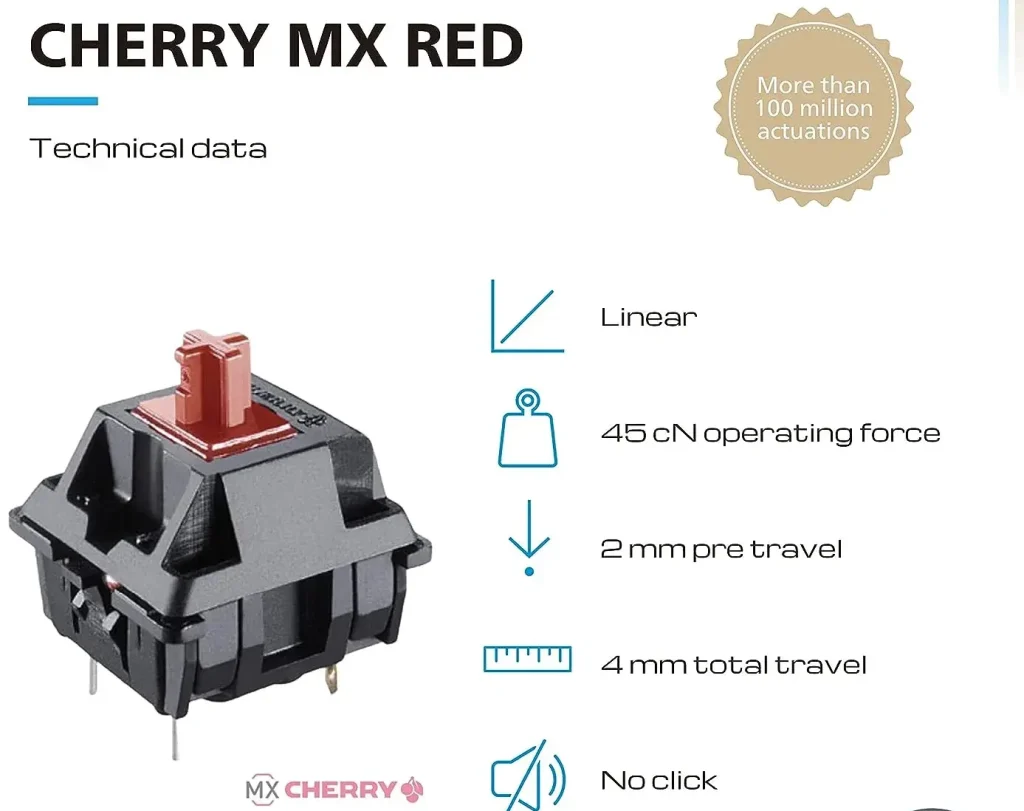
That smoothness is why linear switches are the default for gaming. Nothing interrupts the keystroke, so fast, repeated presses feel consistent. Common examples are the Cherry MX Red and Gateron Red, both around 45 grams of force to actuate, and smoother options like the Gateron Oil King. For specific picks, see our best linear switches roundup.

What are tactile switches?

A tactile switch adds a small bump partway down, right around where the key registers. You feel that bump as a gentle resistance, which tells your finger the keystroke has landed without having to press the key all the way down.

That feedback is why tactile switches are popular for typing. You can type accurately with a lighter touch because you feel each key fire. The classic example is the Cherry MX Brown, which has a soft bump. If you want a stronger, sharper bump, switches like the Gazzew Boba U4T or Holy Panda are favorites. For picks at every price, see our best tactile switches guide.

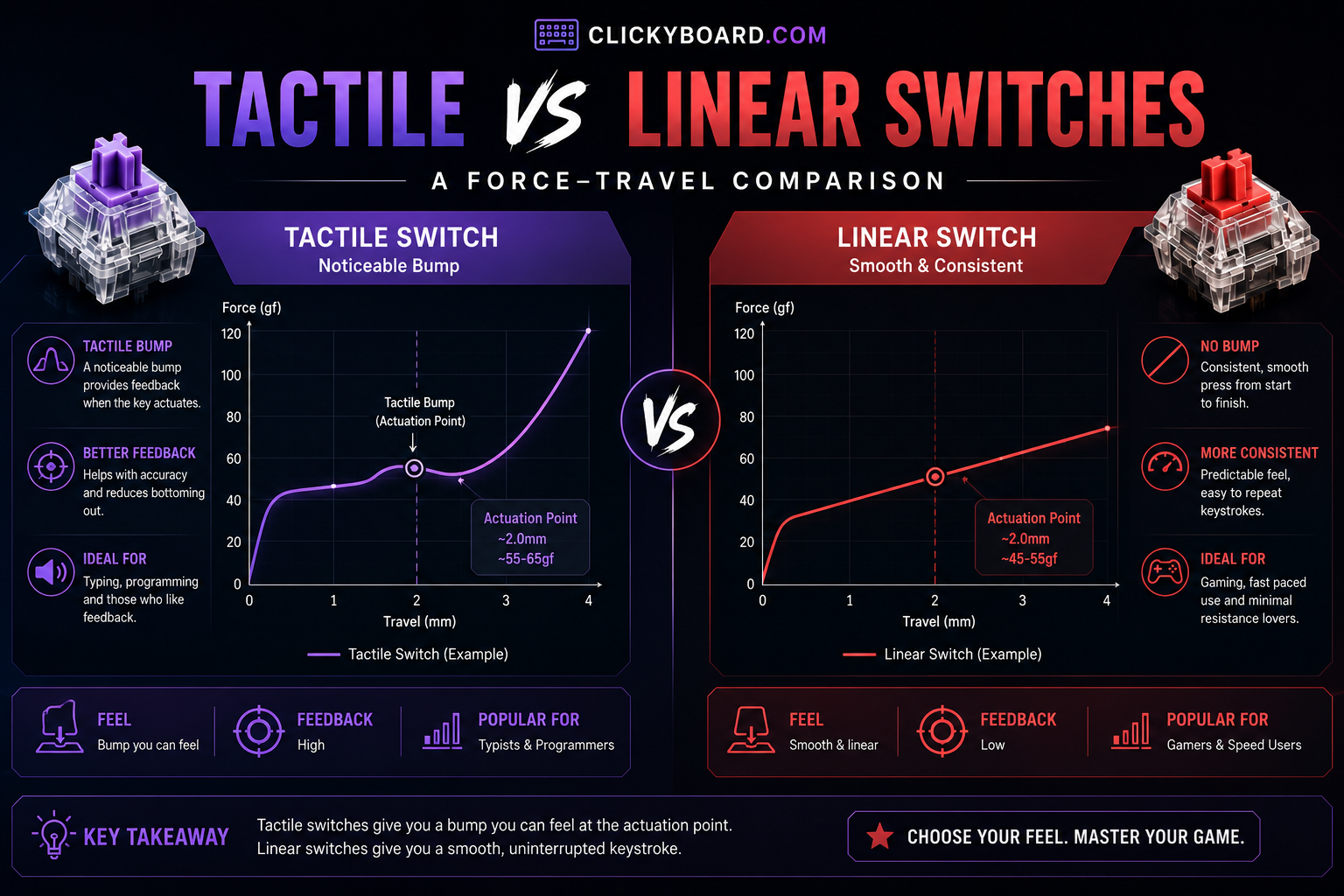
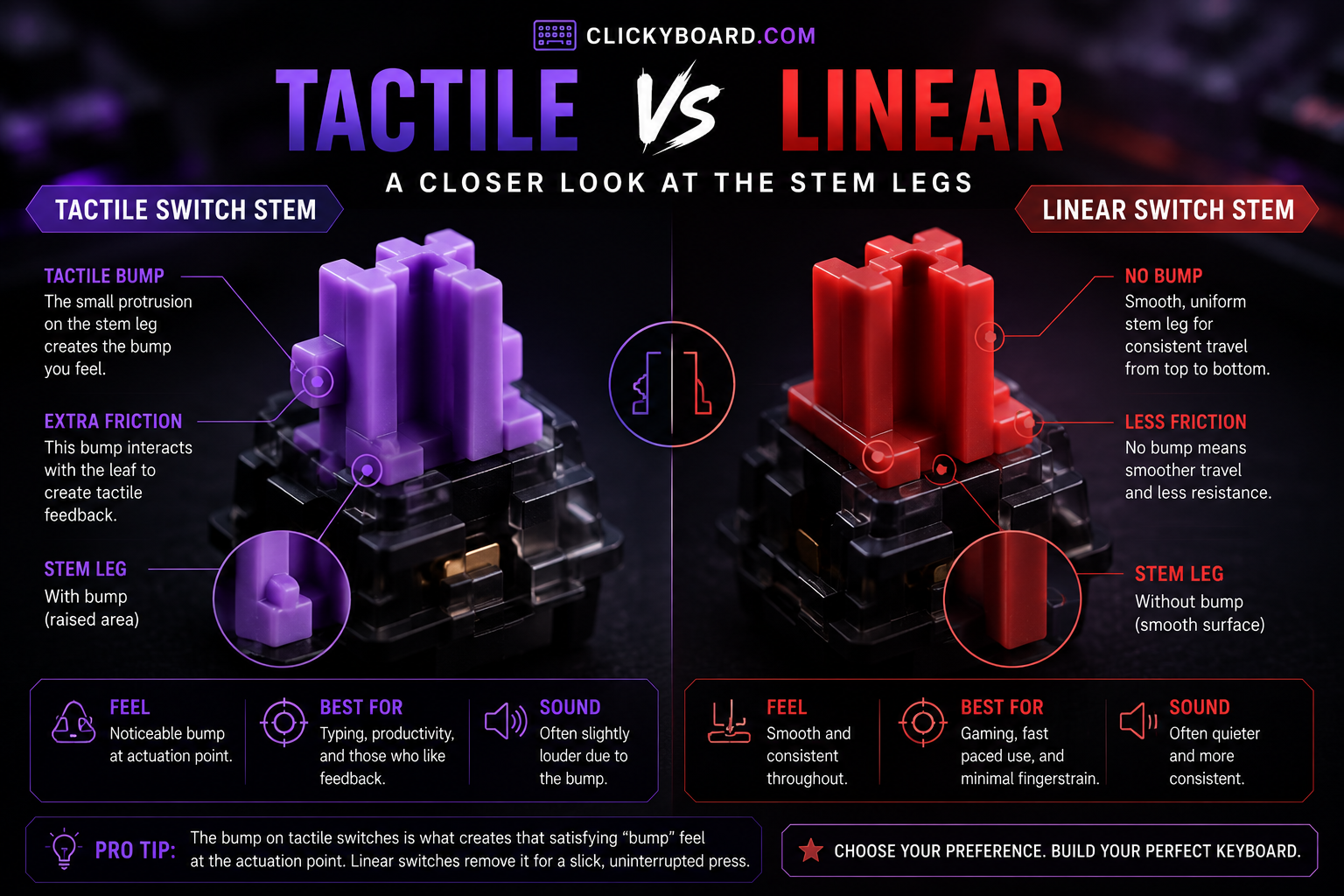
Close-up comparing a tactile switch stem leg to a linear switch stem leg
The tactile stem has a raised leg that creates the bump; the linear stem is straight, so it glides.

Tactile vs linear at a glance

 LinearTactile
FeelSmooth, no bumpA bump you feel at actuation
Typing feedbackNone until you bottom outYou feel each keystroke register
SoundCleaner and usually quieterSlightly louder, more pronounced
Best forGaming, fast repeated pressesTyping, accuracy
Learning curveVery easyVery easy
Typical actuation forceAround 45 gAround 55 to 65 g at the bump
Popular examplesCherry MX Red, Gateron Oil KingCherry MX Brown, Boba U4T
Force-travel graph comparing the tactile bump to the flat linear curve
A tactile switch shows a bump in its force curve near actuation; a linear switch stays flat all the way down.

How they feel to type on

Tactile switches give you something to feel. The bump acts like a checkpoint, so you can register a key with a lighter press and lift off before bottoming out. Over a long typing session that can feel less tiring and more precise, which is why a lot of writers and coders prefer them.

Linear switches feel smooth and quiet, but they give no feedback until the key hits the bottom. Some people love that clean glide. Others find they make more typos at first, because there is no signal that a key has fired. You adjust quickly, but the first week can feel less accurate.

How they perform for gaming

For fast games, especially shooters, linear switches have the edge. The smooth travel makes rapid taps and holds feel consistent, with nothing getting in the way of the press. That is why most gaming keyboards ship with linears.

Tactile switches still work fine for gaming, and plenty of players use them without issue. The bump is not a real disadvantage in most games. If you want the fastest, most competitive setup, though, linear is the usual choice, and newer Hall-Effect magnetic switches take that further with adjustable actuation and rapid trigger.

Sound differences

Linear switches tend to sound cleaner and a little quieter, since there is no tactile mechanism adding noise. Tactile switches are usually a touch louder and have a more pronounced sound because of the bump.

Keep in mind that sound depends heavily on the keyboard, the keycaps, and whether the switches are lubed, not just the switch type. A well-built tactile board can sound deeper and nicer than a cheap linear one. If sound matters to you, that build work matters as much as the switch.

What about clicky switches?

There is a third family worth naming so you are not confused by it. Clicky switches are tactile switches with an added mechanism that makes a loud click, like the Cherry MX Blue. They feel similar to tactiles but are much louder. They are fun at a private desk and a problem in shared spaces or on voice chat. If you like the bump but not the noise, a tactile switch gives you the feel without the click.

A quick word on actuation and travel

Two terms explain most of the difference. Actuation is the point where a keypress registers, usually about halfway down. Bottom-out is pressing the key all the way. A tactile switch places its bump near the actuation point so you feel the key fire; a linear switch has no bump, so the only feedback is hitting the bottom. Once you know that, the marketing terms stop being confusing.

Which should you choose?

Choose linear if you:

  • Game a lot, especially fast-paced or competitive titles
  • Like a smooth, uninterrupted keystroke
  • Want a quieter switch for a shared space
  • Do not need feedback and tend to bottom out anyway

Choose tactile if you:

  • Type for work or write a lot
  • Want to feel each keystroke land for better accuracy
  • Like a switch with some feedback and character
  • Do a mix of typing and gaming and want one do-it-all switch

If you genuinely cannot decide, start with a tactile switch. It handles typing and gaming well and gives most people the more satisfying feel out of the box.

Can you change your mind later?

Yes, if your keyboard is hot-swappable. Hot-swap sockets let you pull switches out and press new ones in with no soldering, so you can try linear and tactile on the same board and keep whichever you prefer. On a first keyboard, hot-swap is worth having for exactly this reason. Lubing your switches also changes the feel a lot, and our switch lubing guide walks through it.

Frequently asked questions

Are tactile or linear switches better for gaming?

Linear switches are usually better for fast, competitive gaming because the smooth travel makes rapid presses consistent, with no bump in the way. Tactile switches still work well for most games, so the gap is smaller than it sounds. If competitive shooters are your main focus, go linear or look at magnetic switches.

Are tactile or linear switches better for typing?

Tactile switches are generally better for typing. The bump lets you feel each key register, so you can type accurately with a lighter touch and less bottoming out. Linear switches are fine for typing too, but they give no feedback until the key bottoms out, which some people find less precise.

Are linear switches good for beginners?

Yes. Linear switches are smooth and easy to use, and there is nothing to get used to. The only adjustment is the lack of feedback, which can cause a few extra typos at first. If you mainly type, a tactile switch may feel more natural, but both are beginner-friendly.

Do tactile switches sound louder than linear?

Usually a little, because the bump adds some noise. The bigger factors in how a keyboard sounds are the case, the keycaps, and whether the switches are lubed. A well-built tactile board can sound better than a cheap linear one, so do not choose on switch type alone if sound is your priority.

What is the difference between tactile and clicky switches?

Both have a bump you can feel. Clicky switches add a mechanism that makes a loud click on every press, while tactile switches stay much quieter. If you want the bump without the noise, choose tactile. If you love the sound and have a private space, clicky can be fun.

Can you actually feel the difference between tactile and linear?

Yes, clearly. A tactile switch has a noticeable bump partway down, and a linear switch is smooth the whole way. Most people can tell them apart in the first few presses, even without knowing the terms.

Verdict: how to choose

If you want one rule, match the switch to what you do most. Type more than you game, pick tactile. Game more than you type, pick linear. For a mix, tactile is the safer all-rounder, and a hot-swap board means the choice is never permanent.

Beyond that, remember that lube, keycaps, and the keyboard itself shape the feel and sound as much as the switch family does. Get the switch type right for your use, buy a board you can tune later, and you will be happy with either one.


We review and update our switch guides as new switches launch and community consensus shifts, so the recommendations stay current.

Written by Elizabeth · Published September 3, 2024
Reviewed & Updated by Olivia · Updated on July 25, 2026

Disclosure: This guide contains affiliate links. If you buy through them we may earn a small commission at no extra cost to you. We only recommend switches we would put in our own boards.

Linear switches press straight down with no bump and no click, which makes them smooth, consistent, and the default choice for gaming. But not all linears feel the same. Spring weight, factory lube, and housing material change the feel and sound a lot. Below are the best linear switches you can buy in 2026, sorted so you can match one to how you type or play.

⚡ Quick take

For most people, a factory-lubed Gateron linear like the Ink Black is the smoothest safe bet. Gamers who want a light, fast switch should look at the TTC Gold Pink. On a budget, the Akko or Kailh reds do the job. New to switches? Start with the tried and true Cherry MX Red.

This roundup ranks linear switches for typing and everyday use. If you are buying specifically for gaming, where actuation weight and how early the switch fires matter more than sound, start with our best linear switches for gaming guide instead.

How we picked

We judged each switch on smoothness, sound, spring weight, whether it comes factory-lubed, availability, and value. Every pick has a real use case and an honest downside, because no single switch is best for everyone. If you are still deciding between linear and tactile, start with our tactile vs linear switches guide, then come back here.

Best linear switches compared

SwitchActuation (approx)Feel and soundBest for
Cherry MX Red45 gLight, clacky, reliableBeginners and gaming
Gateron Baby Raccoon~62 gSmooth, deep, factory lubedThocky sound lovers
NovelKeys Cream~55 gCreamy POM, improves with break-inEnthusiasts who lube
Kailh Red~50 gBasic, budget-friendlyCheap builds
Razer Linear OpticalLightFast optical actuationRazer keyboard gamers
Akko Pink (CS)~45 gLight, smooth for the priceBudget Akko builds
Outemu Red~50 gVery cheap, decentRock-bottom budget
Durock Linear~62 gSmooth, good valueSmooth mid-weight typing
TTC Gold Pink~37 gVery light and fastSpeed-focused gaming
Tealios V2~67 gPremium, extremely smoothEnthusiasts chasing smoothness
Gateron Ink Black~60 gDeep, smooth, premiumSound and smoothness
Alpaca V2~62 gBoutique-smooth, great valueMid-weight all-rounder

The 12 best linear switches

1. Cherry MX Red, the reliable classic

Cherry MX RED 1

Why it is here. The 45 g Cherry MX Red is the switch that made linears mainstream. It is light, dependable, and available in almost every board, which makes it the safe first linear. Best for: beginners and everyday gaming.

Watch out: it is not factory lubed and feels a little scratchier and clackier than modern Gateron linears. A quick lube fixes most of that.

2. Gateron Baby Raccoon, deep and thocky

Gateron baby racoon

Why it is here. A factory-lubed linear around 62 g with a deep, full sound that people chase for a thocky build. Smooth out of the box with a satisfying, rounded bottom-out. Best for: people who care about sound.

Watch out: the heavier spring is not for everyone, and stock can come and go depending on the batch.

3. NovelKeys Cream, the creamy POM linear

Novelkeys Cream MX SMD

Why it is here. Full POM housings give the Cream a unique, muted, creamy sound and feel that no other switch quite copies. It gets smoother the more you use it. Best for: enthusiasts who lube and enjoy a distinctive sound.

Watch out: it can feel scratchy out of the box and really wants a lube and a short break-in to shine. Not a plug-and-play pick.

4. Kailh Red, the budget standard

Kailh-Red-Switch-Set_720x

Why it is here. A dependable, cheap linear around 50 g that shows up in a lot of budget boards. It does the job without fuss. Best for: low-cost builds and spares.

Watch out: it is not as smooth as a modern Gateron and has no factory lube, so it feels basic next to premium options.

5. Razer Linear Optical, fast for Razer boards

Razer red Linear Optical

Why it is here. Razer’s optical linear registers with light instead of metal contact, which shaves a little latency and appeals to competitive players on Razer boards. Best for: gamers already in the Razer ecosystem.

Watch out: it only works in Razer optical keyboards, so you cannot hot-swap it into a standard MX board. That limits it to Razer owners.

6. Akko CS Pink, budget smoothness

Jelly Pink Akko

Why it is here. A light linear around 45 g that is smoother than you expect for the money, and a natural pick if you already own an Akko board. Best for: budget builds that still want a pleasant feel. See more in our best Akko keyboards guide.

Watch out: the light spring and budget housing mean it does not match premium switches on consistency, and some units are slightly scratchy.

7. Outemu Red, the rock-bottom option

Yunzii Outemu Switches for Mechanical Keyboard DIY

Why it is here. If you need the cheapest possible linear for a first build or a repair, Outemu Red gets you typing. Best for: the tightest budgets.

Watch out: quality varies from unit to unit and it is scratchier than pricier switches. Treat it as a starting point, not an endgame.

8. Durock Linear, smooth value

Durock Linear

Why it is here. Durock’s linears around 62 g are smooth, well built, and priced below boutique switches, which makes them a great value upgrade. Best for: smooth mid-weight typing without paying flagship prices.

Watch out: Durock sells several linear models under different names, so check the exact weight and stem before you buy.

9. TTC Gold Pink, light and fast

TTC V2

Why it is here. A very light linear around 37 g that actuates fast and feels effortless, which speed-focused gamers love. Best for: fast gaming and light-touch typists.

Watch out: that light spring causes accidental key presses for some people, especially heavy typists. Try before committing a full board.

10. Tealios V2, premium smoothness

tealios v2 switches

Why it is here. Tealios V2, the linear member of the Zeal family, is one of the smoothest stock linears you can buy, with a clean, refined feel around 67 g. Best for: enthusiasts chasing top-tier smoothness.

Watch out: it is expensive and often out of stock. You pay a real premium over switches that get most of the way there for less.

11. Gateron Ink Black, deep and refined

Gateron Ink Black Linear Switch

Why it is here. The Ink Black pairs a special ink housing with a smooth, slightly heavier linear feel around 60 g and a deep, premium sound. It is a community favorite for a reason. Best for: people who want smoothness and a deep sound in one switch.

Watch out: it costs more than standard Gateron linears, and the heavier spring is not ideal if you like a light touch.

12. Alpaca V2, boutique feel for less

Alpaca V2

Why it is here. Alpacas built a reputation as a smooth, mid-weight linear around 62 g that punches well above its price. A great all-rounder for typing and gaming. Best for: a balanced daily-driver linear.

Watch out: availability comes and goes, and stem wobble is slightly higher than the most premium options.

What to look for in a linear switch

  • Spring weight: lighter switches (around 45 g) suit fast gaming and light typists; heavier ones (60 g and up) feel more deliberate and reduce accidental presses.
  • Factory lube: a factory-lubed switch feels smoother out of the box. Unlubed switches can be improved with our switch lubing guide.
  • Housing and stem material: POM and ink housings change the sound, usually toward a deeper, muted tone.
  • Sound: heavier, well-lubed linears in a foamed board give the deep thock many people want.
  • Compatibility: standard MX-style linears drop into any hot-swap board. Proprietary optical switches, like Razer’s, only work in their own keyboards.

Frequently asked questions

Are linear switches good for typing?

Yes, though they feel different from tactile switches. Linears are smooth with no bump, so you get no feedback until you bottom out. Many people type happily on them, especially heavier, well-lubed linears. If you want to feel each key register, a tactile switch may suit you better.

What is the best linear switch overall?

For most people, a smooth factory-lubed Gateron linear like the Ink Black is the best balance of smoothness, sound, and availability. Enthusiasts chasing the smoothest possible feel often pick the Tealios V2, and gamers who want a light, fast switch prefer the TTC Gold Pink.

What is the smoothest linear switch?

The Tealios V2 is widely considered one of the smoothest stock linears, with the Gateron Ink Black and Alpaca V2 close behind for less money. Any linear gets smoother with a proper lube job, so a mid-priced switch plus lube often rivals a premium one.

Are linear switches good for gaming?

Yes. Their smooth, consistent travel makes rapid presses reliable, which is why most gaming keyboards ship with linears. Lighter linears like the TTC Gold Pink feel especially fast. For the lowest latency, use a wired board or look at magnetic switches.

Do linear switches work in any keyboard?

Standard MX-style linear switches drop into any hot-swap or solderable board. The exception is proprietary optical switches, such as Razer’s linear optical, which only work in that brand’s optical keyboards and cannot be swapped into a normal MX board.

Verdict: which linear switch should you buy?

If you want one easy answer, get a smooth factory-lubed Gateron linear like the Ink Black. It sounds great, feels smooth out of the box, and suits both typing and gaming. Gamers who want a light, fast switch should pick the TTC Gold Pink, budget builders are well served by the Akko or Kailh reds, and enthusiasts chasing the smoothest possible feel should try the Tealios V2.

Whatever you choose, remember that a lube job and a well-built board change the feel and sound as much as the switch itself. Pick the weight that matches your hands, and you will be happy with any switch on this list.


We update this roundup as new switches launch and community favorites shift, so the picks stay current.

Written by Elizabeth · Published August 29, 2024
Reviewed & Updated by Olivia · Updated on July 26, 2026

Disclosure: This guide contains affiliate links. If you buy through them we may earn a small commission at no extra cost to you. We only recommend switches we would put in our own boards.

Akko has become one of the best value brands in switches, and its linear lineup is where it shines. Linear switches press straight down with no bump, which makes them smooth and a favorite for gaming and fast typing. But Akko sells a lot of them, split across the budget CS series and the pre-lubed V3 Pro series, and they do not all feel the same. Below are the best Akko linear switches in 2026, ranked and sorted so you can pick the right one for your build.

⚡ Quick take

For most people the V3 Cream Yellow Pro is the best all-round Akko linear: smooth, pre-lubed, and easy to love out of the box. Gamers who want speed should get the V3 Silver Pro, and anyone on a budget is well served by the CS Jelly Black. New to switch types? Read our tactile vs linear guide first.

How we picked

We judged each Akko linear on smoothness, sound, spring weight, whether it comes factory pre-lubed, and value. The V3 Pro switches ship pre-lubed and feel more refined, while the CS series is cheaper and still solid for the money. Every pick below has a clear best use and an honest downside, because no single switch suits everyone.

Akko linear switches compared

SwitchSeriesWeight (approx)Best for
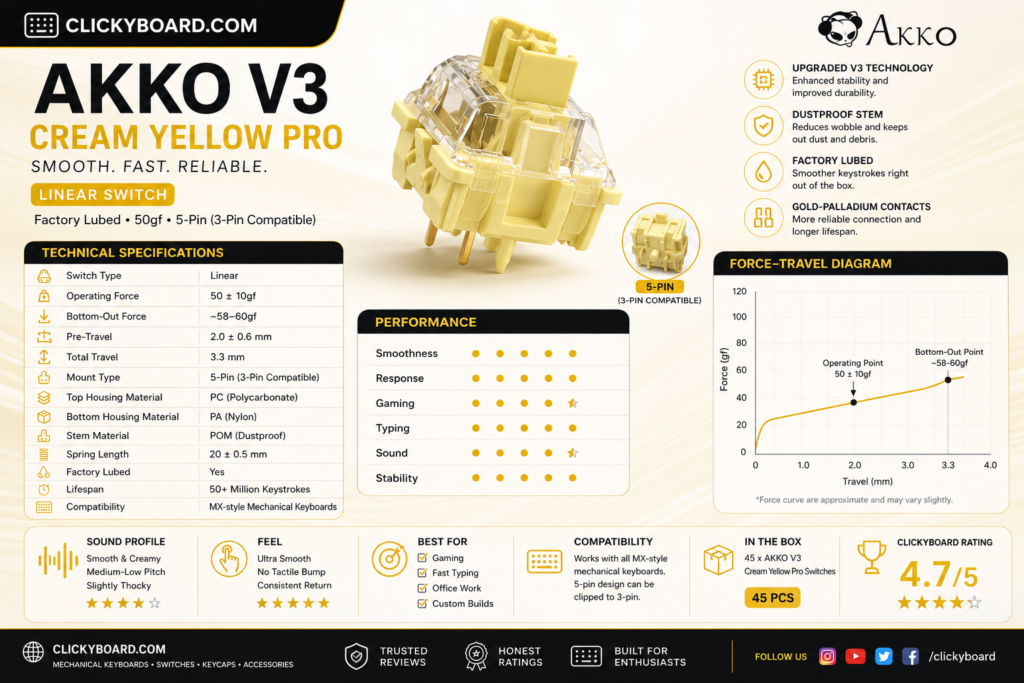
V3 Cream Yellow ProV3 Pro~50 gBest overall
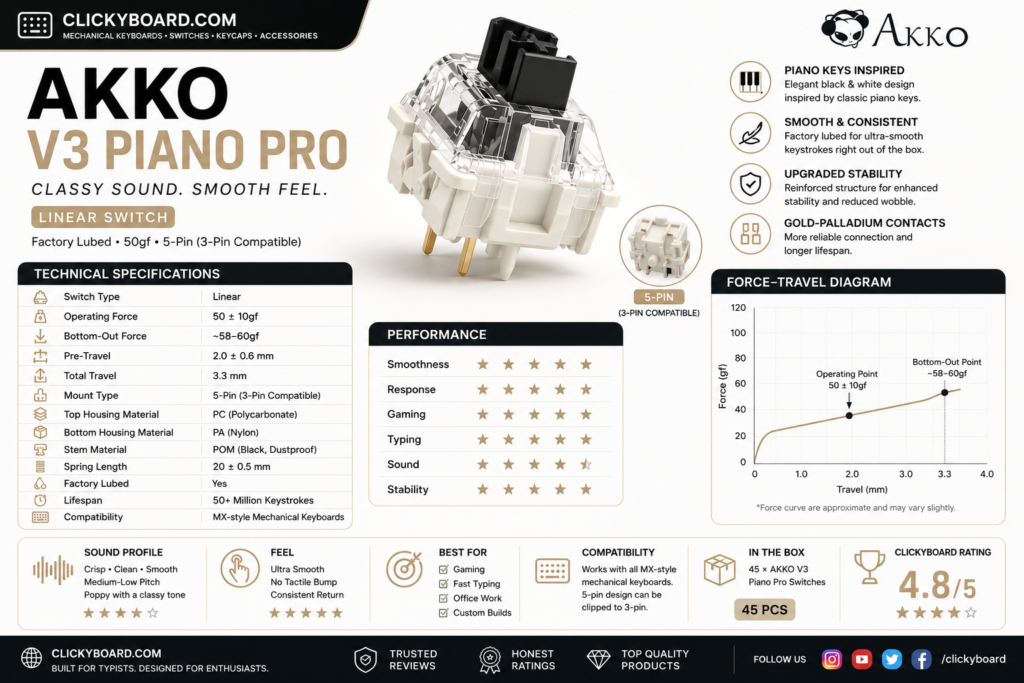
V3 Piano ProV3 Pro~63 gBest sound
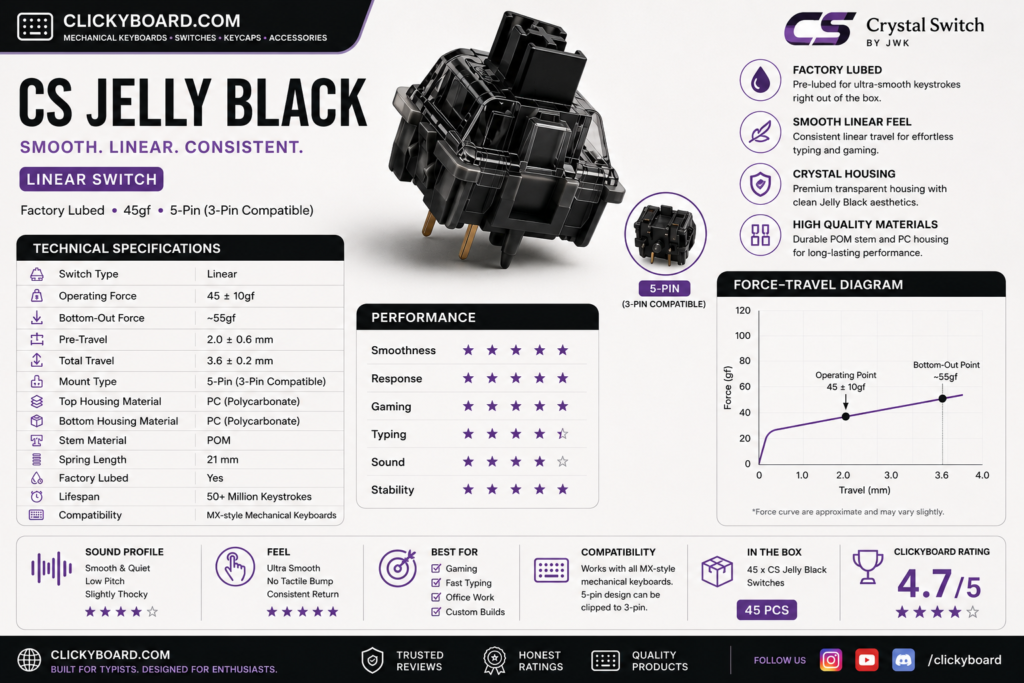
CS Jelly BlackCS~50 gBest budget
V3 Cream Black ProV3 Pro~60 gBest heavier linear
V3 Silver ProV3 Pro~43 gBest for gaming and speed
V3 Matcha Green ProV3 Pro~50 gBest balanced feel
Akko x TTC DemonCollab~42 gBest light and smooth
CS Lavender PurpleCS~45 gQuiet-ish budget linear
RosewoodThemed~43 gLight budget classic
POM PinkThemed~45 gCreamy, muted feel
CS CrystalCS~43 gBudget RGB shine-through
CS Wine RedCS~50 gBudget all-rounder

The best Akko linear switches

1. Akko V3 Cream Yellow Pro, the best all-rounder

Akko v3 cream yellow pro

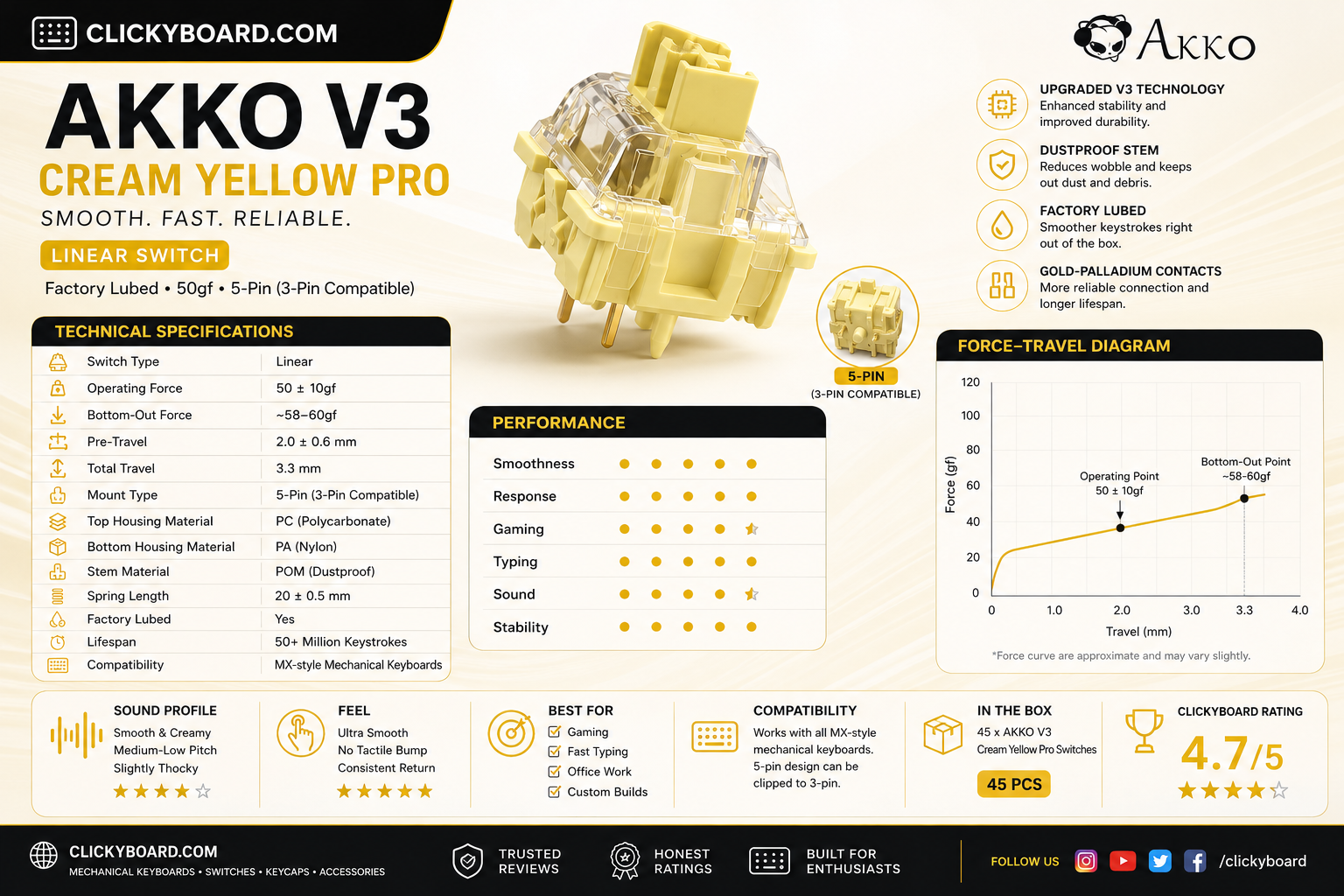
Why it is here. A medium-weight linear around 50 g that comes factory pre-lubed and feels smooth and deep straight out of the box. It is the switch most people should buy first, with a rounded, satisfying sound. Best for: an easy, do-it-all linear for typing and gaming.

Watch out: the mid weight feels a touch heavy if you prefer a fast, feather-light switch for competitive play.

2. Akko V3 Piano Pro, the best sound

Akko v3 piano pro

Why it is here. Tuned for a deep, musical sound, the Piano Pro is pre-lubed and smooth with a fuller thock than most Akko linears. It is the pick if you care most about how a board sounds. Best for: sound-focused builds.

Watch out: it is heavier and pricier than the CS series, so it is overkill if you just want a cheap, light linear.

3. Akko CS Jelly Black, the best budget pick

CS jelly black

Why it is here. A budget linear around 50 g that is smoother than its price suggests and a favorite for first builds. Great value if you are filling a whole board. Best for: cheap builds that still want a pleasant feel.

Watch out: it is not pre-lubed, so it is a step less refined than the V3 Pro switches. A quick lube closes most of the gap.

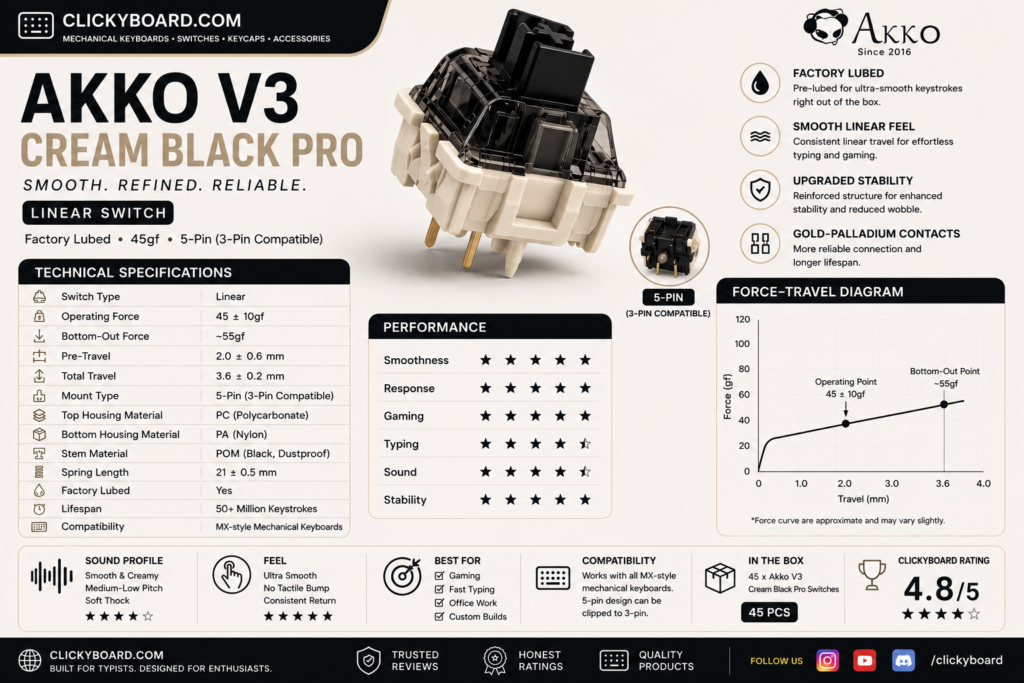
4. Akko V3 Cream Black Pro, the best heavier linear

Akko v3 cream black pro

Why it is here. A pre-lubed linear around 60 g with a firmer, more deliberate press and a deep sound. Typists who bottom out hard tend to love it. Best for: heavy-handed typists who want control.

Watch out: the heavier spring tires out light typists and is not ideal for fast gaming.

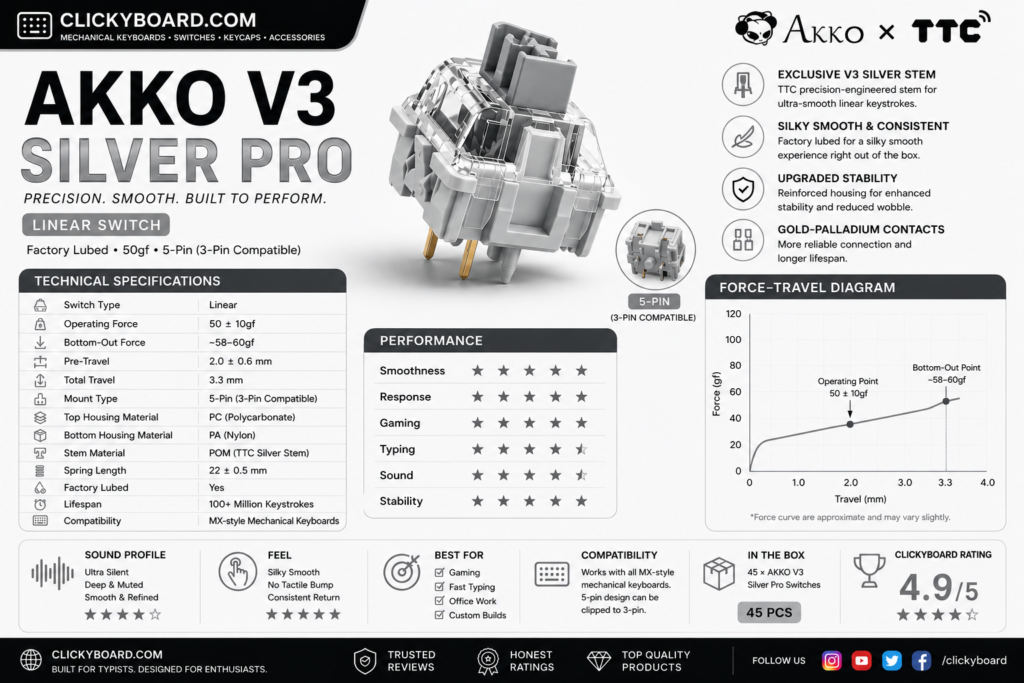
5. Akko V3 Silver Pro, the best for gaming

Akko v3 silver pro

Why it is here. A light, short-travel speed linear around 43 g that actuates fast, which competitive gamers value. Pre-lubed and smooth for a speed switch. Best for: fast gaming and quick reactions.

Watch out: the short travel and light spring cause accidental presses for some, especially while typing.

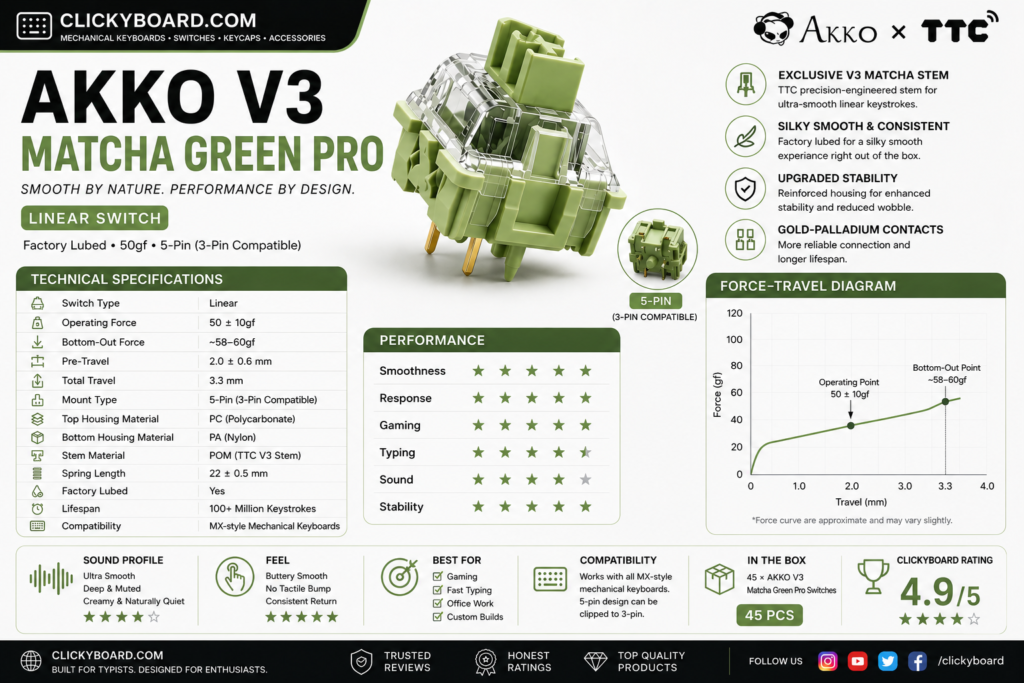
6. Akko V3 Matcha Green Pro, the balanced choice

Akko v3 matcha green pro

Why it is here. A smooth mid-weight linear around 50 g with a balanced feel and a pleasant, slightly muted sound. A great alternative if you want the Cream Yellow feel with a different tone. Best for: a balanced daily-driver linear.

Watch out: it is close enough to the Cream Yellow Pro that you rarely need both.

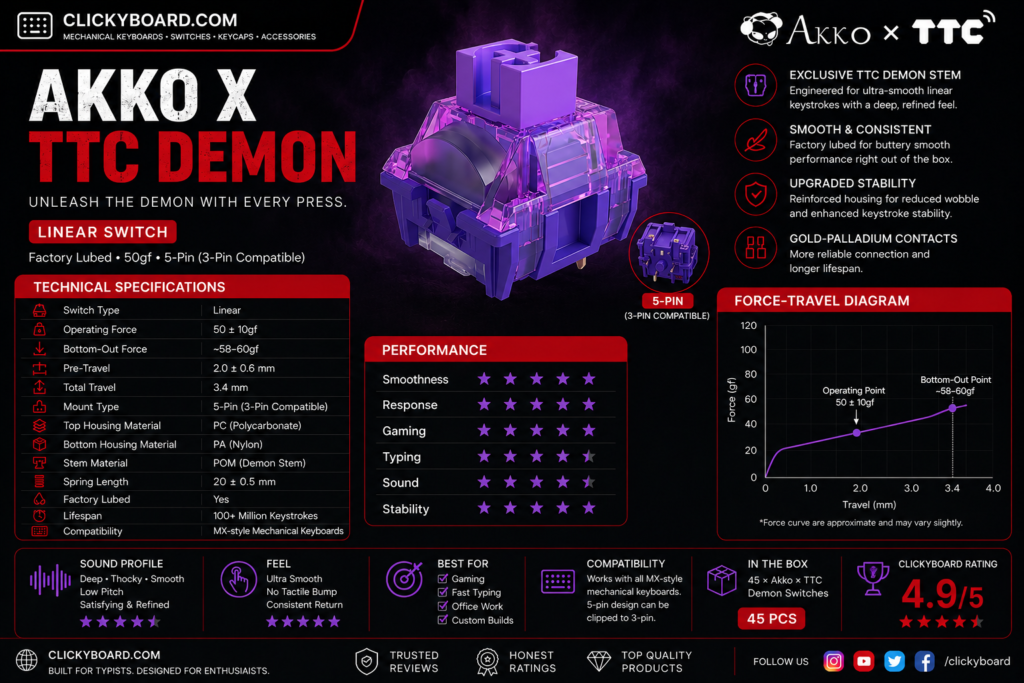
7. Akko x TTC Demon, the light and smooth pick

Akko ttc pro

Why it is here. A collaboration with TTC that produces a very smooth, light linear around 42 g. If you like a fast, effortless keystroke, this is one of the smoothest light Akko options. Best for: light-touch typists and gamers.

Watch out: the light weight is not for heavy typists, and stock can be harder to find.

8. Akko CS Lavender Purple, the quiet-ish budget linear

Why it is here. One of the softest-sounding switches in the CS line, with a light press and a muted, low-pitched bottom-out that suits shared rooms without going fully silent. It is also among the cheapest ways into a decent Akko linear. Best for: quiet offices on a budget.

Watch out: it is not a silent switch, just a quieter one. If you need genuine silence, a dampened switch is the answer, and our best silent switches guide covers those, including Akko’s own silent tactile Penguin.

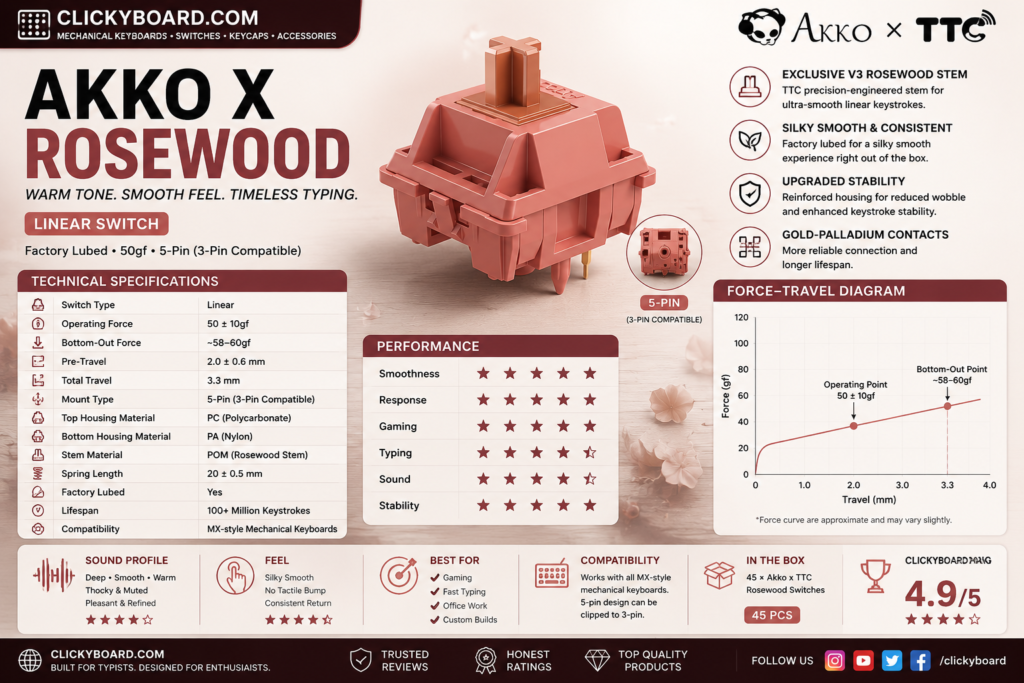
9. Akko Rosewood, a light budget classic

Akko Rosewood

Why it is here. A light linear around 43 g from Akko’s themed lineup, smooth and easy to type on at a low price. A solid, no-drama budget option. Best for: a cheap, light everyday linear.

Watch out: it is an older line, so availability can be hit or miss.

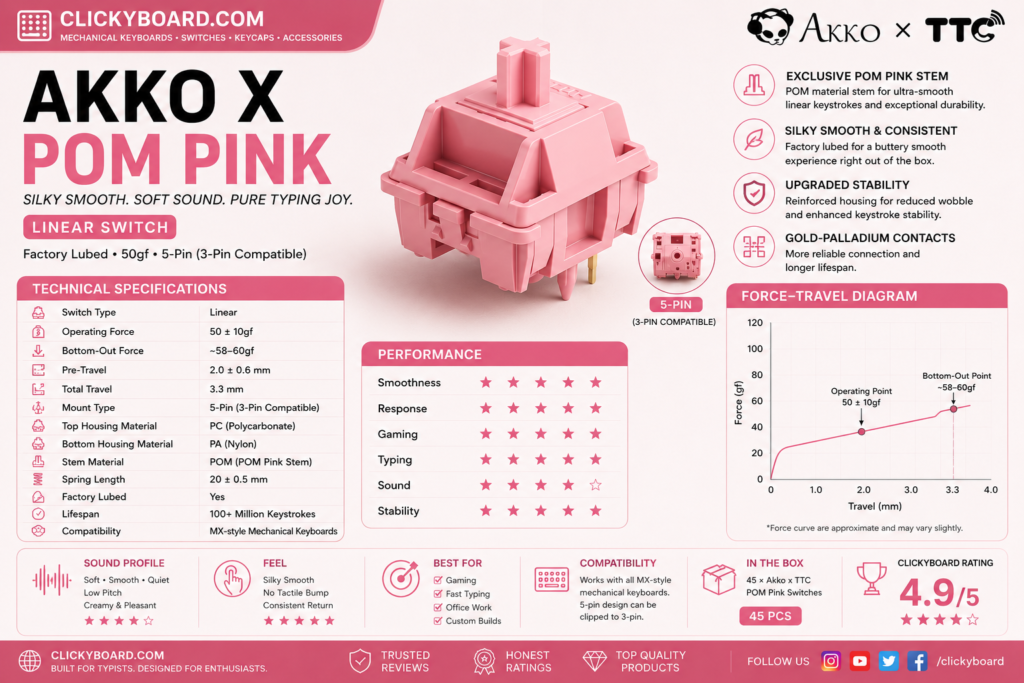
10. Akko POM Pink, creamy and muted

Akko POM Pink

Why it is here. POM parts give this linear a soft, creamy feel and a muted, rounded sound that some people prefer over a sharper switch. Best for: a softer, quieter linear character.

Watch out: the muted sound and soft feel are subjective, so try to hear it before buying a full set.

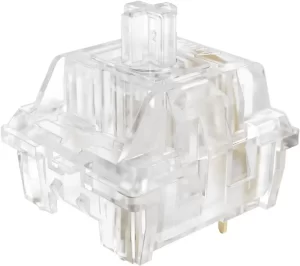
11. Akko CS Crystal, budget RGB shine-through

Crystal Transparent Linear Akko

Why it is here. A clear-housing budget linear that lets RGB shine through brightly, so it is a natural pick for a colorful, backlit build. Light and easy to press. Best for: RGB-focused budget builds.

Watch out: the feel is basic next to the V3 Pro switches, and it is not pre-lubed.

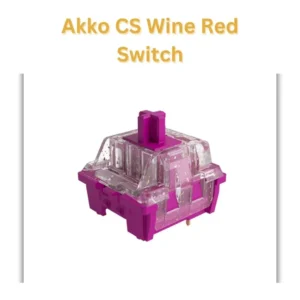
12. Akko CS Wine Red, the budget all-rounder

Akko CS Red Wine factory pre lubed linear switches

Why it is here. A dependable budget linear around 50 g that handles both typing and gaming without fuss. A safe, cheap choice if you just want a solid linear. Best for: a low-cost, general-purpose linear.

Watch out: it is unremarkable next to the premium picks and has no factory lube.

CS series vs V3 Pro: which should you buy?

Akko splits its linears into two families. The CS series is the budget line: good switches with no factory lube, best for cheap builds or if you plan to lube them yourself. The V3 Pro series costs more but ships pre-lubed and feels noticeably smoother and deeper out of the box. If you want the best experience with no extra work, buy V3 Pro. If you are filling a big board on a budget, the CS series is the smart value, and our switch lubing guide will get them most of the way to V3 Pro smoothness.

Frequently asked questions

What is the best Akko linear switch?

For most people the V3 Cream Yellow Pro is the best Akko linear overall. It is pre-lubed, smooth, and has a deep, pleasant sound out of the box. Gamers who want a lighter, faster switch should look at the V3 Silver Pro, and budget builders are well served by the CS Jelly Black.

Are Akko linear switches good?

Yes. Akko linears offer some of the best value in switches, especially the pre-lubed V3 Pro line, which feels smooth and refined for the price. The cheaper CS series is also solid, though it benefits from a lube job. They are a common recommendation for people getting into the hobby.

What is the difference between Akko CS and V3 Pro switches?

The CS series is budget-priced and not factory lubed, while the V3 Pro series costs more, ships pre-lubed, and feels smoother and deeper straight away. Buy V3 Pro for the best out-of-box feel, or CS if you want to save money and do not mind lubing them yourself.

Which Akko linear switch is best for gaming?

The V3 Silver Pro is the best Akko linear for gaming. It is a light, short-travel speed switch that actuates quickly, which helps in fast games. If you find it too light and prone to accidental presses, the V3 Cream Yellow Pro is a slightly heavier all-rounder that still games well.

Do Akko switches fit any keyboard?

Yes. Akko switches use the standard MX stem and pins, so they drop into any hot-swap or solderable board that takes MX-style switches. Check whether your board is 3-pin or 5-pin, though most modern hot-swap boards accept both.

Verdict: which Akko linear should you buy?

If you want one easy answer, buy the V3 Cream Yellow Pro. It is smooth, pre-lubed, and suits almost any build. Gamers should get the V3 Silver Pro for speed, budget builders should grab the CS Jelly Black, and anyone chasing a deep sound should try the V3 Piano Pro.

Whatever you pick, Akko linears are among the best value switches you can buy, and a lube job plus a well-built board will make any of them sing. If you are still weighing linear against tactile, our tactile vs linear guide and our best linear switches roundup will help, and you can pair these switches with a board from our best Akko keyboards guide.


We update this roundup as Akko releases new switches and community favorites shift, so the picks stay current.

Written by Elizabeth · Published August 21, 2024
Reviewed & Updated by Olivia · Updated on July 26, 2026

Disclosure: This guide contains affiliate links. If you buy through them we may earn a small commission at no extra cost to you. We only recommend switches we would put in our own boards.

Lubing switches by hand is the single best way to make them smoother, but it is slow, fiddly, and not for everyone. Factory-lubed linear switches skip that step: they come lubricated from the factory, so they feel smooth and sound good the moment you drop them in. Below are the best factory-lubed linear switches in 2026, so you can get a premium feel with zero extra work.

⚡ Quick take

The Gateron Oil King is the best factory-lubed linear for most people: smooth, deep, and available everywhere. On a budget, the Gateron Milky Yellow Pro is unbeatable value, and the Akko V3 Cream Yellow Pro is the easiest all-rounder. Want the full picture on linears first? See our best linear switches roundup.

How we picked

Every switch here ships factory-lubed and is a true linear, smooth all the way down with no bump. We judged them on how good the factory lube actually is (some are lubed better than others), smoothness, sound, spring weight, and value. Each pick lists an honest downside, because even good factory lube is not perfect.

Factory-lubed linear switches compared

SwitchWeight (approx)Feel and soundBest for
Gateron Oil King~55 gVery smooth, deepBest overall
Akko V3 Cream Yellow Pro~50 gSmooth, roundedBest all-rounder
Gateron Milky Yellow Pro~50 gSmooth for the priceBest budget
Akko V3 Piano Pro~63 gDeep, musicalBest sound
Cherry MX2A Red~45 gLight, refinedBest from Cherry
Gateron Baby Raccoon~62 gThocky, fullThocky sound
Akko V3 Cream Black Pro~60 gFirm, controlledHeavier typists
Gateron Ink Black V2~60 gPremium, deepEnthusiast pick

The best factory-lubed linear switches

1. Gateron Oil King, the best overall

gateron-oil-king

Why it is here. The Oil King is the switch that made factory lube respectable. It comes lubed well from the factory, feels genuinely smooth, and has a deep, satisfying sound around 55 g. It is the easy default. Best for: anyone who wants a premium feel with no work.

Watch out: the deep, medium-heavy feel is not for people who prefer a very light, fast switch.

2. Akko V3 Cream Yellow Pro, the best all-rounder

Akko Cream Yellow V3 switch

Why it is here. A pre-lubed medium linear around 50 g that feels smooth and sounds rounded straight out of the box, at a lower price than most premium switches. A superb first factory-lubed switch. Best for: an easy, affordable all-rounder for typing and gaming.

Watch out: it is a touch heavier than speed switches, so competitive gamers may want something lighter.

3. Gateron Milky Yellow Pro, the best budget pick

Gatero-Milky-Yellow-Pro
GATERON KS-3X1 RGB Milky Yellow Pro Switch

Why it is here. The value champion. It is lightly factory-lubed, smooth for the money, and one of the cheapest ways to fill a whole board with a decent linear. Best for: filling a full board on a tight budget.

Watch out: the factory lube is lighter than premium switches, so a few units can feel slightly less consistent. A quick extra lube makes them excellent.

4. Akko V3 Piano Pro, the best sound

Akko V3 Piano Pro 1

Why it is here. Pre-lubed and tuned for a deep, musical sound, the Piano Pro is the pick if a full, thocky tone matters most to you. Smooth out of the box with a heavier press. Best for: sound-focused builds.

Watch out: the heavier spring and higher price make it overkill if you just want a cheap, light linear.

5. Cherry MX2A Red, the best from Cherry

Cherr- MX2- Red

Why it is here. The MX2A is Cherry’s overhaul of its classic Red, with a smoother stem and factory lube that finally fixes the scratchiness the old MX Red was known for. Light at around 45 g and very reliable. Best for: fans of the classic Cherry feel who want it smoother.

Watch out: it is smoother than before but still not as deep-sounding as the Gateron or Akko picks.

6. Gateron Baby Raccoon, the thocky pick

Gateron-baby-racoon

Why it is here. A factory-lubed linear around 62 g with a deep, full sound that people chase for a thocky build. Smooth out of the box with a rounded bottom-out. Best for: a deep, thocky sound with no lubing.

Watch out: the heavier spring is not for everyone, and stock can come and go by batch.

7. Akko V3 Cream Black Pro, for heavier typists

Akko V3 Creamy Black Pro Switch

Why it is here. A pre-lubed linear around 60 g with a firmer, more deliberate press and a deep sound. If you bottom out hard and want control, this is the factory-lubed pick. Best for: heavy-handed typists.

Watch out: the heavier spring tires out light typists and is not ideal for fast gaming.

8. Gateron Ink Black V2, the enthusiast pick

gateron ink v2 silent black

Why it is here. The Ink Black pairs a special ink housing with a smooth, slightly heavier linear feel around 60 g and a deep, premium sound. It is a community favorite that needs no extra lube. Best for: enthusiasts who want smoothness and a deep sound in one switch.

Watch out: it costs more than standard Gateron linears, and the heavier spring is not ideal if you like a light touch.

Does factory lube mean you never need to lube again?

Mostly, yes. A well factory-lubed switch like the Oil King feels great with no extra work, which is the whole point. But factory lube is applied by machine, so it is lighter and less precise than a careful hand lube. If you want the absolute smoothest result, you can still hand-lube a factory-lubed switch, and budget picks like the Milky Yellow benefit the most. Our switch lubing guide walks through it if you decide to go further.

Three of the picks above are Akko V3 Pro switches, because Akko lubes well at a low price. If you have already settled on the brand, our best Akko linear switches guide ranks the full range including the CS budget line.

Frequently asked questions

What does factory-lubed mean?

Factory-lubed means the switch comes with lubricant already applied to the stem and rails when you buy it, so it feels smoother out of the box. It saves you the slow job of lubing each switch by hand, though a careful hand lube can still improve them further.

What is the best factory-lubed linear switch?

For most people the Gateron Oil King is the best factory-lubed linear, with excellent factory lube, a smooth feel, and a deep sound. On a budget the Gateron Milky Yellow Pro is the value pick, and the Akko V3 Cream Yellow Pro is the easiest affordable all-rounder.

Do I still need to lube factory-lubed switches?

No, not for a great experience. A well factory-lubed switch feels smooth as-is. Enthusiasts sometimes add a hand lube for the last bit of smoothness, and cheaper factory-lubed switches benefit the most, but it is optional, not required.

Are factory-lubed switches good for gaming?

Yes. Factory-lubed linears are smooth and consistent, which suits gaming well. For speed, pick a lighter factory-lubed switch, and for the lowest latency use a wired board. Most of the picks here work well for both typing and gaming.

Verdict: which factory-lubed linear should you buy?

If you want one easy answer, buy the Gateron Oil King. Its factory lube is genuinely good, it feels smooth, and it sounds deep with no extra work. Budget builders should grab the Gateron Milky Yellow Pro, the Akko V3 Cream Yellow Pro is the friendliest affordable all-rounder, and sound chasers should try the Akko V3 Piano Pro.

Factory lube gets you most of the way to a premium feel with none of the effort. If you later want to go further, our best linear switches roundup and lubing guide cover the next steps, and you can pair these switches with a board from our best Akko keyboards guide.


We update this roundup as new factory-lubed switches launch, so the picks stay current.

Written by Elizabeth · Published August 20, 2024
Reviewed & Updated by Olivia · Updated on July 27, 2026

Disclosure: This guide contains affiliate links. If you buy through them we may earn a small commission at no extra cost to you. We only recommend switches we would put in our own boards.

Brown switches are the classic middle-ground: a tactile switch with a small bump you feel when the key registers, quieter than a clicky and more interesting than a linear. Cherry MX Brown made the color famous, but plenty of people find its bump too soft. So this guide covers the best true browns and the stronger tactile switches that scratch the same itch better. If you type a lot and want feedback without the noise, one of these is for you.

⚡ Quick take

The Cherry MX Brown is the safe classic, but if you want a bump you can actually feel, the Gazzew Boba U4T is the brown done right. Best value goes to the pre-lubed Akko V3 Cream Blue Pro. Wondering if browns suit gaming? See our take on brown switches for gaming.

How we picked

We looked at true brown switches and the tactile switches people buy when browns feel too weak. We judged them on how strong and clean the bump is, smoothness, sound, spring weight, and value, and every pick lists an honest downside. If you are not sure a tactile is right for you at all, our tactile vs linear guide is the place to start.

Brown and tactile switches compared

SwitchWeight (approx)Bump strengthBest for
Cherry MX Brown~55 gLightThe classic gateway
Gateron Brown Pro~55 gLightA smoother classic brown
Akko V3 Cream Blue Pro~55 gMediumBest value
Gazzew Boba U4T~62 gStrongBrown done right
Gateron Baby Kangaroo V2~67 gStrong, snappySnappy feedback
Holy Panda X~60 gStrong, sharpPremium tactile
Outemu Brown~55 gLightCheapest brown
Durock T1~67 gMedium-sharpSharp tactile value

The best brown and tactile switches

1. Cherry MX Brown, the original brown

CHERRY MX BROWN 368x368 1

Why it is here. The switch that made browns famous. A light tactile around 55 g with a soft, rounded bump, it is reliable, quiet enough for most rooms, and available everywhere. A safe first tactile. Best for: a classic, no-surprises tactile.

Watch out: the bump is famously subtle, and stock Cherry Browns can feel a little scratchy since they are not factory lubed. Many people upgrade for a stronger tactile feel.

2. Gateron Brown Pro, a smoother classic brown

gateron brown

Why it is here. Gateron’s take on the brown is smoother than Cherry’s out of the box and usually cheaper, with the same light, approachable bump. If you like the idea of a Cherry Brown but want it smoother, start here. Best for: a smoother, better-value classic brown.

Watch out: it is still a light-bump switch, so if you want strong feedback you will prefer the picks below.

3. Akko V3 Cream Blue Pro, the best value

Akko V3 Creamy Blue Pro Switch

Why it is here. A pre-lubed tactile around 55 g with a cleaner, more noticeable bump than a true brown, at a budget price. It is one of the easiest ways to get a satisfying tactile feel without spending much. Best for: the best tactile feel per dollar.

Watch out: the bump is stronger than a classic brown, so it is not the pick if you specifically want a soft, subtle bump.

4. Gazzew Boba U4T, the brown done right

Gazzew Boba U4T

Why it is here. If Cherry Browns left you wanting more, the Boba U4T is the answer. It has a strong, rounded bump you genuinely feel, a deep sound, and excellent smoothness around 62 g. Many people call it the tactile browns should have been. Best for: anyone who found browns too weak.

Watch out: the strong bump and heavier spring are a real jump from a brown, and it is louder, so it is not a subtle switch.

5. Gateron Baby Kangaroo V2, snappy feedback

gateron baby kangaroo v2

Why it is here. A snappy tactile with a sharp, well-defined bump and a springy return, smooth around 67 g. It feels lively and precise, which typists who want obvious feedback love. Best for: a snappy, pronounced bump.

Watch out: the strong, snappy bump is the opposite of a soft brown, so it is not for people who want subtle feedback.

6. Holy Panda X, the premium tactile

holy panda x

Why it is here. The Holy Panda name became famous for a sharp, satisfying tactile bump, and the X version delivers it around 60 g with better smoothness than the originals. A true enthusiast tactile. Best for: a premium, sharp tactile feel.

Watch out: it costs more than most picks here, and the strong bump is a long way from a gentle brown.

7. Outemu Brown, the cheapest brown

Outemu Brown

Why it is here. If you just need a cheap brown for a first build or a repair, Outemu Brown gets you a light tactile bump for very little money. Best for: the tightest budgets.

Watch out: it is scratchier and less consistent than the pricier picks. Treat it as a starting point, not an endgame.

8. Durock T1, sharp tactile value

DUROCK T1 Tactile Keyboard Switches

Why it is here. The Durock T1 offers a sharp, medium tactile bump with good smoothness at a price below the premium picks. A great step up from a brown without paying flagship money. Best for: a sharp tactile on a mid-range budget.

Watch out: the sharper bump and heavier feel are quite different from a soft brown, and it is not factory lubed as well as some rivals.

What to look for in a brown or tactile switch

  • Bump strength: a true brown has a soft, subtle bump; switches like the Boba U4T and Holy Panda X have a strong, obvious bump. Decide how much feedback you want.
  • Spring weight: lighter switches (around 55 g) are easier for fast typing; heavier ones (65 g and up) feel more deliberate.
  • Factory lube: pre-lubed tactiles feel smoother out of the box. A stock Cherry Brown can be improved with our lubing guide.
  • Sound: stronger tactiles are usually a little louder. If you need quiet, look at silent tactiles instead.

Frequently asked questions

What is the best brown switch?

The Cherry MX Brown is the classic, but if you want a bump you can clearly feel, the Gazzew Boba U4T is widely seen as the brown done right. On a budget, the pre-lubed Akko V3 Cream Blue Pro gives you a satisfying tactile feel for very little.

Are brown switches good for typing?

Yes. The tactile bump lets you feel each key register, so you can type accurately with a lighter touch, which is why browns and other tactiles are popular with writers and coders. If you want stronger feedback than a classic brown, a switch like the Boba U4T or Baby Kangaroo delivers it.

Are brown switches good for gaming?

They are fine for most gaming, and the bump does not really slow you down. Competitive players often prefer a smooth linear for the fastest feel, but plenty of people game happily on browns. We cover this in detail in our brown switches for gaming guide.

Why do people say Cherry MX Browns are weak?

The Cherry MX Brown has a very light, rounded bump that some people can barely feel, so it can feel close to a linear. That is why many buyers move to a stronger tactile like the Boba U4T or Holy Panda X, which give a much more obvious bump.

Verdict: which brown switch should you buy?

If you want the classic, safe answer, buy the Cherry MX Brown or the smoother Gateron Brown Pro. If you found browns too soft and want a bump you actually feel, the Gazzew Boba U4T is the one to get, and the Akko V3 Cream Blue Pro is the best value tactile for the money.

Match the bump strength to what you like, and remember that a lube job and a well-built board improve any of these. For more options, see our tactile vs linear guide and our best linear switches roundup, and pair your switches with a board from the best Akko keyboards guide.


We update this roundup as new tactile switches launch and community favorites shift, so the picks stay current.

Written by Elizabeth · Published August 17, 2024
Reviewed & Updated by Olivia · Updated on July 27, 2026

⚡ Quick answer

Blue switches are usable for gaming, but they are not the best choice. The loud click is satisfying and fine for casual play, yet blues are heavier, have a longer reset before the key can fire again, and the noise gets old fast on voice chat. For most gamers a linear or even a brown switch is the smarter pick. Choose blues because you love the sound, not because they help you win.

What a blue switch is

A blue switch is a clicky switch: it has a tactile bump and an added mechanism that makes a loud, sharp click on every press. It is the loudest common switch type, and the click is the whole reason people love or avoid them.

The catch for gaming: the reset point

Blues have a quirk that matters in games. The point where the key resets and can fire again sits higher and further from the actuation point than on most switches. In fast games that need rapid, repeated presses, that gap can make double-tapping feel slightly less responsive. It is not a dealbreaker for casual play, but competitive players notice it.

Weight and noise

Blues are also on the heavier side, which tires your fingers faster during long sessions, and they are loud. On voice chat or a shared space, every keystroke is broadcast, and many players (and their teammates) find that annoying. Neither issue helps your performance.

Blue vs linear vs brown for gaming

  • Linear switches are the usual gaming pick: smooth, light, and consistent for fast presses, with no click or reset quirk.
  • Brown switches are a good middle ground, giving feedback without the noise, and are covered in our guide to whether brown switches are good for gaming.
  • Blue switches sit last for pure gaming, mainly because of the reset gap, weight, and noise.

When blues are fine for gaming

If you play casually, love the clicky sound, and are not chasing competitive performance, blues will serve you well. Slower-paced games like strategy titles and RPGs do not stress the reset point, so the downsides barely show. Plenty of people game happily on blues because they simply enjoy the feel.

When to pick something else

Avoid blues if you play fast, competitive games that reward rapid double-taps, if you use voice chat, or if you share a room, because the noise and reset gap work against you. A light linear, or a magnetic switch with rapid trigger, is the better tool there.

Frequently asked questions

Can you game with blue switches?

Yes, especially casually. They are just not optimized for fast competitive play because of the reset gap, weight, and noise. Many people game on them daily without any real problem.

Are blue or red switches better for gaming?

Red (a light linear) is better for gaming: smoother, lighter, and quicker to reset. Blue wins only if you value the clicky sound over raw performance.

Are blue switches too loud for gaming?

For solo casual play, no. On voice chat or in shared spaces, many people find them too loud, since every keystroke is clearly audible to others.

Do blue switches slow you down in games?

The higher reset point can make rapid repeated presses feel slightly less responsive, which mostly matters at a competitive level. For casual play you will not notice a difference.

The bottom line

Blue switches are a fun, satisfying switch that you can game on, but they are not built for it. For casual play and sound lovers they are fine; for fast or competitive gaming, a linear or brown switch will serve you better. Buy blues for the sound you love, and pair them with a quieter switch if performance is your priority.


We keep our switch guides updated as new switches launch and community consensus shifts.

Written by Elizabeth · Published August 5, 2024
Reviewed & Updated by Olivia · Updated on July 27, 2026

⚡ Quick answer

Yes, brown switches are good for gaming for most people, and especially good if you also type a lot. The light tactile bump does not meaningfully slow you down. For pure competitive gaming, though, many players prefer a smooth linear switch because it feels slightly faster and more consistent. Browns are a versatile, safe choice, just not the last word in raw speed.

Brown switches get a lot of “are they good for gaming?” questions because they sit in the middle: not the smooth linear that competitive gamers usually reach for, and not the loud clicky most people avoid. The short version is that they work well for the vast majority of players. Here is the honest, detailed answer, including when you might want something else.

What a brown switch actually is

A brown switch is a light tactile switch: it has a small bump you feel partway down, right around where the keypress registers, and it is quieter than a clicky switch. That bump is the whole story here, because the question of “good for gaming” really comes down to whether feeling that bump helps or hurts you in a game.

Does the tactile bump hurt gaming?

For nearly everyone, no. The key still registers at the same point whether or not you feel a bump, so the bump does not add input lag or change when your press counts. What it does add is a bit of feedback, which some players like and some do not notice.

The one place it matters is at the very top of competitive play. In fast games that reward rapid, repeated presses, some players feel a smooth linear is marginally quicker because there is no bump to push through on each stroke. The difference is small and mostly relevant to serious competitors. For casual and mid-level gaming, it is not something you will feel.

Brown vs linear switches for gaming

This is the real comparison. Linear switches are the default for competitive gaming because they are smooth top to bottom, with nothing interrupting a fast press. If your only goal is the fastest, most consistent feel for shooters, a light linear is the usual pick.

Brown switches trade a little of that smoothness for feedback, and they have one big advantage: they are excellent all-rounders. If you split your time between gaming and typing, a brown lets one keyboard do both jobs well, where a pure gaming linear can feel vague for long typing sessions. So the choice is less “which is better” and more “what do you do most.”

Brown vs blue (clicky) switches for gaming

Browns are the better gaming choice here for most people. They have the same tactile feel as a blue but without the loud click, and blues can feel heavier and have a longer reset that some players dislike for rapid presses. If you were choosing between brown and blue for gaming, brown wins. We go deeper on the clicky side in our guide to whether blue switches are good for gaming.

Who should game on brown switches

Browns are a great fit if you are:

  • Someone who types and games on the same keyboard and wants one switch for both
  • A casual or mid-level gamer rather than a top-tier competitor
  • A player who likes feedback and finds fully smooth switches a bit vague
  • Into slower-paced games like strategy, RPGs, or MOBAs, where raw actuation speed matters less

When to pick something else

Consider a different switch if you are a competitive FPS player chasing the fastest possible feel, where a light linear is the safer bet, or you play games with rapid double-taps, where linears or magnetic (Hall-Effect) switches with adjustable actuation and rapid trigger give a real edge. None of this makes browns bad for those players. It just means a more specialized switch squeezes out a little more performance.

Common misconceptions

“Brown switches are bad for gaming.” This is a myth. They are perfectly capable, and plenty of people game on them daily without issue.

“The bump causes double presses.” It does not. A key actuates at a single point, and the tactile bump does not make it fire twice.

“You need the lightest switch to win.” Reaction time is overwhelmingly about the player, not a few grams of spring weight. A switch you enjoy and stay consistent with beats one you picked only for a spec.

Frequently asked questions

Are brown switches good for FPS games?

For casual and mid-level FPS play, yes, they work fine. Competitive players who want the smoothest, fastest feel usually prefer a light linear, but the bump on a brown does not add input lag or stop the key registering on time.

Are brown or red switches better for gaming?

Red (a light linear) has a slight edge for pure, fast gaming because it is smooth with no bump. Brown is the better all-rounder if you also type a lot. If gaming is your only priority, lean red; if you do both, brown is the more flexible choice.

Do brown switches slow you down in games?

Not meaningfully. The key registers at the same point regardless of the bump, so there is no added delay. Any advantage a linear has for rapid presses is small and mostly matters at a high competitive level.

Are brown switches good for both gaming and typing?

Yes, and that is their main strength. The tactile bump helps typing accuracy while staying light enough for gaming, which makes browns one of the best single-switch choices for people who do both.

The bottom line

Brown switches are a good, versatile gaming switch, and the best pick if you split your time between gaming and typing. If your only goal is the fastest competitive edge in fast-paced games, a light linear or a magnetic switch will edge them out. For everyone else, browns handle gaming just fine while staying great for everyday typing.

If you want specific recommendations rather than the general answer, see our roundup of the best brown switches.


We keep our switch guides updated as new switches launch and community consensus shifts.

Written by Elizabeth · Published June 26, 2023
Reviewed & Updated by Olivia · Updated on July 27, 2026

Disclosure: This guide contains affiliate links. If you buy through them we may earn a small commission at no extra cost to you.

⚡ Verdict

Kailh is one of the biggest switch makers in the world, and it stands out for three things: dustproof Box switches, some of the crispest clicky switches anywhere thanks to their click-bar design, and the best low-profile (Choc) switches for slim keyboards. Variety and value are excellent. Kailh’s linears historically trailed Gateron for smoothness, but the Cream and Pro series closed most of that gap.

Who makes Kailh switches?

Kailh is the switch brand of Kaihua Electronics, a large Chinese manufacturer that has made switches since the 1990s. Beyond its own name, Kailh is a major supplier that builds switches and low-profile keys for many other keyboard brands, so you have very likely typed on a Kailh switch without knowing it. That scale is why the lineup is so broad.

What makes Kailh different

  • The Box design. Kailh Box switches wrap the contact mechanism in a square box stem that seals out dust and moisture (rated IP56) and reduces wobble. It also lets the clicky versions use a click bar for a crisper, more consistent click and faster reset than a Cherry Blue.
  • Low-profile leadership. Kailh Choc switches are the standard for slim, low-profile keyboards, used across popular thin boards. No other maker owns this space the way Kailh does.
  • Sheer variety. From heavy thick-click switches to novelty and collaboration switches, Kailh makes more switch types than almost anyone.

The main Kailh switch families

Box switches

The flagship line. Clicky options run from the light Box White to the heavier, louder Box Jade and the heaviest Box Navy, all with that sharp click-bar sound. There are also tactile (Box Brown) and linear (Box Red) versions. Box switches take standard keycaps and resist dust.

Speed switches

Built for gaming, Kailh Speed switches (Silver, Copper, Bronze, Gold) actuate higher up the keystroke for faster inputs. Silver is the linear speed switch; the others add tactile or clicky feedback.

Pro series

The Pro switches (Pro Purple tactile, Pro Burgundy linear, Pro Light Green clicky) are smoother and better-tuned than the basic line, and they are a community favorite for value. Pro Purple in particular is a well-liked budget tactile.

Kailh Cream

Made with NovelKeys, the Cream is a full-POM linear with a unique creamy feel and sound that improves as it breaks in. It is an enthusiast staple, though it benefits from lube.

Choc (low-profile)

The Choc switches power slim keyboards, in linear (Red), tactile (Brown), and clicky (White) flavors plus many colorways. They need Choc-specific keycaps, not standard MX ones, so plan keycaps around the switch.

How Kailh feels and sounds

Kailh’s personality is crisp and lively. The Box clickies are among the sharpest, most satisfying clicks you can buy, and the Choc switches feel snappy in a way no other low-profile matches. On linears, older Kailh switches could feel slightly scratchier than Gateron, but the Cream and Pro Burgundy are smooth and well-regarded. Overall, Kailh leans toward character and variety rather than one signature feel.

The best Kailh clicky switches

Kailh’s Box clickies are its standout products. Here are the three to know.

📷 Add image, Kailh Box White

Kailh Box White, the light clicky. A crisp, lighter click-bar clicky that is the easiest Box clicky to type on all day. The best starting point for the clicky sound.

📷 Add image, Kailh Box Jade

Kailh Box Jade, the loud thick click. A heavier, louder click with a thick click bar and a big, satisfying tactile bump. The pick if you want the most dramatic clicky feel and do not share a room.

📷 Add image, Kailh Box Navy

Kailh Box Navy, the heaviest click. The heaviest thick-click switch, with a firm, deliberate press. For typists who want maximum resistance and a bold click, but too heavy for fast gaming.

Best Kailh switches for other uses

  • Best tactile: Kailh Pro Purple, a smooth, budget-friendly tactile. See our best tactile switches roundup.
  • Best linear: Kailh Cream or Pro Burgundy, creamy POM or smooth budget linear. More options in our best linear switches guide.
  • Best for gaming: Kailh Speed Silver, a light linear with a high, fast actuation point.
  • Best low-profile: Kailh Choc Red, the go-to slim linear for thin keyboards.

Pros and cons of Kailh

Pros: huge variety, dustproof Box design, class-leading low-profile Choc switches, crisp click-bar clickies, strong value, wide availability.

Cons: basic linears trail Gateron for out-of-box smoothness, Choc needs its own keycaps, and the sheer number of models can be confusing for beginners.

Who should buy Kailh switches?

Kailh is a great fit if you want a crisp clicky switch, a low-profile keyboard, or simply variety and value. It is also smart for anyone who wants dust and spill resistance from the Box design. If your top priority is the smoothest possible stock linear, Gateron is still the safer default, though Kailh’s Cream and Pro Burgundy are close.

Kailh vs Cherry vs Gateron

  • vs Cherry: Kailh offers more variety and, in the Box clickies, a crisper click than Cherry Blue, usually for less money.
  • vs Gateron: Gateron generally wins on smooth stock linears, while Kailh wins on clicky switches, low-profile, and range. Many builders own both.
Frequently asked questions

Are Kailh switches good?

Yes. They are reliable, varied, and good value, and they lead the market in clicky and low-profile switches. Their premium linears (Cream, Pro Burgundy) are well-liked too.

Are Kailh Box switches worth it?

If you want a clicky switch, yes. The click bar gives a crisper, more consistent click and faster reset than a Cherry Blue, plus dust resistance from the box stem.

Do Kailh switches fit any keyboard?

Standard Kailh switches use the MX mount and fit any MX-compatible board. Low-profile Choc switches only fit Choc-compatible boards and need Choc keycaps.

Kailh or Gateron, which is better?

Gateron for the smoothest stock linears, Kailh for clicky switches, low-profile, and variety. Neither is strictly better; it depends on what you want.

The bottom line

Kailh is a powerhouse switch brand with something for almost everyone. It is the top choice for crisp clicky switches and low-profile keyboards, offers unmatched variety, and delivers strong value. Its stock linears trail Gateron slightly, but the Cream and Pro series close the gap. For most people, there is a Kailh switch that fits the build perfectly.

We keep our brand guides updated as new switches launch.

Written by Elizabeth · Published June 25, 2023
Reviewed & Updated by Olivia · Updated on July 28, 2026

Disclosure: This review contains affiliate links. If you buy through them we may earn a small commission at no extra cost to you.

⚡ Verdict

Matcha Latte switches are a smooth, pre-lubed linear with a soft, slightly muted sound and a cozy green-and-cream look. They are an easy recommendation for anyone who wants a comfortable everyday linear that feels good straight out of the bag, with no tuning required. If you want a light, fast gaming switch or a loud, poppy sound signature, look elsewhere.

📷 Add image, Matcha Latte switches

What are Matcha Latte switches?

Matcha Latte is a linear mechanical keyboard switch built around a matcha-inspired look: a soft green housing paired with a creamy off-white base. They come lubed from the factory, so they feel smooth right away without the hand-lubing that many stock linears need. They use the standard MX mount, so they drop into any MX-compatible hot-swap or solder keyboard.

The appeal is simple: a good-looking, ready-to-type linear that sits in the comfortable middle of the weight range, aimed at typing and casual use rather than competitive gaming.

How they feel

The keypress is clean and consistent top to bottom, with no bump and very little scratch thanks to the factory lube. The weight lands in medium territory, firm enough to avoid accidental presses but light enough for long typing sessions. It is a relaxed, easygoing linear rather than a fast, feather-light one.

Stem wobble is minimal, which keeps keycaps feeling planted. Out of the bag they are already smooth; a light application of your own lube on the springs can quiet the small amount of spring ping some units have, but it is optional.

How they sound

The sound is soft and a little muted, on the deeper end rather than clacky. In a well-built board with some foam, they produce a gentle, rounded thock instead of a sharp click. If you share a room or an office, that calmer profile is a real plus. If you specifically want a loud, marbly, high-pitched sound, these will feel too reserved.

Who they are for

  • Everyday typists who want a comfortable, smooth linear with no tuning.
  • Beginners who want a switch that feels good out of the bag and looks great in a pastel or nature-themed build.
  • Quiet-ish setups where a soft, muted sound is welcome.

Who should skip them

  • Competitive gamers who want the lightest, fastest actuation. A speed linear like a Kailh Speed Silver or Gateron is a better fit.
  • Sound chasers who want a loud, poppy signature. These lean soft and muted.
  • Heavy-switch fans who like a firm, high-resistance press.

Alternatives worth a look

  • Gateron Milky Yellow: a legendary budget linear, smooth and slightly deeper, at a lower price. See our best linear switches guide.
  • Kailh Cream: a creamy POM linear that breaks in beautifully, for those who want a project switch.
  • Gateron Oil King: a premium, deep, ultra-smooth linear if budget is not the priority.

Pros and cons

Pros: smooth factory lube, comfortable medium weight, soft and pleasant sound, attractive green-and-cream design, standard MX fit, ready to use with no tuning.

Cons: not fast or light enough for competitive gaming, sound is too muted for people who want loud clack, some units have minor spring ping, and premium budget linears can match the smoothness for less.

Buy link placeholder, swap the # above for the Matcha Latte affiliate URL.

Frequently asked questions

Are Matcha Latte switches good for gaming?

They work fine for casual gaming, but they are not a dedicated speed switch. Their medium weight and standard actuation point make them better suited to typing and everyday use than to competitive play.

Do Matcha Latte switches need lubing?

No. They come lubed from the factory and feel smooth out of the bag. You can add a little spring lube if you want to reduce minor ping, but it is optional.

Will they fit my keyboard?

Yes, if your board is MX-compatible. They use the standard MX mount and work in hot-swap and solder keyboards alike.

Are they loud?

No. They are on the soft, muted side, which makes them a good pick for shared spaces. If you want a loud, poppy sound, a different linear will suit you better.

The bottom line

Matcha Latte switches deliver exactly what they promise: a smooth, comfortable, good-looking linear that is ready to type on the moment you install it. They are not built for competitive speed and they will not satisfy sound chasers, but for a relaxed everyday build they are an easy, pleasant choice.


We update our switch reviews as new batches and colorways are released.