


We regularly review and update our guides to ensure keyboard recommendations, specs, and software information stay current with the latest releases and updates.
Affiliate disclosure: this article contains Amazon affiliate links. Purchases made through these links support Clickyboard at no extra cost to you.
Disclosure: This is an affiliate site. If you buy through a link on this page, we may earn a small commission at no extra cost to you. We only recommend boards we would tell a friend to buy.
Akko sits in a sweet spot most keyboard brands miss. You get real build quality, PBT keycaps, and hot-swap sockets at prices that stay friendly, plus a lineup that runs from budget starter boards to magnetic-switch gaming decks. That range is great for buyers and confusing at the same time, because two Akko boards at similar prices can feel completely different.
This guide sorts it out. Below are the best Akko keyboards for different needs, each with what it does well, where it falls short, and who should skip it. If you only read this page, you should still leave knowing which one to buy.
⚡ Quick take: for most people, a hot-swappable 75% Akko board is the best balance of size, features, and price. Competitive gamers should look at the magnetic MOD007 line. Numpad users and budget buyers are covered below.
How I picked these
I chose boards to cover the decisions that actually change how a keyboard feels: size, switch type, wireless, and build. Every pick had to earn its place on more than a spec sheet.
- Form factor spread so there is a right answer whether you want a numpad or a tiny 60%.
- Switch options, including Akko CS-series mechanical switches and the newer Hall-Effect magnetic switches for gaming.
- Build and keycaps, favoring a stable case, PBT keycaps, and gasket mounting where it matters.
- Value, judged against what the same money buys elsewhere.
- Real limitations, because a pick with no downsides is a pick you cannot trust.
One note before we start: Akko software is the brand’s weakest area, and VIA support is limited to select models. That shapes a few picks below, and I call it out where it matters.
Quick picks
| Category | Pick | Why |
|---|---|---|
| Best overall | Akko ACR75 | 75% layout, hot-swap, gasket mount, easy to live with |
| Best for competitive gaming | Akko MOD007 V5 HE | Magnetic switches, adjustable actuation, rapid trigger |
| Best value magnetic board | Akko 5075 V3 HE | Hall-Effect performance at a lower price |
| Best full-size | Akko 3098B | Numpad, aluminum-accented case, wireless |
| Best compact (65%) | Akko MOD007 (65%) | Keeps arrow keys, frees desk space |
| Best design piece | Akko MU02 | Real walnut case, warm premium look |
| Best for creators | Akko 5098B | Built-in screen and scroll-wheel numpad |
The best Akko keyboards
Best overall: Akko ACR75
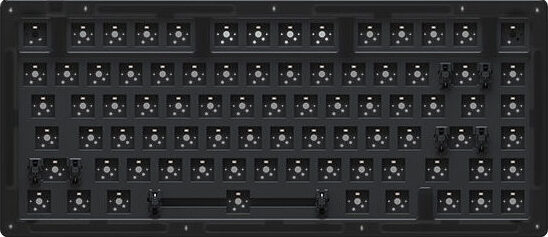
Why it is here. The ACR75 gets the fundamentals right without asking you to compromise. The 75% layout keeps your function row and arrow keys while dropping the numpad, so your mouse sits closer and your shoulder relaxes. Hot-swap sockets let you change switches with no soldering, and gasket mounting gives the typing feel a soft, cushioned bottom-out instead of a hard tap.
Who it is for. Someone who wants one board that types well, fits any desk, and can grow with them as they learn what they like.
Strengths: flexible 75% layout, hot-swap PCB, gasket mount for a softer feel, PBT keycaps that stay matte instead of going shiny. Weak spots: it is wired-focused, and Akko software is clunky if you want deep remapping.
Price: mid-range. Skip it if you need a numpad daily, or you want proper VIA and QMK remapping out of the box.
Best for competitive gaming: Akko MOD007 V5 HE
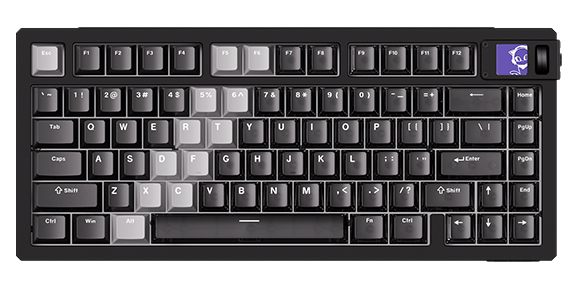
Why it is here. This is Akko’s answer to premium magnetic gaming boards, at well under boutique prices. Hall-Effect magnetic switches let you set exactly how deep a key travels before it registers, and rapid trigger resets the key the instant you lift, which helps with counter-strafing and fast repeated taps. The CNC aluminum case with stainless accents gives it real desk presence, and a tool-free ball-catch mechanism makes opening it for mods genuinely easy.
Who it is for. Competitive FPS players who want adjustable actuation and low latency without paying the highest enthusiast prices.
Strengths: adjustable actuation point, rapid trigger, premium metal build, tri-mode connectivity. Weak spots: magnetic switches are not swappable with normal mechanical switches, it costs more than most Akko boards, and the software learning curve is real.
Price: premium. Skip it if you mainly type, or you want to swap in standard mechanical switches later. For the mechanical, hot-swap MOD instead, see our Akko MOD 007 V2 review.
Best value magnetic board: Akko 5075 V3 HE
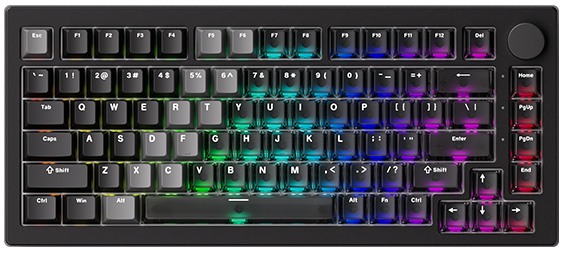
Why it is here. The 5075 V3 HE, and its 80% sibling the 5087 V3 HE, is the affordable way into magnetic switches. It uses Akko Starlight magnetic switches with a high polling rate and rapid trigger, so the responsiveness is close to boards that cost more. Because it also has gasket mounting, sound foam, and PBT doubleshot keycaps, it types and sounds good rather than being a gaming-only tool.
Who it is for. Budget-minded players who also type all day and want one board that does both.
Strengths: magnetic responsiveness at a lower price, softer gasket-mounted feel, doubleshot PBT keycaps. Weak spots: it is wired only, and you cannot drop in standard mechanical switches.
Price: mid-range. Skip it if you want wireless, or you have no interest in tuning actuation and would rather just buy a good normal board.
Best full-size: Akko 3098B

Why it is here. If you punch numbers all day, the 3098B keeps the numpad without feeling cheap. It pairs an aluminum-accented case with hot-swap sockets and PBT doubleshot keycaps, and it runs tri-mode, so you can go wireless over Bluetooth or the 2.4GHz dongle and cut the cable clutter. It comes in Ocean Star and Black and Gold colorways if looks matter. Our full Akko 3098B review digs into the 96% layout quirks and keycap compatibility before you buy.
Who it is for. Accountants, data-entry workers, spreadsheet users, and anyone who reaches for a numpad more than a couple of times a week.
Strengths: full numpad, hot-swap PCB, wireless flexibility, durable keycaps. Weak spots: a full-size board pushes your mouse further right, which is worse for posture over long sessions, and it is larger to travel with.
Price: mid-range. Skip it if you rarely touch a numpad, where a TKL or 75% frees up desk space.
Best compact 65%: Akko MOD007 (65%)
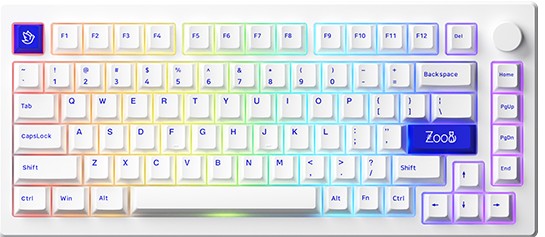
Why it is here. The 65% MOD007 keeps the arrow keys that people miss most on smaller boards while cutting the numpad and function row you rarely touch. That makes it compact enough to feel special and functional enough that you will not fight it daily. It is the layout I point people to when they want small without regret.
Who it is for. People who want a minimal, tidy desk but are not ready to give up dedicated arrow keys.
Strengths: space-saving 65% layout, keeps arrows, solid stock build. Weak spots: you reach some keys through a function layer, which takes about a week to learn, and keycap sets for 65% need a compatibility check before you buy.
Price: budget to mid-range. Skip it if you use the function row constantly for work shortcuts, where a 75% is the safer compact choice.
Best design piece: Akko MU02
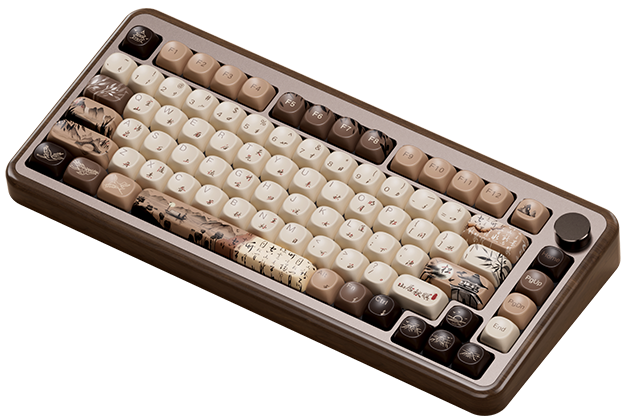
Why it is here. The MU02 is the one you buy because it looks and feels special. A real walnut case is rare at this price and gives the board a warm presence that aluminum and plastic cannot match. It still runs tri-mode wireless and ships with dye-sub PBT keycaps, so it is a genuine daily driver, not just a shelf piece.
Who it is for. Anyone building a warm, design-led desk who wants a centerpiece.
Strengths: solid walnut case, tri-mode connectivity, durable dye-sub keycaps, distinctive look. Weak spots: wood is heavier and needs a little more care than plastic, and the aesthetic premium means you pay more than for a comparable plastic board.
Price: premium. Skip it if you want maximum specs per dollar, or you move the board around a lot and want something rugged and light.
Best for creators: Akko 5098B
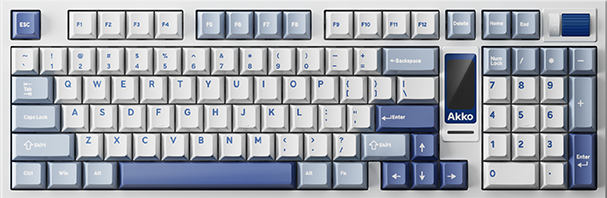
Why it is here. The 5098B stands out for its built-in screen and scroll-wheel numpad. The display can show system stats, the time, or custom images, and the wheel doubles as a dial for scrubbing timelines and nudging values, which is genuinely useful when editing video or streaming. It is hot-swap, gasket-mounted, and tri-mode, so the fundamentals hold up under the novelty.
Who it is for. Creators, editors, and streamers who want a functional desk centerpiece that still has a numpad.
Strengths: customizable screen, scroll-wheel numpad, hot-swap PCB, wireless. Weak spots: the screen and wheel add cost you will not use if you only type and game, and the extra features lean on Akko software, the brand’s weak spot.
Price: premium. Skip it if you want a clean, simple board and see the screen as a gimmick you would rather not pay for.
Akko keyboards compared
| Model | Layout | Switch type | Wireless | Standout | Best for | Price |
|---|---|---|---|---|---|---|
| ACR75 | 75% | Mechanical (hot-swap) | Wired-focused | Gasket mount + hot-swap | All-rounders | Mid |
| MOD007 V5 HE | 75% | Magnetic (HE) | Tri-mode | Adjustable actuation | Competitive gaming | Premium |
| 5075 V3 HE | 75% | Magnetic (HE) | Wired | Value magnetic | Budget gamers who type | Mid |
| 3098B | Full-size | Mechanical (hot-swap) | Tri-mode | Numpad + wireless | Numpad users | Mid |
| MOD007 (65%) | 65% | Mechanical | Varies | Compact with arrows | Small desks | Budget–Mid |
| MU02 | 75% | Mechanical | Tri-mode | Walnut wood case | Design-led desks | Premium |
| 5098B | 96% | Mechanical (hot-swap) | Tri-mode | Screen + scroll wheel | Creators | Premium |
Prices change often, so check the live listing through each board’s button for the current number.
What to look for in an Akko keyboard
You can judge any Akko board yourself with five questions.
Do you need a numpad? Yes points you to full-size (3098B) or the 96% 5098B. No opens up 75%, 65%, and smaller, which put your mouse closer.
Mechanical or magnetic switches? Akko CS-series mechanical switches suit typing and general use and are often hot-swappable. The Hall-Effect magnetic switches on the MOD007 and 5075 V3 HE lines are built for gaming, with adjustable actuation, and they cannot be swapped for standard switches.
Hot-swap or not? Hot-swap sockets let you change how the board feels later with no soldering. On a first board, it is worth having.
Wired or wireless? Tri-mode boards give you Bluetooth, a 2.4GHz dongle, and USB-C. Wired-only boards like the 5075 V3 HE trade that for a lower price.
Keycaps and mount: look for PBT keycaps, which stay matte instead of going shiny, and gasket mounting, which softens the typing feel. Most current Akko boards get both right.
Frequently asked questions
Are Akko keyboards good?
Yes, for the money. Akko boards consistently ship with PBT keycaps, stable cases, and hot-swap sockets at prices below most enthusiast brands, which makes them a common first recommendation for people entering the hobby. The main trade-off is software, which is less polished than the VIA and QMK setups on some rivals.
Are Akko switches good?
Akko CS-series switches are smooth and pleasant for the price, and the newer Hall-Effect magnetic switches are a real step up for gaming responsiveness. They are not boutique switches, but for most users they feel good out of the box, and hot-swap boards let you replace them if you want something different.
Are Akko keyboards good for gaming?
The mechanical boards are fine for casual and mid-level gaming. For competitive play, the magnetic MOD007 V5 HE and 5075 V3 HE are the ones to look at, because adjustable actuation and rapid trigger give an edge in fast games. Wired or 2.4GHz wireless is preferable to Bluetooth for gaming.
Are Akko keyboards hot-swappable?
Many are, including the 3098B, ACR75, and 5098B, which let you pull switches out and press new ones in with no soldering. The magnetic-switch boards are an exception, since their switches are part of a Hall-Effect system and cannot be swapped for standard mechanical switches.
Do Akko keyboards support VIA or QMK?
Support is limited and varies by model, and this is Akko’s weakest area. Some boards work with VIA, but many rely on Akko’s own configurator, which is less flexible. If deep remapping matters to you, confirm VIA support for the specific model before buying.
Where are Akko keyboards made?
Akko is a Chinese brand, and its keyboards are manufactured in China. That is a big part of how it keeps build quality high while prices stay low.
Verdict: how to choose
If you want one safe answer, buy a hot-swappable 75% Akko board like the ACR75. It fits almost any desk, types well, and lets you change switches as you learn your preferences.
From there, match the board to your main use. Competitive gamers should get the magnetic MOD007 V5 HE, or the 5075 V3 HE to save money. Numpad users want the 3098B. If you value how a desk looks, the walnut MU02 is the standout, and creators who want a screen and a dial should look at the 5098B.
Whatever you pick, the pattern that rarely disappoints is simple: a hot-swappable board, PBT keycaps, and the smallest layout you can live with. Akko does all three well, which is why it stays an easy brand to recommend.
We review and update this guide as Akko releases new boards, so recommendations and specs stay current. Prices and availability are not listed here on purpose, since they change often, check the live listing through each button.