


We regularly review and update our guides to ensure keyboard recommendations, specs, and software information stay current with the latest releases and updates.
Affiliate disclosure: this article contains Amazon affiliate links. Purchases made through these links support Clickyboard at no extra cost to you.
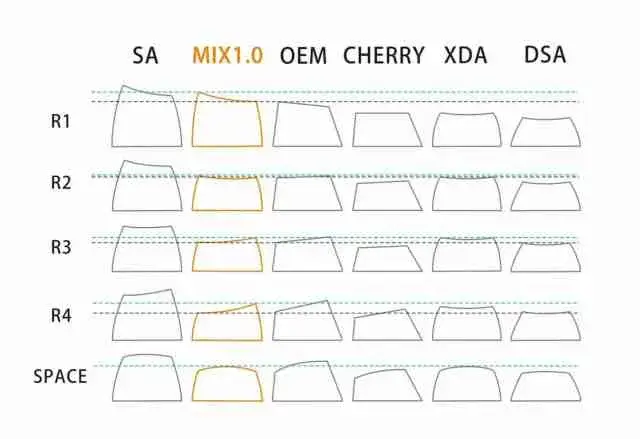
Every keycap has three shape decisions built into it: how tall it is, whether all the rows are the same height, and what the top surface does to your fingertip. Those three things together are what people mean by a keycap profile, and they change how a keyboard feels and sounds more than most people expect before they try a second set.
This guide covers every profile you are likely to encounter, what each one is actually like to use, and how to pick one without buying three sets to find out.
⚡ Quick answer: for a first upgrade, buy Cherry. It is low, sculpted, available in every colourway and needs no adaptation. Pick SA or MT3 if you want something tall and dramatic and will accept a week of adjusting. Pick XDA or DSA if you want a flat set whose keys you can rearrange freely.
What a keycap profile actually decides
Height. How far the top of the cap sits above the board. Taller caps put your fingers further from the case and give the keyboard a bigger internal air chamber, which is why height affects sound as well as feel.
Sculpt. A sculpted profile gives each row its own height and angle, so the number row leans back towards you and the bottom row leans forward. The rows are not interchangeable. A uniform profile makes every key identical, so any cap fits any position and you can rearrange the whole set.
Top surface. A cylindrical top curves in one direction only, front to back, forming a shallow trough. A spherical top curves in every direction, forming a dish. Spherical dishes cradle the fingertip and feel more locating; cylindrical tops let the finger slide between keys more easily, which is why fast gaming setups tend to prefer them.
Every major profile compared
| Profile | Sculpt | Top | Height | Sound | Adjusting | Best for |
|---|---|---|---|---|---|---|
| OEM | Sculpted | Cylindrical | Medium | Neutral | None | Whatever came on your board |
| Cherry | Sculpted | Cylindrical | Low | Slightly higher pitched | None | First upgrade, typing, gaming |
| SA | Sculpted | Spherical | Very tall | Deep and loud | 1 to 2 weeks | Retro looks, dramatic sound |
| DSA | Uniform | Spherical | Low | Bright, clacky | A few days | Ortholinear, 40%, macropads |
| XDA | Uniform | Spherical | Medium | Fuller than DSA | A few days | Cheap uniform sets, colourways |
| MT3 | Sculpted | Deep spherical | Tall | Deep, muted | 1 to 3 weeks | Long typing sessions |
| KAM | Uniform | Spherical | Tall | Deep | About a week | Tall caps without the sculpt |
| Choc | Uniform | Flat-ish | Very low | Thin, sharp | Immediate | Low-profile boards only |
OEM: the one you already own
Before the enthusiast profiles, it is worth starting with the one almost everybody already has. OEM is the default profile fitted to the overwhelming majority of prebuilt mechanical keyboards, and unless you have deliberately bought a keycap set, it is what is on your board right now.
It is sculpted, with a cylindrical top, and it sits slightly taller than Cherry with a more upright front face. That extra height is the main practical difference between the two, and it is why a Cherry set feels noticeably lower to type on when you switch.
OEM matters for two reasons beyond ubiquity. It is the cheapest profile to buy into, because volume drives the price down, and it is the reference point everything else gets described against: if you are unsure whether you want something taller or flatter, OEM is the middle you are comparing to.
We cover it in full, including row heights, compatibility and the best sets to buy, in our dedicated OEM keycap profile guide.
Cherry: the safe default
Cherry profile was designed by Cherry for its own boards and has since become the standard the enthusiast market builds around. It is sculpted and cylindrical like OEM, but roughly a millimetre lower per row, with a flatter front face.
That lower height is the whole appeal. Your wrists sit closer to the desk, you can often type without a wrist rest, and the shorter travel between the top of the cap and the switch makes the board feel quicker. Because it is sculpted, your fingers still get positional feedback from the row angles, so there is essentially no adaptation period coming from OEM.
The practical argument for Cherry is availability. Nearly every group buy and every in-stock vendor set is offered in Cherry, which means comprehensive kits for odd layouts, spare novelties, and easy replacement if you break a cap. If you have a 65%, an Alice board or anything with a non-standard bottom row, Cherry is the profile most likely to have the keys you need.
The downsides are mild. Short walls mean less acoustic body than a tall profile, so Cherry sets sound a little higher pitched and a little thinner. And it is so common that it does not make a board look distinctive.
SA: tall, spherical and loud
SA is the tall, retro-looking profile, originally from Signature Plastics and modelled on the spherical caps used on 1970s terminals and typewriters. It is heavily sculpted, with a deep spherical dish and thick walls, usually in ABS.
It is the most dramatic profile to type on. The dish locates each fingertip firmly, the rows are separated by a lot of height, and the sheer size of the cap gives a big internal air volume. That volume is why SA sounds the way it does: deep, resonant and loud, with a distinctive hollow character that people either love or find obnoxious.
Living with it takes commitment. The height means you almost certainly want a wrist rest, the caps are heavy enough to be noticeable when the board is moved, and the adjustment period is real: expect a week or two before you stop misfiring on the bottom row. On compact boards with tight key spacing it can feel cramped, because the tall walls sit closer together at the top than the plate does.
Uniform variants exist, usually sold as SA R3, where every row uses the home-row shape. That gets you the height and the sound without the sculpt.
DSA: flat, uniform and rearrangeable
DSA is the low uniform profile, also from Signature Plastics. Every key is the same shape and height with a shallow spherical dish, so any cap fits any position on the board.
That single property drives most of its use. If you run an ortholinear board, a split ergonomic layout, a 40%, a macropad, or a non-QWERTY layout like Colemak or Dvorak, DSA lets you place keys wherever they need to go without hunting for a matching row. It is also why DSA sets tend to be cheaper per key: manufacturers only need one mould.
Typing on it is a different experience from anything sculpted. With no row heights to feel for, your fingers lose the positional cues they were using, and touch typists usually overshoot the number row for the first few days. Once that passes, most people find it comfortable, and the low height is easy on the wrists.
DSA is typically thin PBT, which combined with the low walls gives a bright, clacky sound with little resonance. If you want a quiet, high-pitched board it works well; if you are chasing depth it is the wrong profile.
XDA: the middle of the uniform group
XDA is uniform and spherical like DSA, but taller with a wider, flatter top surface. The larger landing area is the main functional difference, and it is the reason some people find XDA more forgiving than DSA when they first move away from sculpted caps.
The extra height also adds body to the sound. XDA sits between DSA and the tall profiles: fuller and lower pitched than DSA, nowhere near SA. Combined with wide availability from budget vendors and an enormous range of colourways, that makes it the easiest uniform profile to buy into cheaply.
The trade-off is that the wide, near-flat top reduces the locating effect of the dish, so it gives you less feedback about where your finger has landed than either DSA or a sculpted profile.
MT3: deeply scooped and polarising
MT3 is Drop’s profile, designed by Matteo Spinelli and modelled on old DEC and IBM terminal keycaps. It is tall, aggressively sculpted, and has by far the deepest spherical dish of any common profile, with high walls surrounding each key.
The feel is unlike anything else. Your fingertips sit down inside each cap rather than on top of it, and the walls physically guide them back to centre. For slow, deliberate typing that is genuinely comfortable, and it is the profile most often recommended by people who type all day and care about fatigue.
It is also the profile people most often bounce off. The same walls that centre your fingers get in the way when you want to slide between keys, which makes it a poor fit for gaming and for anyone with a fast, light typing style. Adjustment takes longer than any other profile, commonly one to three weeks.
Sound is deep and comparatively muted. The caps are thick, so you get the low pitch of a tall profile without the hollow ring that SA is known for.
KAM: tall without the sculpt
KAM comes from Keyreative and answers a specific question: what if you want SA’s height and sound but the freedom of a uniform set? It is uniform, spherical, and considerably taller than XDA.
The result keeps the deep sound that comes from a large cap volume while letting you rearrange keys freely, which makes it a good match for ergonomic and ortholinear boards that would otherwise be stuck with low profiles. The catch is that tall plus uniform means your fingers stretch further to the top row than they would on a sculpted set of the same height, so the number row can feel like a reach.
Low profile: check the stem, not the name
Low-profile boards are the one place where profile compatibility can fail outright, and the reason is the stem rather than the shape.
Kailh Choc switches use a completely different stem: two rectangular posts instead of a single MX cross. No standard keycap fits, no adapter makes it fit, and you must buy caps sold specifically for Choc. Choc also uses tighter key spacing than MX, so even the footprint differs.
Cherry MX Low Profile and most low-profile switches from Gateron keep the MX cross stem, so caps are cross-compatible in principle. In practice a full-height cap on a low-profile switch defeats the purpose and can bottom out against the case, so you still want caps made for the shorter travel.
💡 Before you buy anything: confirm your switches use an MX cross stem. Almost every mechanical keyboard sold today does, which is why profile is usually the only question. Choc, Topre and older proprietary switches are the exceptions, and on those the profile name tells you nothing about whether a set will fit.
How much does profile change the sound?
Enough to hear clearly, but less than the case, the plate and whether the board has foam in it. Two things about the cap matter.
Internal volume. A taller cap encloses more air, and more air means a lower resonant pitch. This is the main reason SA and MT3 sound deep and DSA sounds bright, and it holds regardless of what the cap is made of.
Wall thickness. Thin walls flex and ring on impact, adding a hollow, plasticky component to the sound. Thick walls damp that out. This is where profile and material overlap, since the profiles known for thick walls are also the ones usually moulded in thick ABS.
Profile and material are separate choices
Profile is the shape. Material is the plastic. They are independent, and you can get almost any profile in either of the two common plastics, so decide them separately rather than assuming a profile commits you to a material.
Briefly: ABS is smoother, produces a deeper sound, and develops a shine where your fingers land, usually within months of daily use. PBT is more textured, sounds higher pitched, and resists shine almost indefinitely. Our ABS vs PBT guide covers the legend printing methods and durability differences in detail.
Which profile should you buy?
Your first keycap set: Cherry. No adaptation, widest availability, and it will teach you whether you want something taller or flatter next.
Gaming, especially fast lateral movement: Cherry or OEM. Low, sculpted and cylindrical, so your fingers slide between keys instead of climbing walls.
Ortholinear, split or a custom layout: DSA or XDA. Uniform is not a preference here, it is a requirement if you want keys in arbitrary positions.
You want the board to look and sound dramatic: SA. Nothing else has the same presence, and the sound is the reason most people buy it.
Eight hours of typing a day: MT3 if you will commit to the adjustment period, Cherry if you would rather not think about it.
A 40% board or a macropad: DSA. Cheap, uniform, and the low height suits boards where you are already using layers rather than reaching.
A low-profile board: work out the stem type first, then buy whatever fits it.
Adapting to a new profile
The mistake people make is switching back and forth. If you install a tall or uniform set, keep it on for at least a week of normal use. Alternating between two profiles keeps resetting the muscle memory you are trying to build, and the frustration is what makes people conclude a profile is bad when they have simply not finished learning it.
Expect the errors to cluster in two places. The bottom row, because your thumb and little finger travel furthest and are least precise, and the number row, because on a uniform set there is no height change telling you that you have reached the top. Both settle within days once you stop looking down.
Frequently asked questions
Can I mix different profiles on one keyboard?
Physically yes, and one combination is common: a uniform alpha set with a sculpted function row, or SA R3 uniform keys mixed into a sculpted set. Mixing profiles of different heights across the main alphas is a different matter, because the height jumps break the finger positioning both profiles were designed around.
Will any profile fit my switches?
If your switches use the standard MX cross stem, which nearly all do, then yes, profile has no bearing on whether a cap fits. The exceptions are Kailh Choc, Topre and a few proprietary designs, which use their own stems and need caps made for them.
Which profile is most comfortable for long typing sessions?
MT3 if you are willing to adapt to it, because the deep dish and high walls hold your fingers in position and reduce the small corrections you make all day. Cherry is the answer if you want comfort without an adjustment period, since its low height keeps your wrists flat.
How long does it take to get used to a new profile?
Moving between similar profiles such as OEM to Cherry takes no time at all. Sculpted to uniform, such as Cherry to XDA, takes a few days. The big jumps, Cherry to SA or to MT3, commonly take one to three weeks of daily use.
What is the difference between cylindrical and spherical tops?
Cylindrical tops curve in one direction only, forming a trough that runs left to right, so your finger can slide along it. Spherical tops curve in every direction, forming a dish that cups the fingertip and resists sliding. Spherical feels more locating, cylindrical feels faster.
Are expensive keycap sets actually better?
Price mostly buys thicker walls, tighter moulding tolerances and better legend printing, all of which you can feel and hear. What it does not buy is a better profile for you specifically. A cheap set in the right profile will suit you more than an expensive set in the wrong one, which is a good argument for trying a budget set in an unfamiliar profile before committing.