


We regularly review and update our guides to ensure keyboard recommendations, specs, and software information stay current with the latest releases and updates.
Affiliate disclosure: this article contains Amazon affiliate links. Purchases made through these links support Clickyboard at no extra cost to you.
Disclosure: This review contains affiliate links. If you buy through them we may earn a small commission at no extra cost to you. Our verdict is based on the product, not the commission.
The Epomaker TH80 Pro is a wireless 75% mechanical keyboard that tries to give you enthusiast features, hot-swap switches, a gasket-mounted feel, PBT keycaps, and triple connectivity, at a mainstream price. For most people who type and browse, it delivers. For competitive gamers and anyone who needs deep software control, it has real limits. Here is the full picture after living with it.
⚡ Verdict
A strong value pick for typists and multi-device users who want a comfortable wireless 75% out of the box. Skip it if you need low-latency competitive gaming or VIA and QMK remapping. Rating: 4 out of 5.
Specifications
| Layout | 75% with rotary knob (around 80 to 84 keys) |
| Switches | Hot-swappable (5-pin), ships with Epomaker or Gateron options |
| Keycaps | PBT dye-sublimated |
| Mounting | Gasket-mounted with sound-absorbing foam |
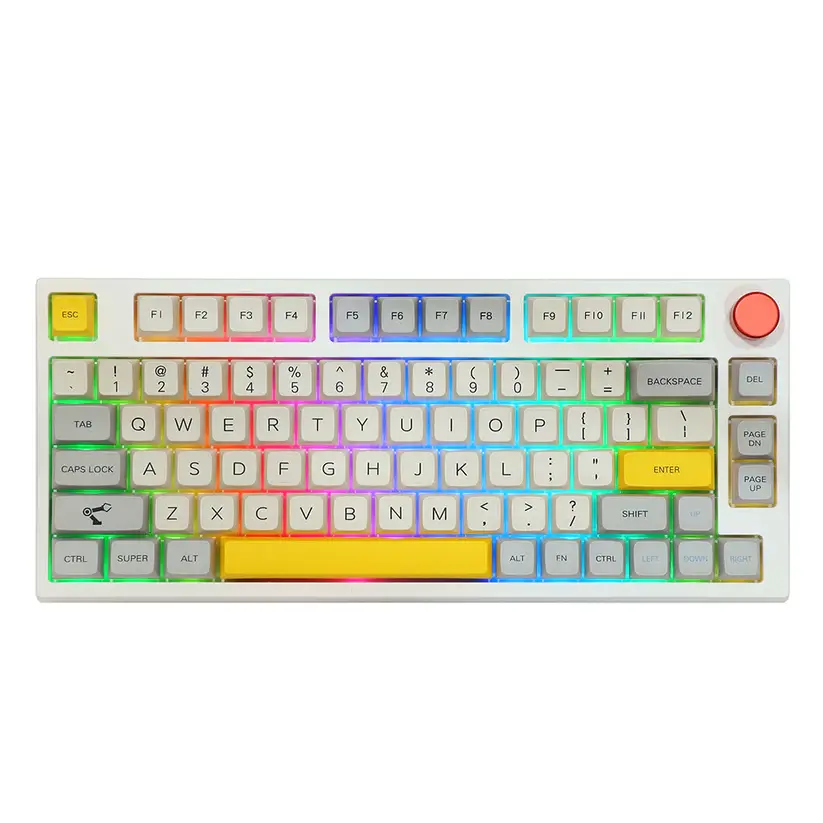
| Backlight | South-facing per-key RGB |
| Connectivity | Bluetooth 5.0, 2.4GHz wireless, USB-C wired (tri-mode) |
| Software | Epomaker driver (Windows); no VIA or QMK |
| Compatibility | Windows and macOS |
| Battery | 4,000 mAh; owners report weeks between charges with lighting low |
| Price | Check the current listing through the button above |
Design and build
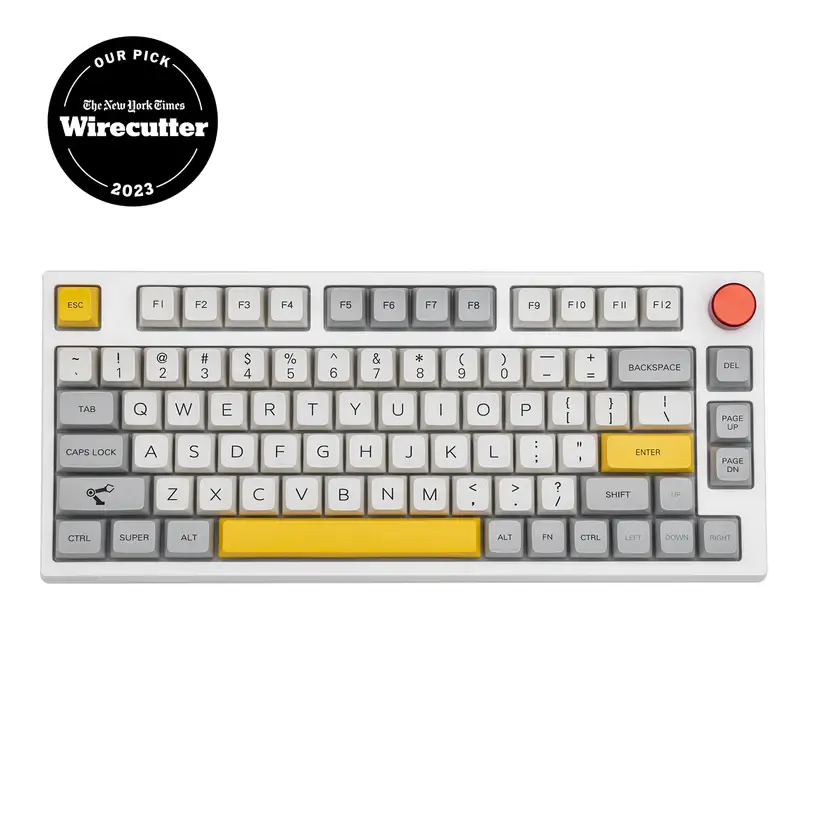
The TH80 Pro is a compact 75% board, so it keeps the function row and arrow keys but drops the numpad, which frees up desk space and brings your mouse closer. There is a rotary knob in the top right for volume and other controls, and the case feels solid with no obvious flex.
The keycaps are PBT dye-sublimated, which means they stay matte and resist the greasy shine that cheaper ABS keycaps develop over time. It is a genuinely nice set for the price, and the legends are clean.
Typing experience
This is where the TH80 Pro earns its keep. The gasket-mounted plate and internal foam give the typing feel a soft, cushioned bottom-out instead of a hard, hollow tap. Out of the box it sounds fuller and quieter than most boards at this price, without any modding.
Because the switches are hot-swappable, you are not locked into what it ships with. If the stock feel is not for you, you can pull the switches and press in new ones with no soldering. If you are deciding between switch types first, our guide to tactile vs linear switches is a good starting point, and you can improve the sound further with our switch lubing guide.
Wireless and connectivity
The TH80 Pro is tri-mode. You can connect over Bluetooth 5.0 to as many as three devices and switch between them, use the 2.4GHz USB dongle for a more stable wireless link, or plug in over USB-C. Moving between a work PC, a laptop, and a tablet is quick, which makes it a good fit for a multi-device desk.
Bluetooth is convenient but adds a little latency, so for anything time-sensitive use the 2.4GHz dongle or a cable. That is normal for wireless keyboards, not a fault unique to this one.
Battery life
The 4,000 mAh battery is one of the board’s real strengths, and how long it lasts depends almost entirely on the RGB lighting. With the backlight off or low, owners regularly report going weeks, in some cases close to a month, between charges. Run the RGB at full brightness and it drains far faster, so turning the lighting down is the easy way to stretch it. You can always fall back to the cable while it charges.
Software
This is the weakest part of the package. The TH80 Pro uses Epomaker’s own driver rather than the open VIA or QMK standard that many enthusiasts prefer. The software works for remapping keys, setting macros, and changing lighting, but the interface is clunky and less flexible than VIA. If deep, precise customization is a priority, this is the main thing to weigh before buying.
Gaming performance
For casual and mid-level gaming, the TH80 Pro is fine, especially wired or on the 2.4GHz dongle. For competitive play, it is not the right tool. Wireless latency is higher than a dedicated gaming board, and there is no rapid trigger or adjustable actuation. If fast shooters are your focus, a wired board or a magnetic-switch keyboard, like the picks in our best Akko keyboards guide, will serve you better.
What buyers say
We read through owner reviews and hands-on coverage to see how the TH80 Pro holds up beyond one desk. A few themes come up again and again.
What owners praise: the sound and feel out of the box, the value at around $99, and especially the battery. Several reviewers report going weeks, in some cases close to a month, between charges with the lighting kept low, backed by the 4,000 mAh cell.
Common complaints: Bluetooth can be slow to reconnect when the board wakes, the Epomaker software feels sluggish moving between menus, and the keycaps do not print the secondary functions, so you have to memorize shortcuts. A smaller group report quality-control and support issues, from glitchy keys to slow warranty help, so it is worth buying from a seller with an easy return path.
Pros and cons
✅ Pros
- Tri-mode wireless plus wired, easy multi-device switching
- Hot-swappable switches, no soldering to change the feel
- Gasket mount and foam give a soft, full sound out of the box
- PBT dye-sub keycaps that resist shine
- Rotary knob and per-key RGB
- Strong value for the feature set
❌ Cons
- Epomaker software is clunky, with no VIA or QMK support
- Legends can be hard to read in a dark room
- Wireless latency is not ideal for competitive gaming
- Battery drains quickly with RGB at full brightness
- Fewer stock switch options than some rivals
Who should buy it, and who should skip it
Buy it if you mostly type, want a comfortable wireless 75% that sounds good without modding, and like the idea of switching between a PC, laptop, and tablet. At its price, it is one of the easier boards to recommend for everyday use.
Skip it if you play competitive games and need the lowest latency, you want full VIA or QMK remapping, or you need a numpad. Those needs point to a different board.
Alternatives worth considering
- Want VIA and QMK: a Keychron V1 gives you full open-source remapping in a similar 75% size, usually for less, though it is wired.
- Want competitive gaming: a magnetic-switch board with rapid trigger, such as the picks in our best Akko keyboards guide, is the better tool.
- Not sure on size: our keyboard sizes and types guide helps you decide before you commit.
Final verdict
The Epomaker TH80 Pro is a lot of keyboard for the money. You get a gasket-mounted 75% with hot-swap switches, PBT keycaps, a knob, and triple connectivity, and it types and sounds good straight out of the box. The catches are the clunky software with no VIA or QMK, and wireless latency that rules it out for serious competitive gaming. If those are not deal-breakers for you, it is an easy, comfortable board to live with, and a genuine value at its price.
Frequently asked questions
Is the Epomaker TH80 Pro good for gaming?
It is fine for casual and mid-level gaming, especially wired or on the 2.4GHz dongle. For competitive play it falls short, because wireless latency is higher than a dedicated gaming board and there is no rapid trigger or adjustable actuation. Serious gamers should look at a wired or magnetic-switch board.
Is the TH80 Pro hot-swappable?
Yes. It uses hot-swap sockets, so you can pull the switches out and press new ones in with no soldering. That lets you change how the board feels later without buying a new keyboard.
Does the TH80 Pro support VIA or QMK?
No. It relies on Epomaker’s own driver software for remapping, macros, and lighting. That software works but is less flexible than VIA, so if open-source remapping matters to you, this is the main limitation to weigh.
How is the battery life?
It depends heavily on the RGB lighting. With the backlight off or low, it lasts for days of normal use. At full brightness it drains much faster. Turning the lighting down is the simplest way to extend it, and you can use it wired while it charges.
Does it work with Mac?
Yes. The TH80 Pro works with both Windows and macOS and can pair with several devices over Bluetooth, so switching between a PC and a Mac is straightforward. The configuration software is best supported on Windows.
We revisit our reviews as firmware, pricing, and competing models change, so this verdict stays current.