
Written by Elizabeth · Published September 17, 2024 Reviewed & Updated by Olivia · Updated on July 25, 2026
Disclosure: This review contains affiliate links. If you buy through them we may earn a small commission at no extra cost to you. Our verdict is based on the product, not the commission.
The Epomaker TH80 Pro is a wireless 75% mechanical keyboard that tries to give you enthusiast features, hot-swap switches, a gasket-mounted feel, PBT keycaps, and triple connectivity, at a mainstream price. For most people who type and browse, it delivers. For competitive gamers and anyone who needs deep software control, it has real limits. Here is the full picture after living with it.
⚡ Verdict
A strong value pick for typists and multi-device users who want a comfortable wireless 75% out of the box. Skip it if you need low-latency competitive gaming or VIA and QMK remapping. Rating: 4 out of 5.
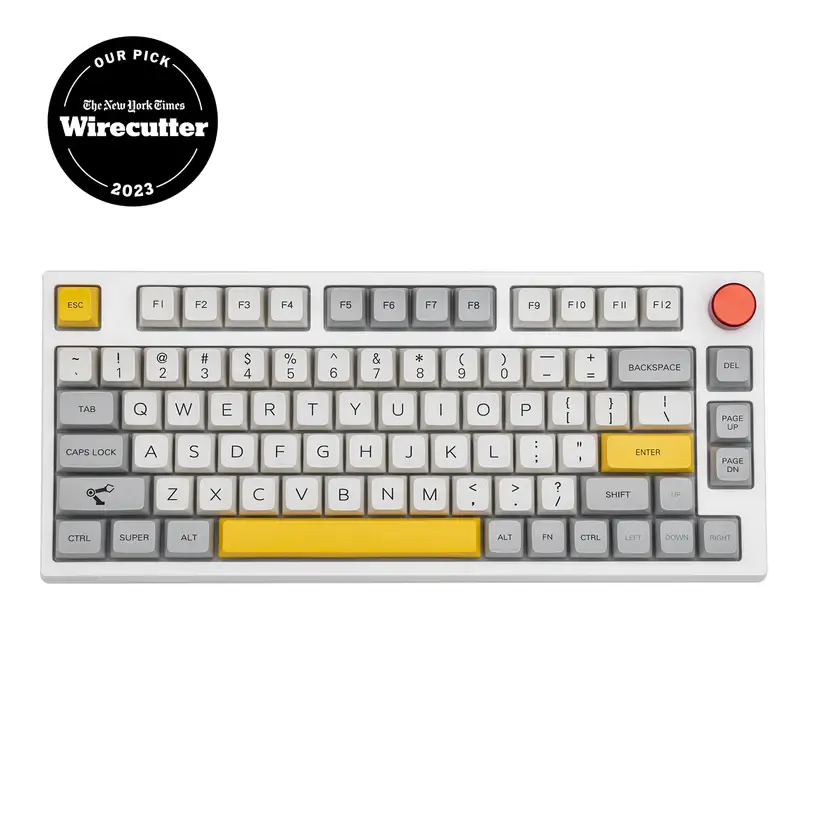
The Epomaker TH80 Pro is a wireless 75% board with a rotary knob.
Specifications
Layout
75% with rotary knob (around 80 to 84 keys)
Switches
Hot-swappable (5-pin), ships with Epomaker or Gateron options
Keycaps
PBT dye-sublimated
Mounting
Gasket-mounted with sound-absorbing foam
Backlight
South-facing per-key RGB
Connectivity
Bluetooth 5.0, 2.4GHz wireless, USB-C wired (tri-mode)
Software
Epomaker driver (Windows); no VIA or QMK
Compatibility
Windows and macOS
Battery
4,000 mAh; owners report weeks between charges with lighting low
Price
Check the current listing through the button above
Design and build
The TH80 Pro is a compact 75% board, so it keeps the function row and arrow keys but drops the numpad, which frees up desk space and brings your mouse closer. There is a rotary knob in the top right for volume and other controls, and the case feels solid with no obvious flex.
The keycaps are PBT dye-sublimated, which means they stay matte and resist the greasy shine that cheaper ABS keycaps develop over time. It is a genuinely nice set for the price, and the legends are clean.
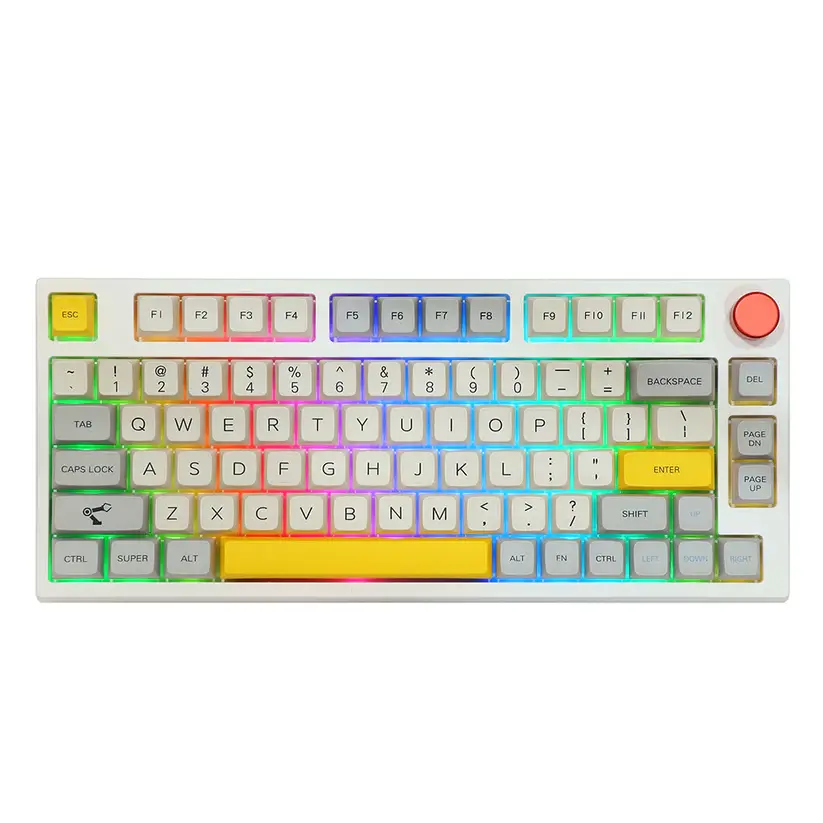
PBT dye-sub keycaps and a solid case give it a more premium feel than the price suggests.
Typing experience
This is where the TH80 Pro earns its keep. The gasket-mounted plate and internal foam give the typing feel a soft, cushioned bottom-out instead of a hard, hollow tap. Out of the box it sounds fuller and quieter than most boards at this price, without any modding.
Because the switches are hot-swappable, you are not locked into what it ships with. If the stock feel is not for you, you can pull the switches and press in new ones with no soldering. If you are deciding between switch types first, our guide to tactile vs linear switches is a good starting point, and you can improve the sound further with our switch lubing guide.
Wireless and connectivity
The TH80 Pro is tri-mode. You can connect over Bluetooth 5.0 to as many as three devices and switch between them, use the 2.4GHz USB dongle for a more stable wireless link, or plug in over USB-C. Moving between a work PC, a laptop, and a tablet is quick, which makes it a good fit for a multi-device desk.
Bluetooth is convenient but adds a little latency, so for anything time-sensitive use the 2.4GHz dongle or a cable. That is normal for wireless keyboards, not a fault unique to this one.
Battery life
The 4,000 mAh battery is one of the board’s real strengths, and how long it lasts depends almost entirely on the RGB lighting. With the backlight off or low, owners regularly report going weeks, in some cases close to a month, between charges. Run the RGB at full brightness and it drains far faster, so turning the lighting down is the easy way to stretch it. You can always fall back to the cable while it charges.
Software
This is the weakest part of the package. The TH80 Pro uses Epomaker’s own driver rather than the open VIA or QMK standard that many enthusiasts prefer. The software works for remapping keys, setting macros, and changing lighting, but the interface is clunky and less flexible than VIA. If deep, precise customization is a priority, this is the main thing to weigh before buying.
Gaming performance
For casual and mid-level gaming, the TH80 Pro is fine, especially wired or on the 2.4GHz dongle. For competitive play, it is not the right tool. Wireless latency is higher than a dedicated gaming board, and there is no rapid trigger or adjustable actuation. If fast shooters are your focus, a wired board or a magnetic-switch keyboard, like the picks in our best Akko keyboards guide, will serve you better.
What buyers say
We read through owner reviews and hands-on coverage to see how the TH80 Pro holds up beyond one desk. A few themes come up again and again.
What owners praise: the sound and feel out of the box, the value at around $99, and especially the battery. Several reviewers report going weeks, in some cases close to a month, between charges with the lighting kept low, backed by the 4,000 mAh cell.
Common complaints: Bluetooth can be slow to reconnect when the board wakes, the Epomaker software feels sluggish moving between menus, and the keycaps do not print the secondary functions, so you have to memorize shortcuts. A smaller group report quality-control and support issues, from glitchy keys to slow warranty help, so it is worth buying from a seller with an easy return path.
Pros and cons
✅ Pros
Tri-mode wireless plus wired, easy multi-device switching
Hot-swappable switches, no soldering to change the feel
Gasket mount and foam give a soft, full sound out of the box
PBT dye-sub keycaps that resist shine
Rotary knob and per-key RGB
Strong value for the feature set
❌ Cons
Epomaker software is clunky, with no VIA or QMK support
Legends can be hard to read in a dark room
Wireless latency is not ideal for competitive gaming
Battery drains quickly with RGB at full brightness
Fewer stock switch options than some rivals
Who should buy it, and who should skip it
Buy it if you mostly type, want a comfortable wireless 75% that sounds good without modding, and like the idea of switching between a PC, laptop, and tablet. At its price, it is one of the easier boards to recommend for everyday use.
Skip it if you play competitive games and need the lowest latency, you want full VIA or QMK remapping, or you need a numpad. Those needs point to a different board.
Alternatives worth considering
Want VIA and QMK: a Keychron V1 gives you full open-source remapping in a similar 75% size, usually for less, though it is wired.
Want competitive gaming: a magnetic-switch board with rapid trigger, such as the picks in our best Akko keyboards guide, is the better tool.
The Epomaker TH80 Pro is a lot of keyboard for the money. You get a gasket-mounted 75% with hot-swap switches, PBT keycaps, a knob, and triple connectivity, and it types and sounds good straight out of the box. The catches are the clunky software with no VIA or QMK, and wireless latency that rules it out for serious competitive gaming. If those are not deal-breakers for you, it is an easy, comfortable board to live with, and a genuine value at its price.
It is fine for casual and mid-level gaming, especially wired or on the 2.4GHz dongle. For competitive play it falls short, because wireless latency is higher than a dedicated gaming board and there is no rapid trigger or adjustable actuation. Serious gamers should look at a wired or magnetic-switch board.
Is the TH80 Pro hot-swappable?
Yes. It uses hot-swap sockets, so you can pull the switches out and press new ones in with no soldering. That lets you change how the board feels later without buying a new keyboard.
Does the TH80 Pro support VIA or QMK?
No. It relies on Epomaker’s own driver software for remapping, macros, and lighting. That software works but is less flexible than VIA, so if open-source remapping matters to you, this is the main limitation to weigh.
How is the battery life?
It depends heavily on the RGB lighting. With the backlight off or low, it lasts for days of normal use. At full brightness it drains much faster. Turning the lighting down is the simplest way to extend it, and you can use it wired while it charges.
Does it work with Mac?
Yes. The TH80 Pro works with both Windows and macOS and can pair with several devices over Bluetooth, so switching between a PC and a Mac is straightforward. The configuration software is best supported on Windows.
We revisit our reviews as firmware, pricing, and competing models change, so this verdict stays current.
75% mechanical keyboards have garnered immense popularity due to their unique design and functionality. These compact yet powerful devices offer a perfect blend of space-saving benefits and performance. Whether you’re a tech-savvy gamer or a meticulous typist, finding the right 75% keyboard can significantly enhance your computing experience.
As the market continues to expand, there’s an impressive array of options to choose from, each catering to different preferences and requirements.
What Is 75% Mechanical Keyboards?
75% mechanical keyboards are a type of keyboard that has a compact layout. They are smaller than full-size keyboards, but they still have all of the essential keys.
This makes them a good choice for people who want a keyboard that takes up less space on their desk. 75% keyboards are becoming increasingly popular among tech enthusiasts because they offer a good balance of compactness and functionality.
They are also relatively affordable, making them a good option for budget-minded buyers.
For gamers who demand the best, the GMMK Pro commands attention. Crafted with a gasket-mounted case, case and plate foam, and encoder knob, linear switches, it’s a masterpiece tailored for superior gaming.
South-facing LEDs eliminate interference, while responsive keystrokes bring your virtual adventures to life. Welcome to the future of immersive gameplay.
Glorious GMMK PRO Pre-Built (Black)
$349.99
GLORIOUS GMMK Pro Prebuilt (Black) – ANSI/USA Layout – Lubed Fox Linear Switches PBT Keycaps (White) – High Profile Gasket Mounted Prebuilt Premium RGB 75% Keyboard
Meet the Keychron K3, a pioneer in low-profile, hot-swappable technology. While its innovation knows no bounds, the K3 does demand sensitivity.
Yet, for those who seek ergonomic design and unique features, it’s an invitation to a new era of typing.
Keychron K3 V2
$88.99
Keychron K3 Version 2, 75% Layout 84 Keys Ultra-Slim Wireless Bluetooth/USB Wired Mechanical Keyboard with White Backlit, Hot-Swappable Low-Profile Keychron Optical Brown Switch for Mac Windows
Kechron Q1 – A Glimpse into the Premium 75% Keyboards
The Keychron Q1, a 75% keyboard that arrives pre-modded and primed to dazzle.
This marvel of engineering offers a harmonious blend of tactile pleasure and Bluetooth convenience, all encased in a robust build. PBT keycaps ensure durability, while pre-lubed switches deliver a smooth typing symphony
Say goodbye to the intricate tinkering, and embrace the Q1 effortless brilliance.
Keychron Q1
$199.99 $209.99
Keychron Q1 Wired Custom Mechanical Keyboard Knob Version, 75% Layout QMK/VIA Programmable with Hot-swappable Gateron G Pro Brown Switch Double Gasket Compatible with Mac Windows Linux – Version 2
EPOMAKER EP84 Pro – Pinnacle of Innovation in 75% Keyboard Design
The EPOMAKER EP84 Pro – a pinnacle of innovation in the world of 75% keyboards. Elevating your typing experience to new heights, this keyboard boasts upgraded features and unparalleled adaptability.
Seamlessly fusing 2.4GHz, Bluetooth 5.0, and USB-C connectivity, the EP84 Pro becomes an extension of your versatility. T
he RGB radiance dances across premium PBT keycaps, adding a mesmerizing touch to your gaming prowess. Enhanced by Gateron Pro Yellow switches, this keyboard delivers a responsive and tactile gaming journey.
With programmable software and NKRO, the EPOMAKER EP84 Pro caters to Mac and Windows users alike. Embrace the future of gaming – where innovation takes center stage.
Epomaker EP84 Pro
$99.99
EPOMAKER EP84 Pro Upgraded 75% RGB Hot Swappable 2.4GHz/Bluetooth 5.0/USB-C Wired Mechanical Gaming Keyboard with Programmable Software, NKRO, PBT Keycaps for Mac/Win/Gamers(Gateron Pro Yellow)
75% layout
Hot-swappable PCB
Gateron Pro Yellow switches
PBT keycaps
RGB backlighting
2.4GHz wireless connectivity, Bluetooth 5.0 connectivity
Some other 75 Keyboards which you might be interested in are listed below:
Keychron Q10:
Known for its ergonomic design, the Keychron Q10 is a great choice for users seeking a comfortable typing experience. It is a feature-rich and customizable keyboard designed to provide a comfortable and efficient typing experience.
With its unique layout, advanced features, and thoughtful design, it caters to users seeking a distinctive and ergonomic keyboard solution.
iQunix:
The iQunix keyboard combines aesthetics and functionality, making it a popular choice among users who prioritize both design and performance.
With a striking design reminiscent of the ebb and flow of waves, the ZX75 adds an artistic touch to your setup. Featuring hotswap TTC Speedsilver switches, every keystroke becomes a symphony of precision and speed
Logitech G915 TKL:
This tenkeyless Lightspeed wireless RGB mechanical gaming keyboard is a true powerhouse, offering a winning combination of performance and style. Designed for the discerning gamer, the low-profile switch options provide a tactile experience that’s both responsive and precise.
Immerse yourself in a symphony of Lightsync RGB lighting, creating an immersive atmosphere that syncs with your every move. With advanced wireless and Bluetooth support, the G915 TKL offers unparalleled connectivity, ensuring you’re always in control.
Elevate your gaming setup with the Logitech G915 TKL – where cutting-edge technology meets a tactile gaming experience.
VELOCIFIRE TKL02:
With a focus on comfort and efficiency, the VELOCIFIRE TKL02 is designed to enhance the typing experience.
It is an 87-key ergonomic mechanical keyboard meticulously crafted to elevate your typing experience. Designed with copywriters, typists, and programmers in mind, this keyboard is a game-changer for those who demand precision and efficiency.
Equipped with tactile brown switches, every keystroke is a masterpiece of responsiveness and comfort. The white LED backlit keys illuminate your path to productivity, even in dimly lit environments.
Embrace the ergonomic design that reduces strain and enhances comfort during extended typing sessions. The VELOCIFIRE TKL02 is more than a keyboard; it’s your gateway to a world of seamless typing and unparalleled productivity.
YUNZII KC84:
The YUNZII KC84 offers a blend of aesthetics and performance, catering to users who want a visually appealing keyboard.
Its is a 84-key hot swappable wired mechanical keyboard designed to revolutionize your typing experience. With a symphony of features, this keyboard is a must-have for gamers, typists, and creatives alike.
The Gateron Blue switches provide a tactile and audible sensation that transforms every keystroke into a satisfying melody. The PBT dye-subbed keycaps offer durability and style, while the RGB lighting adds a mesmerizing visual flair to your workspace.
Whether you’re conquering your gaming quests or diving into intensive typing tasks, the YUNZII KC84’s programmable functions and Type-C cable ensure seamless connectivity.
Elevate your typing prowess and embrace the future of precision with the YUNZII KC84 – where innovation meets your fingertips.
EPOMAKER 3084B Plus:
This model stands out for its unique layout, making it an interesting choice for users who want something different.
The EPOMAKER 3084B Plus Black & Pink is a 75% hot-swappable mechanical keyboard with CS Jelly Pink switches for tactile typing.
Its striking black and pink design, double-shot PBT keycaps, and versatile 2.4GHz/Bluetooth/wired connectivity options make it a stylish and functional choice for Windows, Mac, and Linux users.
NZXT Function MiniTKL:
With its space-saving design, the NZXT Function MiniTKL is ideal for users who want a minimalist setup without sacrificing functionality.
Experience precision like never before with the NZXT Function MiniTKL. This compact tenkeyless gaming keyboard is a powerhouse of performance, featuring Gateron Red mechanical switches that offer a linear, fast, and whisper-quiet keystroke experience.
The hot-swappable design provides customization at your fingertips, while the dynamic RGB backlighting adds a vibrant touch to your setup.
Crafted with an aluminum top plate and sound-dampening foam, the Function MiniTKL ensures a premium and quiet typing experience.
Embrace a new level of gaming excellence with the NZXT Function MiniTKL – where precision meets innovation in a sleek black design.
Vissles V84 (2.0):
This wireless Bluetooth/USB wired mechanical keyboard is a compact 84-key wonder, designed for ultimate versatility. With hot-swappable functionality and tactile Brown switches, every keystroke becomes a masterpiece of comfort and precision.
The dynamic RGB backlighting adds a touch of vibrancy to your workspace, while the included wrist rest enhances your ergonomic comfort.
Compatible with both Mac and Windows systems, the Vissles V84 offers a seamless and customizable typing experience that adapts to your needs.
Embrace the future of typing with the Vissles V84 – where innovation meets ergonomic excellence.
Nuphy Air 75:
The Nuphy Air 75 focuses on comfort and performance, making it an appealing choice for extended typing sessions.
A 75% low profile mechanical keyboard that redefines wireless elegance. With seamless support for Bluetooth 5.0, 2.4G, and wired connections, this keyboard offers unparalleled versatility.
The Gateron Brown switches provide a tactile typing experience that strikes the perfect balance between responsiveness and comfort.
Compatible with both Windows and Mac OS systems, the nuphy Air75 effortlessly adapts to your preferred operating environment.
Embrace a new era of wireless sophistication with the nuphy Air75 – where sleek design meets effortless functionality.
Matias Matias Mini USB:
Experience a new level of typing excellence with the Matias Mini USB Tenkeyless Tactile Pro Mac Keyboard.
Designed with Mac users in mind, this n-key rollover Mac-compatible wired keyboard combines precision and convenience.
The tactile switches deliver a satisfying keystroke, while the built-in 3 high-speed USB 2.0 port hub enhances connectivity and productivity.
Whether you’re a Mac enthusiast or a professional in need of seamless typing, the Matias Mini USB Tenkeyless Tactile Pro Mac Keyboard is your gateway to enhanced performance and efficiency.
What is the Benefits of a 75% Keyboard
Compact Design
The primary advantage of a 75% keyboard is its space-saving design. It occupies less desk space compared to full-size keyboards, which is ideal for users with limited space. The compact nature also makes it more portable, simplifying travel and on-the-go usage.
If you are looking for a keyboard that is as compact as possible, then a 75% keyboard is a good option. However, if you find that you need the numpad or function keys for your work or gaming, then you may want to consider a larger keyboard. It is important to choose a keyboard that is the right size for your needs and preferences.
High Functionality
Despite its reduced size, a 75% keyboard offers impressive functionality. It retains arrow keys essential for navigating documents and websites and function keys for quick access to shortcuts. The smaller layout also facilitates easier key reach, potentially improving typing speed and accuracy.
Customization Options
75% keyboards provide extensive customization possibilities. Users can configure them with various key switches, keycaps, and even lighting options, enabling the creation of a personalized keyboard that caters to individual needs and preferences.
In addition to the basic features of a keyboard, there are a number of extra features that can be found on 75% mechanical keyboards. These features can include RGB lighting, wireless connectivity, and software customization. These features can add to the cost of the keyboard, but they can also make it a more versatile and enjoyable experience.
BEWARE: New Keycaps Might Not Fit – Compatibility Concerns
One potential downside of 75% mechanical keyboards is that they may not be compatible with all keycaps. This is because the layout of a 75% keyboard is different from that of a full-size keyboard. If you are planning on changing the keycaps on your 75% keyboard, it is important to do your research to make sure that the keycaps you choose will fit.
Why 75% Keyboards are Gaining Popularity
Aesthetics
One reason for the increasing popularity of 75% keyboards is their aesthetics. The compact design imparts a sleek, modern appearance, making it a visually appealing addition to any workspace.
Ergonomics
Ergonomics also contribute to their popularity. The smaller layout allows users to keep their hands closer together, reducing strain on the shoulders and wrists. This design can be particularly beneficial for individuals who type for extended periods.
Gaming
Gamers have also embraced 75% keyboards. The smaller size enhances keyboard and mouse maneuverability while still providing the necessary keys for gaming. The customization options allow gamers to create a unique gaming keyboard tailored to their style and gameplay preferences.
What is the Differences Between a 75% Keyboard and a 60% Keyboard
A 75% keyboard is larger than a 60% keyboard, which is even more compact, featuring only around 60% of the keys of a standard keyboard. A 60% keyboard typically removes the function keys and arrow keys while also featuring a smaller spacebar and fewer keys overall.
While both 75% and 60% keyboards offer compact designs, they cater to different use cases. 75% keyboards are better suited for users who require arrow keys and function keys, while 60% keyboards are ideal for those who prioritize space-saving and portability.
Key Considerations When Choosing a 75% Keyboard
When selecting a 75% keyboard, consider the following factors:
Switch Type
Mechanical keyboards are available with various switch types, each offering a unique feel and sound. Popular switch types include Cherry MX, Gateron, and Kailh. The switch type significantly impacts the typing experience and should be a primary consideration when choosing a 75% keyboard.
Keycaps
Keycaps also play an essential role, affecting the overall look and feel of the keyboard. Popular keycap materials include ABS and PBT, with various colors and designs available.
Brand and Price
The brand and price of a 75% keyboard can vary significantly, with budget options costing less than $50 and high-end models reaching several hundred dollars. It’s crucial to consider the brand’s reputation and your budget when making a decision.
75% mechanical keyboards are often praised for their typing experience. The compact layout makes it easy to reach all of the keys, and the mechanical switches provide a satisfying tactile and auditory feedback. This makes 75% mechanical keyboards a good choice for people who do a lot of typing. 75% mechanical keyboards are also becoming increasingly popular for gaming. The compact layout makes them easy to move around, and the mechanical switches provide a fast and responsive feel. This makes them a good choice for competitive gamers.
How to Choose the Perfect 75% Mechanical Keyboard
Switches: The switches are the heart of any mechanical keyboard. They determine the feel and sound of the keyboard, and they can have a big impact on your typing and gaming experience. There are many different types of switches available, so it is important to try out a few different ones to find the ones that you like best.
Build quality: The build quality of a keyboard is important for durability and longevity. A well-built keyboard will last for many years of use. Look for a keyboard that is made with high-quality materials and has a sturdy construction.
Features: Some 75% mechanical keyboards come with additional features, such as RGB lighting, wireless connectivity, and software customization. These features can add to the cost of the keyboard, but they can also make it a more versatile and enjoyable experience.
Price: 75% mechanical keyboards range in price from around $50 to $200. It is important to set a budget before you start shopping so that you don’t overspend.
Conclusion
75% keyboards present an excellent choice for users who seek a compact design without sacrificing functionality. They offer customization options and ergonomic benefits, making them suitable for both typing and gaming. When choosing a 75% keyboard, it’s important to consider factors such as switch type, keycaps, brand, and price.
In summary, 75% keyboards cater to users desiring a compact and functional keyboard. Their smaller size doesn’t compromise functionality, and they offer extensive customization options for a tailored typing experience. With their sleek design and ergonomic benefits, it’s no surprise that they are becoming increasingly popular.
Yes, 75% keyboards are suitable for typing, as they retain arrow keys and function keys despite their compact size, making them functional for typing tasks.
Can 75% keyboards be customized?
Yes, 75% keyboards are highly customizable, offering various key switch, keycap, and lighting options for a personalized experience.
What are the benefits of a compact keyboard?
Compact keyboards save desk space, making them ideal for limited workspaces, and their portability allows for easy transportation and use on the go.
Are 75% keyboards good for gaming?
Yes, 75% keyboards are suitable for gaming, as their smaller size enables easier keyboard and mouse maneuvering while still providing essential keys for gaming.
What is the difference between a 75% keyboard and a 60% keyboard?
A 75% keyboard is larger than a 60% keyboard, retaining crucial arrow and function keys, making it more suitable for users who need these keys. A 60% keyboard prioritizes space-saving and portability, removing the function and arrow keys, and is ideal for users who don’t need these keys as often.