Reviews

Hands-on product reviews of keyboards, switches and accessories.

Clickyboard is reader-supported. When you buy through links on this page, we may earn an affiliate commission at no extra cost to you. 

Most keyboards don’t come with a screen. The Epomaker RT100 does — a small detachable display tucked into the top corner of a keyboard that otherwise looks like it wandered out of a 1980s office catalog. That combination of retro styling and a genuinely unusual gadget feature is the whole reason people ask about this board specifically, rather than just picking any keyboard from Epomaker’s RT series. This review breaks down whether the display, the layout, and the rest of the hardware add up to something worth buying, or whether the screen is carrying more of the marketing than it should.

What the RT100 Actually Is

Strip away the retro paint job and the RT100 is a 96%-ish layout board — 97 keys on US ANSI, 98 on ISO — with a numpad, a full function row, and a dedicated multimedia knob tucked into the top-right corner. It’s part of Epomaker’s RT series, which we’ve already covered in our broader Epomaker brand review as the line built around wireless reliability and eye-catching design rather than the acoustics-first approach of the TH series. The RT100 is the flagship expression of that idea: same gasket-mounted, hot-swap foundation as the rest of the lineup, wrapped in a case that leans hard into a nostalgic aesthetic most modern boards don’t attempt.

Design and Build Quality

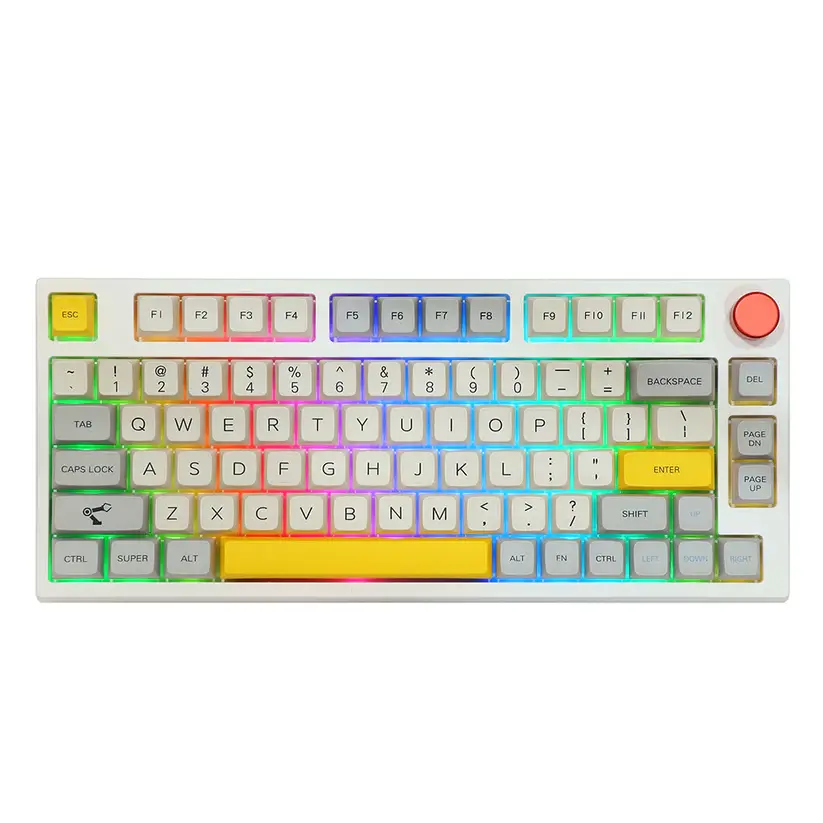
The case comes in a handful of two-tone retro colorways, and the details back up the theme — a slightly rounded silhouette, warm accent colors, and keycap legends that look pulled from an old terminal rather than a gaming peripheral. Underneath the styling, the construction is more conventional: a gasket-mounted plate that isolates the switches from the case for a softer landing on each keystroke, and adjustable two-stage feet wrapped in silicone that add some grip and a couple of typing-angle options without the rattle that cheap flip-feet tend to develop.

PBT keycaps in an MDA profile round out the package — thicker-walled than the ABS caps you’ll find on cheaper boards, with a rounded top that splits the difference between the flatter OEM profile and taller SA-style caps. It’s a comfortable, unfussy profile that doesn’t demand any adjustment if you’re coming from a standard keyboard.

The Smart Display: Gimmick or Genuinely Useful?

The RT100’s signature feature is a small detachable screen built into the case, and it’s worth being direct about what it does and doesn’t do. Through Epomaker’s companion software, you can set it to show the time, basic system stats, a weather readout, or a custom image or short GIF. It’s genuinely fun to set up once, and it’s a reasonable conversation starter on a desk setup.

What it isn’t is essential. You will not miss any core keyboard functionality if you never touch it, and readers who found Epomaker’s other GIF-capable displays more novelty than utility in our brand review will likely feel the same way here. Treat the display as a fun extra bundled into the price, not a reason on its own to choose this board over a cheaper RT-series alternative.

Switches and Typing Feel

The RT100 ships with a choice of stock switches, including Epomaker’s own Sea Salt Silent — a dampened silent linear — or Gateron Pro Yellow, a smoother, slightly heavier linear option. Either way, the 5-pin hot-swap sockets mean the stock switches are a starting point rather than a commitment: standard 3-pin or 5-pin switches from any brand will drop in without soldering, so readers already invested in a favorite switch from our switch guides can swap freely.

Combined with the gasket mount, the typing feel lands somewhere in familiar Epomaker territory — cushioned, a little quieter than a rigid-mounted board, and consistent enough that most typists won’t feel a need to mod anything before they’re comfortable using it daily.

Connectivity and Wireless Performance

Three connection modes cover most use cases: Bluetooth 5.0 for casual multi-device use, a 2.4GHz wireless dongle (with a storage slot built into the case, so it’s not the first thing you lose) for lower-latency wireless, and USB-C for a fully wired connection. Bluetooth mode can pair with up to three devices and switch between them, which is genuinely convenient if you’re bouncing between a work laptop, a personal machine, and a tablet over the course of a day.

Battery capacity is generous enough to go several days between charges under normal use with the backlighting on, longer with it off — in line with what we’d expect from a board in this class rather than a standout in either direction.

Gaming Performance

Full anti-ghosting and N-key rollover mean the RT100 won’t drop inputs even when you’re mashing several keys at once, which covers the baseline requirement for any keyboard marketed toward gamers. That said, this isn’t a competitive-first board: Bluetooth introduces enough latency that fast-paced shooters are better played wired or over the 2.4GHz connection, a pattern consistent with what we found across Epomaker’s wireless boards generally. For casual and mid-intensity gaming, wired or 2.4GHz mode is plenty responsive.

Software

Epomaker’s companion software handles key remapping, macro creation, RGB customization, and configuring the smart display’s content. It gets the job done without being especially polished — consistent with the software critique in our broader Epomaker brand review, where we noted the driver is functional but dated-feeling. Once your lighting, macros, and display settings are saved, though, there’s no need to keep the software running in the background.

Who Should Actually Buy This

The RT100 makes the most sense for readers who want the retro look and the smart display specifically — if that combination doesn’t appeal to you, a plainer RT-series board or the TH80 V2 Pro will get you the same hot-swap, gasket-mounted foundation for less money. Where the RT100 earns its price is in the details that don’t show up on a spec sheet: the tri-device Bluetooth switching, the case-mounted dongle storage, and a typing feel that doesn’t need any modding to feel finished.

Skip it if competitive gaming is the priority — the wireless latency profile isn’t built for that — or if the retro aesthetic isn’t your style, since it’s central to the board’s identity rather than incidental to it.

Check current Epomaker RT100 pricing on Amazon →

Frequently Asked Questions

Is the Epomaker RT100 hot-swappable?

Yes — 5-pin hot-swap sockets accept both 3-pin and 5-pin switches without soldering.

What is the smart display on the Epomaker RT100?

A small detachable screen that shows the time, system stats, weather, or a custom image/GIF via Epomaker’s software. It’s a fun extra, not a core feature.

Does the Epomaker RT100 work well for gaming?

It’s fine for casual and mid-intensity gaming wired or over 2.4GHz. Bluetooth’s added latency makes it a weaker choice for competitive, fast-paced titles.

How does the RT100 compare to the rest of Epomaker’s lineup?

It’s the design-forward flagship of the RT series, prioritizing retro styling and the smart display over the acoustics-first TH series or the tinkerer-focused F series.
Written by Elizabeth · Published September 17, 2024
Reviewed & Updated by Olivia · Updated on July 25, 2026

Disclosure: This review contains affiliate links. If you buy through them we may earn a small commission at no extra cost to you. Our verdict is based on the product, not the commission.

The Epomaker TH80 Pro is a wireless 75% mechanical keyboard that tries to give you enthusiast features, hot-swap switches, a gasket-mounted feel, PBT keycaps, and triple connectivity, at a mainstream price. For most people who type and browse, it delivers. For competitive gamers and anyone who needs deep software control, it has real limits. Here is the full picture after living with it.

⚡ Verdict

A strong value pick for typists and multi-device users who want a comfortable wireless 75% out of the box. Skip it if you need low-latency competitive gaming or VIA and QMK remapping. Rating: 4 out of 5.

Epomaker TH80 Pro 75% mechanical keyboard
The Epomaker TH80 Pro is a wireless 75% board with a rotary knob.

Specifications

Layout75% with rotary knob (around 80 to 84 keys)
SwitchesHot-swappable (5-pin), ships with Epomaker or Gateron options
KeycapsPBT dye-sublimated
MountingGasket-mounted with sound-absorbing foam
BacklightSouth-facing per-key RGB
ConnectivityBluetooth 5.0, 2.4GHz wireless, USB-C wired (tri-mode)
SoftwareEpomaker driver (Windows); no VIA or QMK
CompatibilityWindows and macOS
Battery4,000 mAh; owners report weeks between charges with lighting low
PriceCheck the current listing through the button above

Design and build

The TH80 Pro is a compact 75% board, so it keeps the function row and arrow keys but drops the numpad, which frees up desk space and brings your mouse closer. There is a rotary knob in the top right for volume and other controls, and the case feels solid with no obvious flex.

The keycaps are PBT dye-sublimated, which means they stay matte and resist the greasy shine that cheaper ABS keycaps develop over time. It is a genuinely nice set for the price, and the legends are clean.

Epomaker TH80 Pro side profile showing the case and keycaps
PBT dye-sub keycaps and a solid case give it a more premium feel than the price suggests.

Typing experience

This is where the TH80 Pro earns its keep. The gasket-mounted plate and internal foam give the typing feel a soft, cushioned bottom-out instead of a hard, hollow tap. Out of the box it sounds fuller and quieter than most boards at this price, without any modding.

Because the switches are hot-swappable, you are not locked into what it ships with. If the stock feel is not for you, you can pull the switches and press in new ones with no soldering. If you are deciding between switch types first, our guide to tactile vs linear switches is a good starting point, and you can improve the sound further with our switch lubing guide.

Wireless and connectivity

The TH80 Pro is tri-mode. You can connect over Bluetooth 5.0 to as many as three devices and switch between them, use the 2.4GHz USB dongle for a more stable wireless link, or plug in over USB-C. Moving between a work PC, a laptop, and a tablet is quick, which makes it a good fit for a multi-device desk.

Bluetooth is convenient but adds a little latency, so for anything time-sensitive use the 2.4GHz dongle or a cable. That is normal for wireless keyboards, not a fault unique to this one.

Battery life

The 4,000 mAh battery is one of the board’s real strengths, and how long it lasts depends almost entirely on the RGB lighting. With the backlight off or low, owners regularly report going weeks, in some cases close to a month, between charges. Run the RGB at full brightness and it drains far faster, so turning the lighting down is the easy way to stretch it. You can always fall back to the cable while it charges.

Software

This is the weakest part of the package. The TH80 Pro uses Epomaker’s own driver rather than the open VIA or QMK standard that many enthusiasts prefer. The software works for remapping keys, setting macros, and changing lighting, but the interface is clunky and less flexible than VIA. If deep, precise customization is a priority, this is the main thing to weigh before buying.

Gaming performance

For casual and mid-level gaming, the TH80 Pro is fine, especially wired or on the 2.4GHz dongle. For competitive play, it is not the right tool. Wireless latency is higher than a dedicated gaming board, and there is no rapid trigger or adjustable actuation. If fast shooters are your focus, a wired board or a magnetic-switch keyboard, like the picks in our best Akko keyboards guide, will serve you better.

What buyers say

We read through owner reviews and hands-on coverage to see how the TH80 Pro holds up beyond one desk. A few themes come up again and again.

What owners praise: the sound and feel out of the box, the value at around $99, and especially the battery. Several reviewers report going weeks, in some cases close to a month, between charges with the lighting kept low, backed by the 4,000 mAh cell.

Common complaints: Bluetooth can be slow to reconnect when the board wakes, the Epomaker software feels sluggish moving between menus, and the keycaps do not print the secondary functions, so you have to memorize shortcuts. A smaller group report quality-control and support issues, from glitchy keys to slow warranty help, so it is worth buying from a seller with an easy return path.

Pros and cons

✅ Pros

  • Tri-mode wireless plus wired, easy multi-device switching
  • Hot-swappable switches, no soldering to change the feel
  • Gasket mount and foam give a soft, full sound out of the box
  • PBT dye-sub keycaps that resist shine
  • Rotary knob and per-key RGB
  • Strong value for the feature set

❌ Cons

  • Epomaker software is clunky, with no VIA or QMK support
  • Legends can be hard to read in a dark room
  • Wireless latency is not ideal for competitive gaming
  • Battery drains quickly with RGB at full brightness
  • Fewer stock switch options than some rivals

Who should buy it, and who should skip it

Buy it if you mostly type, want a comfortable wireless 75% that sounds good without modding, and like the idea of switching between a PC, laptop, and tablet. At its price, it is one of the easier boards to recommend for everyday use.

Skip it if you play competitive games and need the lowest latency, you want full VIA or QMK remapping, or you need a numpad. Those needs point to a different board.

Alternatives worth considering

  • Want VIA and QMK: a Keychron V1 gives you full open-source remapping in a similar 75% size, usually for less, though it is wired.
  • Want competitive gaming: a magnetic-switch board with rapid trigger, such as the picks in our best Akko keyboards guide, is the better tool.
  • Not sure on size: our keyboard sizes and types guide helps you decide before you commit.

Final verdict

The Epomaker TH80 Pro is a lot of keyboard for the money. You get a gasket-mounted 75% with hot-swap switches, PBT keycaps, a knob, and triple connectivity, and it types and sounds good straight out of the box. The catches are the clunky software with no VIA or QMK, and wireless latency that rules it out for serious competitive gaming. If those are not deal-breakers for you, it is an easy, comfortable board to live with, and a genuine value at its price.

Frequently asked questions

Is the Epomaker TH80 Pro good for gaming?

It is fine for casual and mid-level gaming, especially wired or on the 2.4GHz dongle. For competitive play it falls short, because wireless latency is higher than a dedicated gaming board and there is no rapid trigger or adjustable actuation. Serious gamers should look at a wired or magnetic-switch board.

Is the TH80 Pro hot-swappable?

Yes. It uses hot-swap sockets, so you can pull the switches out and press new ones in with no soldering. That lets you change how the board feels later without buying a new keyboard.

Does the TH80 Pro support VIA or QMK?

No. It relies on Epomaker’s own driver software for remapping, macros, and lighting. That software works but is less flexible than VIA, so if open-source remapping matters to you, this is the main limitation to weigh.

How is the battery life?

It depends heavily on the RGB lighting. With the backlight off or low, it lasts for days of normal use. At full brightness it drains much faster. Turning the lighting down is the simplest way to extend it, and you can use it wired while it charges.

Does it work with Mac?

Yes. The TH80 Pro works with both Windows and macOS and can pair with several devices over Bluetooth, so switching between a PC and a Mac is straightforward. The configuration software is best supported on Windows.


We revisit our reviews as firmware, pricing, and competing models change, so this verdict stays current.

Written by Elizabeth · Published June 25, 2023
Reviewed & Updated by Olivia · Updated on July 28, 2026

Disclosure: This review contains affiliate links. If you buy through them we may earn a small commission at no extra cost to you.

⚡ Verdict

Matcha Latte switches are a smooth, pre-lubed linear with a soft, slightly muted sound and a cozy green-and-cream look. They are an easy recommendation for anyone who wants a comfortable everyday linear that feels good straight out of the bag, with no tuning required. If you want a light, fast gaming switch or a loud, poppy sound signature, look elsewhere.

📷 Add image, Matcha Latte switches

What are Matcha Latte switches?

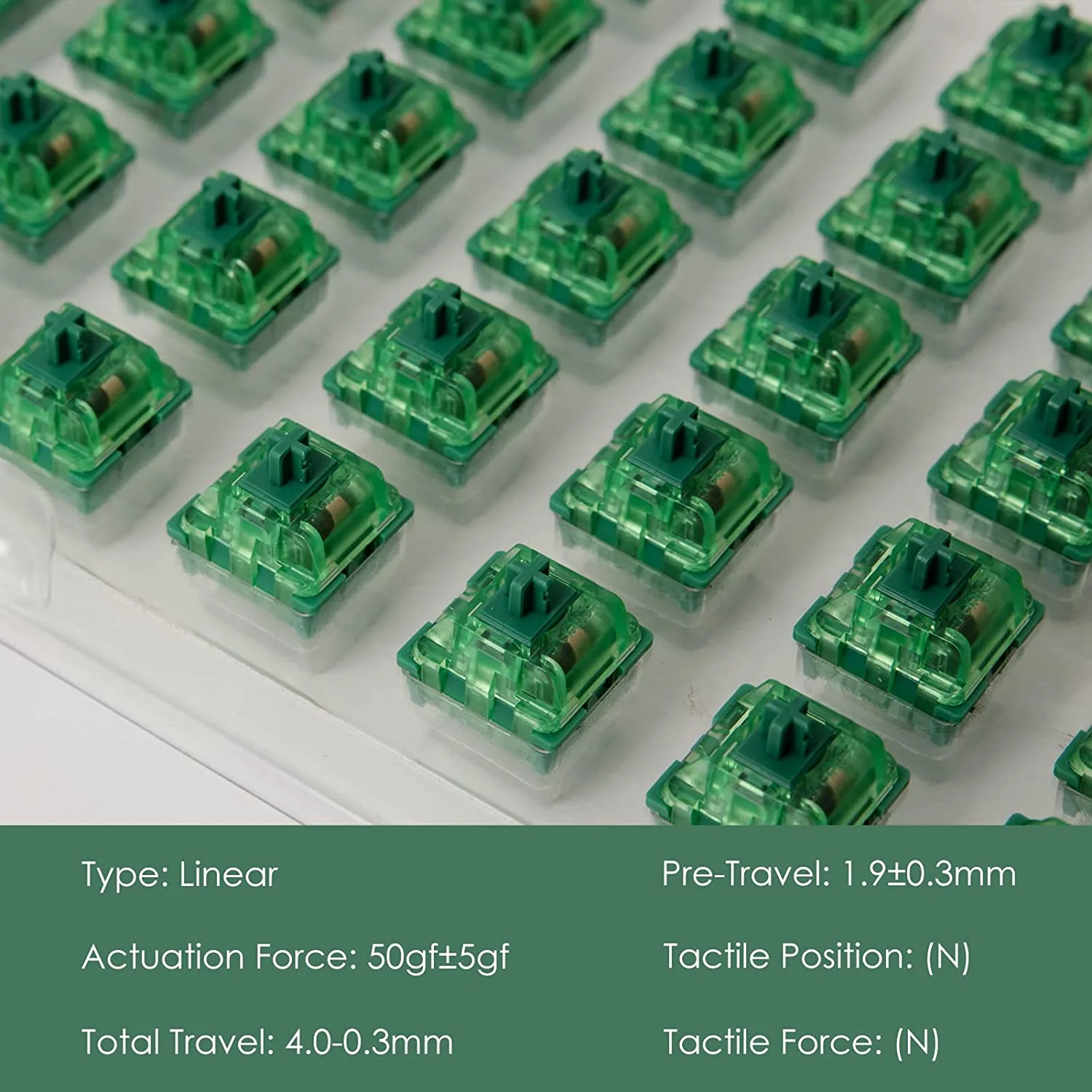
Matcha Latte is a linear mechanical keyboard switch built around a matcha-inspired look: a soft green housing paired with a creamy off-white base. They come lubed from the factory, so they feel smooth right away without the hand-lubing that many stock linears need. They use the standard MX mount, so they drop into any MX-compatible hot-swap or solder keyboard.

The appeal is simple: a good-looking, ready-to-type linear that sits in the comfortable middle of the weight range, aimed at typing and casual use rather than competitive gaming.

How they feel

The keypress is clean and consistent top to bottom, with no bump and very little scratch thanks to the factory lube. The weight lands in medium territory, firm enough to avoid accidental presses but light enough for long typing sessions. It is a relaxed, easygoing linear rather than a fast, feather-light one.

Stem wobble is minimal, which keeps keycaps feeling planted. Out of the bag they are already smooth; a light application of your own lube on the springs can quiet the small amount of spring ping some units have, but it is optional.

How they sound

The sound is soft and a little muted, on the deeper end rather than clacky. In a well-built board with some foam, they produce a gentle, rounded thock instead of a sharp click. If you share a room or an office, that calmer profile is a real plus. If you specifically want a loud, marbly, high-pitched sound, these will feel too reserved.

Who they are for

  • Everyday typists who want a comfortable, smooth linear with no tuning.
  • Beginners who want a switch that feels good out of the bag and looks great in a pastel or nature-themed build.
  • Quiet-ish setups where a soft, muted sound is welcome.

Who should skip them

  • Competitive gamers who want the lightest, fastest actuation. A speed linear like a Kailh Speed Silver or Gateron is a better fit.
  • Sound chasers who want a loud, poppy signature. These lean soft and muted.
  • Heavy-switch fans who like a firm, high-resistance press.

Alternatives worth a look

  • Gateron Milky Yellow: a legendary budget linear, smooth and slightly deeper, at a lower price. See our best linear switches guide.
  • Kailh Cream: a creamy POM linear that breaks in beautifully, for those who want a project switch.
  • Gateron Oil King: a premium, deep, ultra-smooth linear if budget is not the priority.

Pros and cons

Pros: smooth factory lube, comfortable medium weight, soft and pleasant sound, attractive green-and-cream design, standard MX fit, ready to use with no tuning.

Cons: not fast or light enough for competitive gaming, sound is too muted for people who want loud clack, some units have minor spring ping, and premium budget linears can match the smoothness for less.

Buy link placeholder, swap the # above for the Matcha Latte affiliate URL.

Frequently asked questions

Are Matcha Latte switches good for gaming?

They work fine for casual gaming, but they are not a dedicated speed switch. Their medium weight and standard actuation point make them better suited to typing and everyday use than to competitive play.

Do Matcha Latte switches need lubing?

No. They come lubed from the factory and feel smooth out of the bag. You can add a little spring lube if you want to reduce minor ping, but it is optional.

Will they fit my keyboard?

Yes, if your board is MX-compatible. They use the standard MX mount and work in hot-swap and solder keyboards alike.

Are they loud?

No. They are on the soft, muted side, which makes them a good pick for shared spaces. If you want a loud, poppy sound, a different linear will suit you better.

The bottom line

Matcha Latte switches deliver exactly what they promise: a smooth, comfortable, good-looking linear that is ready to type on the moment you install it. They are not built for competitive speed and they will not satisfy sound chasers, but for a relaxed everyday build they are an easy, pleasant choice.


We update our switch reviews as new batches and colorways are released.

Written by Elizabeth · Published June 15, 2023
Reviewed & Updated by Olivia · Updated on July 28, 2026

Disclosure: This review contains affiliate links. If you buy through them we may earn a small commission at no extra cost to you.

⚡ Verdict

The Akko MOD 007 V2 is a 75% gasket-mount keyboard kit with a CNC aluminum case, a hot-swap PCB, and both aluminum and polycarbonate plates in the box, build quality that undercuts most rivals at its price. If you want your first custom-feel board without a full custom-build project, it is one of the easiest recommendations we can make. Just know it is a kit you assemble, it is wired only, and the stock ABS keycaps will shine over time.

What It Is

The MOD 007 V2 is Akko’s enthusiast-leaning 75% board, sold as a DIY kit. You get the case, plates, PCB, stabilizers, and foam, and you add your own switches and keycaps (Akko also sells prebuilt versions). The headline is the value: a machined aluminum case and gasket mount at a price where most boards still use plastic. It is aimed at people who want that premium, flexy custom feel without sourcing every part themselves.

Build and Design

Out of the box the MOD 007 V2 feels the part. The CNC aluminum case is dense and solid, with none of the hollow flex you get from cheaper boards, and at around 1.4 kg it stays planted on the desk. The gasket mount softens each keystroke and, paired with the pre-installed Poron case foam and switch pads, gives a controlled sound with little of the hollow ping older boards suffer from.

The V2 refinements are what make it worth attention. The PCB is slimmed from 1.6 mm to 1.2 mm for more flex, it ships with both an aluminum plate (firmer, sharper) and a polycarbonate plate (softer, deeper), and the silicone gaskets can be swapped for spare Poron ones. In practice that means you can tune the feel and sound to your taste without buying a second board.

Specifications

Layout75% (82 keys, standard ANSI)
CaseCNC-machined aluminum
MountGasket mount (silicone / Poron gaskets)
Plates includedAluminum and polycarbonate
PCB1.2 mm, hot-swap (3/5-pin), screw-in stabilizer support
DampeningPre-installed Poron case foam and switch pads
WeightAbout 1.4 kg
Dimensions320 x 135 x 40 mm
ConnectionWired (USB-C)

Typing Experience

Assembled with a decent linear or tactile switch, the MOD 007 V2 punches well above its price. The gasket mount and thin PCB give a gentle, cushioned flex that takes the harshness out of bottoming out, and the foam keeps the sound tight and clean. Swapping to the polycarbonate plate deepens the sound noticeably, while the aluminum plate keeps things crisp and firm. It genuinely feels like a board costing more than it does.

The screw-in stabilizers are good, though like almost any kit they benefit from a quick lube and tune to fully silence the larger keys. That is normal at this level and part of the fun for many builders.

Pros and Cons

Pros: premium aluminum build for the money, gasket mount with real flex, two plates included, hot-swap PCB, pre-installed quality foam, standard bottom row for easy keycap swaps, multiple colours.

Cons: it is a kit you assemble (switches and keycaps not included on the DIY version), wired only with no wireless option, stock ABS keycaps on the prebuilt will shine over time, and the stabilizers reward a little tuning out of the box.

Who Should Buy It

Buy it if you want your first taste of a premium, gasket-mounted aluminum board without building fully from scratch, and you are happy to drop in switches and keycaps. It is outstanding value for the feel you get.

Skip it if you need wireless, want something that works the moment it arrives with zero assembly or tuning, or you dislike ABS keycaps and do not want to buy a PBT set. For a fully assembled Akko option, see our Akko 3098B review, and browse more in our best Akko keyboards guide.

The Bottom Line

The Akko MOD 007 V2 delivers a genuinely premium typing feel, machined aluminum, gasket flex, and swappable plates, for a price that keeps embarrassing pricier boards. As long as you are comfortable assembling a kit and do not need wireless, it is one of the best value entries into the custom-feel world, and an easy board to recommend.

Frequently Asked Questions

Does the Akko MOD 007 V2 support hot-swapping?

Yes. It has a hot-swap PCB that accepts standard 3-pin and 5-pin MX-style switches, so you can change switches freely with no soldering. It is one of the board’s biggest strengths at this price.

Is the MOD 007 V2 wireless?

No, it is a wired USB-C board. If wireless is a must-have, this is not the right pick; look at a Bluetooth-capable Akko or another brand instead.

What switches should I use with it?

Any standard MX-style switch works. A smooth linear or a tactile like the Akko or Gateron ranges pairs well with the board’s flexy build. Choose based on whether you prefer a smooth or bumpy feel.

How does it differ from the Akko 007 PBT?

The main difference is the keycaps: the MOD 007 V2 ships with ABS keycaps, while the 007 PBT comes with more durable, shine-resistant PBT keycaps. The underlying board is otherwise similar.

Is the Akko MOD 007 V2 worth it?

For the build quality and typing feel, yes. Few boards offer a machined aluminum case, gasket mount, and two plates at this price. Just factor in that it is a kit and, on the DIY version, you supply switches and keycaps.


We update our keyboard reviews as new revisions and colourways are released.

Written by Elizabeth · Published June 12, 2023
Reviewed & Updated by Olivia · Updated on July 28, 2026

Disclosure: This review contains affiliate links. If you buy through them we may earn a small commission at no extra cost to you.

⚡ Verdict

The Akko V3 Cream Yellow is a pre-lubed 50 gf linear that costs around $9 for 45 switches, and it punches well above that price. It is smooth out of the bag with a deep, muted bottom-out, which makes it our default pick for a first linear switch or a budget build. The short 3.5 mm travel and 3-pin housing are the main things to check before buying.

Specifications

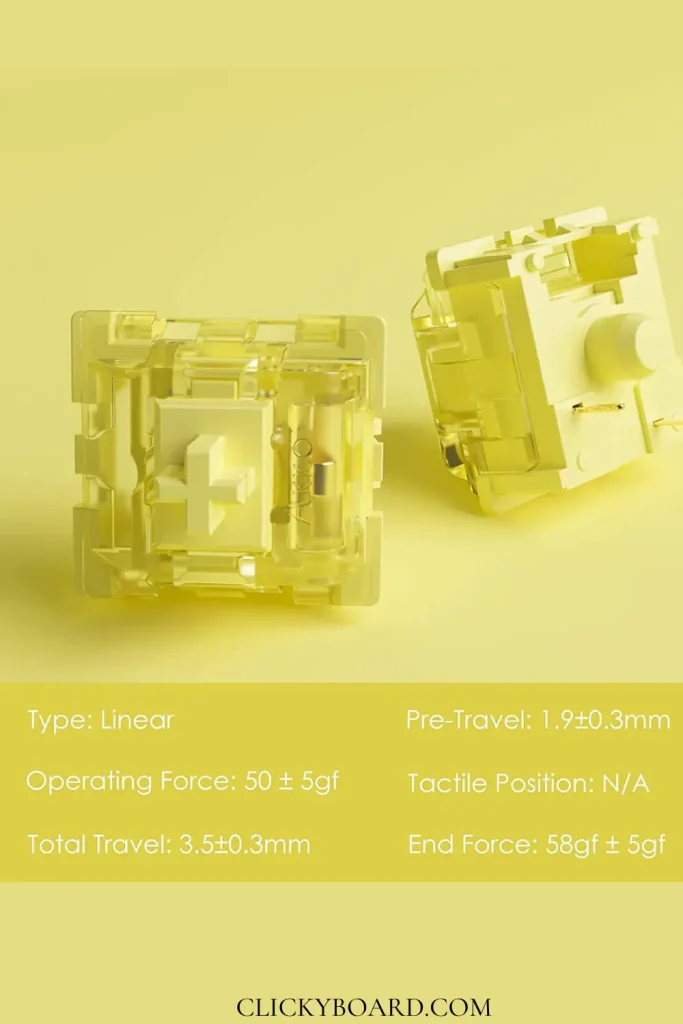
TypeLinear
Operating force50 ± 5 gf
Bottom-out force58 ± 5 gf
Pre-travel1.9 ± 0.3 mm
Total travel3.5 ± 0.3 mm
Factory lubeYes
MountMX-style, 3-pin, hot-swap compatible
PriceAbout $8.99 per 45 (roughly $0.20 each)

The 50 gf actuation sits between featherweight speed switches and heavier typing switches, and the slightly shortened 3.5 mm travel makes rapid presses feel a touch snappier than a standard 4.0 mm linear.

Akko V3 Cream Yellow linear switches

How They Feel

The first press tells you these are factory-lubed. There is none of the scratchiness that usually gives away a budget linear, and the travel is consistent from switch to switch. At 50 gf they land in comfortable middle ground: light enough for long typing sessions and fast presses, firm enough that you will not trigger keys by resting your fingers.

The shortened 3.5 mm travel is the one thing to be aware of. It makes the switch feel slightly quicker to bottom out, which many people like, but if you are used to full 4.0 mm travel it can feel a little shallow at first.

How They Sound

Deeper and more muted than most cheap linears. The factory lube kills the ping and the housing gives a rounded, low thock rather than a sharp clack. They are not loud switches, which makes them a sensible pick for an office or a shared room. If you want a bright, poppy sound signature, these will feel too reserved.

Build and Consistency

Quality control is the pleasant surprise here. Across a set of 45 there were no dead switches and no obvious outliers in feel, which is not something you can take for granted at this price. Stem wobble is average for the category: present if you look for it, not enough to bother most people in normal use.

Pros and Cons

Pros: pre-lubed and genuinely smooth out of the bag, deep muted sound, strong quality control, and a price of roughly $0.20 per switch that undercuts almost every rival.

Cons: the 3.5 mm travel feels shallow if you prefer full-travel switches, the 3-pin housing is slightly less stable than 5-pin in loose sockets, stock availability comes and goes, and the muted sound will not satisfy people chasing a loud, clacky board.

Who Should Buy Them

Buy them if you want your first linear switch, you are filling a whole board on a budget, or you want something smooth with zero tuning required. For the money, very little competes.

Skip them if you want full 4.0 mm travel, a bright and loud sound profile, or the absolute smoothest premium feel, where something like a Gateron Oil King is a step up. Compare more options in our best linear switches roundup and the Akko linear switches guide.

How to Install Them

  1. Unplug the keyboard and confirm it is hot-swappable. V3 Cream Yellows are 3-pin, so they fit both 3-pin and 5-pin hot-swap sockets.
  2. Pull the keycaps with a keycap puller, then remove the old switches with a switch puller, squeezing the clips at the top and bottom edges.
  3. Check each switch’s metal pins are straight, align it with the socket, and press down firmly until it sits flush.
  4. Plug the board in and test every swapped key before refitting the keycaps. Straighten any bent pins with tweezers if a key does not register.

Frequently Asked Questions

Do Akko V3 Cream Yellow switches need lubing?

No. They come factory-lubed and are smooth out of the bag. You can still add a thin coat of Krytox 205g0 for an even deeper sound, but it is optional rather than necessary.

Are V3 Cream Yellows good for gaming?

Yes. The linear action, 1.9 mm actuation point, and 50 gf force suit fast repeated presses, and there is no tactile bump to interrupt double-taps. The shorter travel helps too.

Are they 3-pin or 5-pin?

3-pin. They fit any MX hot-swap socket. In 5-pin sockets they simply leave the two plastic guide holes unused, which is fine, though 5-pin switches sit marginally more securely.

How do they compare to Gateron Yellows?

Both are excellent budget linears. The Akko comes factory-lubed and sounds deeper with shorter travel; Gateron Yellows have standard travel and a slightly brighter sound. Either is a safe first linear.

The Bottom Line

The Akko V3 Cream Yellow is one of the easiest budget recommendations in the hobby. It is smooth, quiet, consistent, and needs no tuning, which is exactly what most people want from a first linear. The short travel and 3-pin housing are worth knowing about, but at roughly twenty cents a switch they are easy trade-offs to accept.


We update our switch reviews as new batches and revisions are released.

Quick answer: the Akko 3098B is one of the best-value 96% mechanical keyboards you can buy. It packs triple-mode connectivity (USB-C, 2.4 GHz, Bluetooth 5.0), hot-swappable switch sockets, double-shot PBT keycaps and a full number pad into a case barely wider than a tenkeyless board — with somewhat clunky companion software as the main trade-off.

Many keyboard enthusiasts have found themselves asking, “Are Akko keyboards good?” The short answer is, yes. Akko Keyboards, especially their Akko 3098B keyboard model, have quickly risen to popularity, owing to their extraordinary blend of aesthetics, functionality, and durability. In this detailed review, we will explore the Akko 3098B, showcasing its impressive features that place it leagues above its competition.

Akko 3098B Specifications

Layout 96% (98 keys) with number pad
Switches Akko CS / Jelly series, hot-swappable (3- and 5-pin)
Keycaps Double-shot PBT, ASA profile
Connectivity USB-C wired, 2.4 GHz dongle, Bluetooth 5.0 (multi-device)
Battery 3,600 mAh — roughly a work week of typing with lighting off, much less with RGB on
Compatibility Windows and macOS
Extras South-facing RGB, N-key rollover

Design and Build

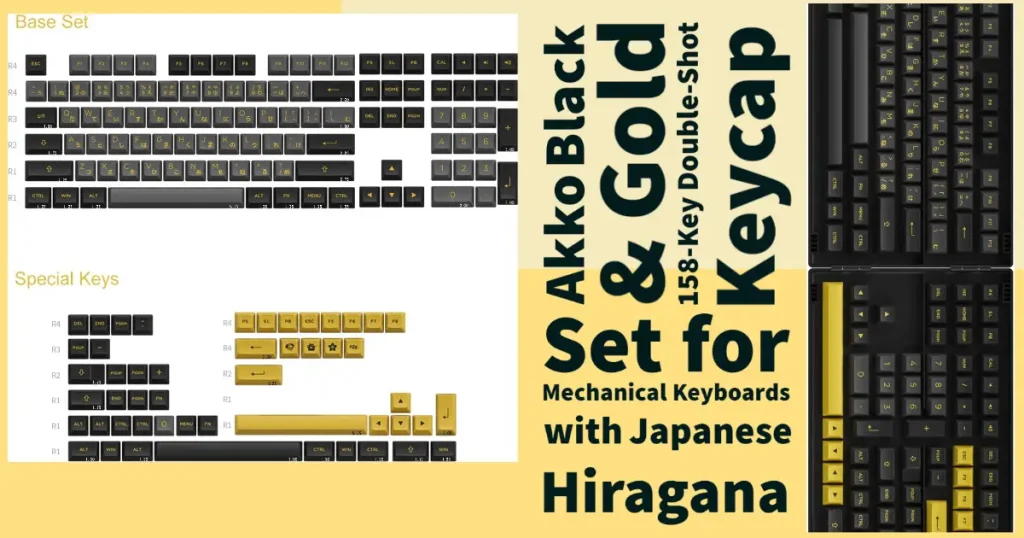
The Akko 3098B is an epitome of innovative design. It’s known for its compact layout that doesn’t compromise the usability and functionality that typists and gamers crave. The model comes in various aesthetic renditions including the Akko Black and Gold, which captivates with its elegant and sleek appeal.

Akko black and Gold Keyboard

After extended daily use, the 3098B earns its reputation: it is an excellent keyboard for the price. The 96% layout keeps the number pad for spreadsheet work while freeing up several centimetres of mouse room compared with a full-size board — a combination that suits people who both work and game at the same desk.

Notably, the keyboard is built for durability with solid construction and features high-quality, thick Akko keycaps, whose large yellow letters are easily readable in decent lighting. While the lack of backlighting on the key lettering can be a downside in darker areas, this doesn’t seem to be a major concern for well-lit spaces. The compact layout, while unique, may present a challenge when looking for replacement keycaps that allow for backlighting to shine through.

As a gaming accessory, the linear Jelly White switches are lauded for their balance between gaming and productivity tasks. And although some may prefer a more clicky response for fast typing, these switches are said to provide quicker response times, making them favorable for gamers.

The keyboard’s software for customization is quite finicky and may present a challenge for those not familiar with such tasks. However, with some patience, it’s possible to customize the backlighting, macros, and key reassignment. Although customization is possible only when the keyboard is connected via USB, the keyboard also provides wireless modes, enabling greater flexibility in usage.

Despite these slight drawbacks, the keyboard remains a commendable purchase given its quality and price. Its 96% layout design is a hit among users, as it saves the ten-key pad for tasks like working on spreadsheets and taxes, all while maintaining a compact size that doesn’t compromise the mouse space, especially crucial for gaming.

In conclusion, Akko’s keyboard is a remarkable product, offering significant value, a good balance between productivity and gaming needs, and quality that justifies its price tag. Despite some potential hurdles with customization and backlighting, its overall performance and user experience make it a worthwhile consideration for both regular users and gaming enthusiasts.

For fans of pop culture, the Akko SpongeBob Keyboard and the ROG x Evangelion Keyboard are a testament to the brand’s commitment to delivering unique designs that resonate with different user interests. The designs not only add flair to your workspace or gaming setup, but also provide an immersive experience for users.

The Akko Alice Plus and Akko Alice Pro Plus

Continuing the theme of unique design coupled with superb functionality, the Akko Alice Plus and Akko Alice Pro Plus stand as worthy mentions. These models take ergonomics and comfort to new heights with their unique layouts, aimed at reducing hand and finger fatigue during prolonged use.

The Alice Plus models stand out with their concave layout, which adheres to the natural movement of fingers, leading to a smoother typing experience. The Pro Plus version also includes hot-swappable keys, allowing users to customize their keyboard layout to their liking.

The Akko 5108B: A Versatile Alternative

For those seeking a full-sized alternative, the Akko 5108B has got you covered. It maintains the brand’s commitment to excellent build quality and aesthetics while offering a comprehensive typing layout. Whether you’re a professional typist, a hardcore gamer, or a casual user, the 5108B provides the versatility and reliability that Akko keyboards are known for.

Pros and Cons

Pros

  • 96% layout: full number pad in a near-TKL footprint
  • Hot-swap sockets — change switches without soldering
  • Triple-mode connectivity with multi-device Bluetooth
  • Thick double-shot PBT keycaps that resist shine
  • Strong value for the price

Cons

  • Companion software is unintuitive and USB-only
  • Legends are not shine-through, so RGB does not light the lettering
  • Non-standard bottom row limits keycap replacement options

Final Verdict

Our Akko keyboard reviews reveal that these keyboards aren’t just about flashy aesthetics – they’re a culmination of well-thought-out design, outstanding build quality, and high functionality. With models like the Akko 3098B leading the pack, it’s safe to say that Akko is defining the future of mechanical keyboards, one keystroke at a time.

Frequently Asked Questions

Is the Akko 3098B hot-swappable?

Yes. The 3098B uses hot-swap sockets that accept standard 3-pin and 5-pin MX-style switches, so you can change switches without any soldering.

Does the Akko 3098B work with a Mac?

Yes. It supports both Windows and macOS, and the multi-device Bluetooth makes it easy to pair with a Mac, a PC and a tablet at the same time.

Is the Akko 3098B good for gaming?

Yes — over the 2.4 GHz dongle or the USB-C cable, both of which are effectively lag-free. Bluetooth adds enough latency that it is better kept for office work.

What is the difference between a 96% and a full-size keyboard?

A 96% board keeps every key, including the number pad, but removes the empty spacing between key clusters. You lose almost nothing in function while saving real desk width for your mouse.

Ducky Keyboards is a renowned brand known for its high-quality mechanical keyboards, offering great performance for both gamers and professionals. Choosing the right keyboard is crucial, as it significantly impacts your daily tasks and gaming experiences. In this article, we will review the top 3 Ducky keyboards of 2023 based on their build quality, performance, and user experience.

I. Ducky One 3 SF Day Break Keyboard Reviewed

Introducing the Ducky One 3 SF Daybreak Keyboard, a cutting-edge keyboard that combines sleek design with advanced features. The One 3 series is built with Ducky’s QUACK Mechanics design philosophy, focusing on aesthetics, functionality, and enhanced sound quality.

The keyboard’s case is designed to be slim and stylish, allowing for various color combinations with its unique 3-layer design. It not only looks great but also provides superior acoustics. Thanks to the silicone plate dampener and EVA foam case dampener, you’ll enjoy a quieter typing experience compared to other prebuilt keyboards.

One of the standout features of the One 3 SF Daybreak is its hot-swappable capability. With Ducky’s exclusive Kailh Yellow Sockets, you can easily change your switches without soldering. This means you have the flexibility to customize your keyboard with different switch options to suit your preferences.

Kailh Yellow Hot-Swappable PCB Sockets by Clikcyboard.

The One 3 series also boasts Ducky’s V2 stabilizers, which offer improved stability, feel, and sound. These stabilizers ensure that each keypress is smooth and consistent, enhancing your overall typing or gaming experience.

When it comes to keycaps, the One 3 SF Daybreak doesn’t disappoint. It features thick Double-shot PBT keycaps with seamless legends. This ensures that the key legends won’t fade or wear out over time, even with heavy use. Additionally, the keyboard has 3 level adjustable feet, allowing you to find the perfect typing angle for comfort.

Other notable features include an improved PCB design for better reliability, a detachable braided USB Type-C cable for convenience, an improved Macro layout for easy customization, and more. The Ducky One 3 SF Daybreak is designed to meet the demands of both gamers and typists, offering a high-quality keyboard that delivers both style and performance.

Review

I recently purchased the Ducky One 3 SF Daybreak Keyboard with Cherry MX Blue switches, and I must say, it has been a mixed experience for me. Overall, I would rate this keyboard positively, but there are a few drawbacks that need to be addressed.

Let’s start with the positives. First and foremost, the click speed of the Cherry MX Blue switches is remarkable. The keys are highly responsive, making typing and gaming a breeze. I was particularly impressed with the fast feedback I got from each keypress, which added to the overall typing experience. The ability to change the keys easily is also a standout feature. Ducky includes extra keycaps, allowing you to give the keyboard a personalized touch right out of the box. The keyboard arrived promptly, and the packaging was well done, ensuring that it reached me in excellent condition.

Ducky One 3 SF Daybreak Keyboard (Cherry MX Blue)

However, there are a couple of issues that need attention. One user mentioned experiencing ghosting when hitting multiple keys, and sadly, I encountered the same problem. During intense gaming sessions, I noticed that certain key combinations didn’t register as expected, which was quite disappointing. This issue could impact the overall gaming performance, especially for fast-paced games where quick and accurate keystrokes are crucial. Additionally, I found that the enter button is a bit small for my liking. While this may not be a dealbreaker for some, a larger enter key would have improved the overall typing experience for me.

In summary, the Ducky One 3 SF Daybreak Keyboard with Cherry MX Blue switches has its merits but also a few drawbacks. The keyboard’s fast click speed and the ability to customize the keys are definite highlights. However, the issue with ghosting when pressing multiple keys and the small enter key size are factors that may deter some users, especially those who prioritize gaming performance. While I appreciate the overall quality and aesthetics of this keyboard, I do have reservations about its longevity and whether it requires maintenance sooner than expected.

Despite these concerns, I believe the Ducky One 3 SF Daybreak Keyboard is a solid choice for those seeking a smaller keyboard for gaming or typing. It certainly has its strengths, and with a bit of improvement in certain areas, it could become an outstanding keyboard in its category.

II. Ducky Shine 7

The Ducky Shine 7 is an outstanding gaming keyboard available in two colors: blackout and gunmetal gray. It features genuine Cherry MX switches in various options, providing a light and responsive typing experience. Its low latency ensures excellent performance during gaming sessions.

Ducky 7 Shine - Clickyboard

The Shine 7 allows you to reprogram or assign macros to any key, although it lacks dedicated macro keys for MMOs. While it offers a better build quality and typing experience than other similarly-priced keyboards, it misses features such as USB passthrough and dedicated media controls.

Review

In addition to its impressive performance, the Ducky Shine 7 also offers a range of convenient features that enhance the overall user experience. The keyboard is equipped with a detachable USB Type-C cable, allowing for easy connectivity and portability. The inclusion of a cable routing system helps to keep your workspace organized and free from cable clutter. Furthermore, the Shine 7 incorporates adjustable feet, allowing you to find the perfect typing angle and comfort level.

Another notable aspect of the Shine 7 is its compatibility with various keycap customization options. This opens up a world of possibilities for personalization, allowing you to explore different keycap sets and create a keyboard setup that truly reflects your style and preferences.

Furthermore, Ducky’s reputation for producing reliable and durable keyboards is well-established, and the Shine 7 is no exception. With proper care, this keyboard is built to withstand long hours of use and provide consistent performance over an extended period of time.

Overall, the Ducky Shine 7 stands out not only for its exceptional performance and sleek design but also for its practical features that enhance usability and customization. Whether you’re a passionate gamer, a dedicated typist, or someone who values both aesthetics and functionality in a keyboard, the Ducky Shine 7 is a reliable choice that is sure to meet your expectations.

III. Ducky One 2 Mini RGB

The Ducky One 2 Mini RGB is a compact mechanical keyboard that offers a sleek and modern design combined with impressive functionality. With its 61-key layout, this keyboard is designed to provide a space-saving solution without compromising on performance. The Ducky One 2 Mini RGB features Cherry MX Blue switches, known for their tactile feedback and satisfying clicky sound. These switches are popular among gamers and typists who appreciate the tactile feedback for precise and enjoyable keystrokes.

One of the standout features of the Ducky One 2 Mini RGB is its stunning RGB backlighting. With full RGB color support, this keyboard allows you to customize and personalize the lighting effects to suit your style and preferences. The dynamic and vibrant lighting effects add an extra level of immersion and visual appeal to your gaming or typing experience.

Connectivity is made easy with both USB and USB-C options, ensuring compatibility with a wide range of devices. The keyboard is compatible with various operating systems, including Linux, providing flexibility for different user preferences.

The Ducky One 2 Mini RGB also offers multimedia functionality, allowing you to control media playback and adjust volume with ease. The compact size and portability of the keyboard make it ideal for on-the-go use or for those who prefer a minimalist setup.

Ducky One 2 Mini RGB

Review

Ever since I laid my hands on the Ducky One 2 Mini RGB, my gaming experience has reached a whole new level. The keys on this keyboard are not only super smooth but also deliver a satisfying sound with every click. It’s like music to my ears, adding an extra layer of immersion to my gaming sessions. As a long-time user of various keyboards, I can confidently say that the Ducky One 2 Mini RGB stands out among the rest. Its compact size and slim profile make it a breeze to navigate, while still offering all the functionality I need. The 60% layout not only saves space on my desk but also gives it a sleek and minimalist look.

The customization options are simply mind-blowing. With the ability to customize macros, LED profiles, shortcuts, and even individual key colors, I have complete control over my gaming setup. The RGB lighting effects are vibrant and dynamic, creating an immersive atmosphere that enhances my gaming experience. The build quality of this keyboard is top-notch. It feels solid and durable, ensuring that it can withstand even the most intense gaming sessions. The included key-puller tool and alternate key caps add a touch of personalization, allowing me to create a keyboard that truly reflects my style.

While I primarily use this keyboard for gaming, it also excels in other areas. Whether I’m typing up documents or engaging in casual browsing, the Cherry MX switches provide a pleasant and responsive typing experience. Plus, with the option of silent switches, I can enjoy a quieter operation without sacrificing performance. I must mention the exceptional customer support I received when I encountered a minor issue. The team at Ducky promptly addressed my concerns and provided a fix that resolved the problem. Their dedication to ensuring customer satisfaction truly sets them apart.

Overall, I highly recommend the Ducky One 2 Mini RGB to any gaming enthusiast or even those seeking a versatile and high-quality keyboard. It’s a game-changer in every sense, combining smooth key operation, customizable lighting, and impeccable build quality. Upgrade your gaming setup with this keyboard, and you won’t be disappointed. It’s truly a must-have!

Honorable Mentions:

  • Ducky One 2 RGB TKL: A tenkeyless keyboard with customizable RGB lighting and excellent performance.
  • Ducky One 2 SF: A compact, 65% keyboard with a dedicated arrow key cluster for those who need more space but still require arrow keys.
  • Ducky Shine 7: A versatile gaming keyboard with a premium build and customizable Cherry MX switches.

Comparison and Final Verdict:

When comparing the Ducky One 2 Mini RGB, Ducky Shine 7, and Ducky One 3 SF Daybreak Keyboard, it’s clear that each keyboard has its own unique features and strengths. The Ducky One 2 Mini RGB stands out with its compact size and customizable RGB lighting options, making it a popular choice for gamers and enthusiasts. The Ducky Shine 7 impresses with its sleek design, durable construction, and advanced RGB effects. Lastly, the Ducky One 3 SF Daybreak Keyboard offers a combination of hot-swappable switches, improved stabilizers, and a unique 3-layer design.

The Ducky Shine 7 stands out as the best keyboard among them with its sleek design, durable construction, and advanced RGB effects.

FAQs

Are Ducky keyboards suitable for both gaming and professional use?

Yes, Ducky keyboards offer a great balance between gaming performance and typing experience, making them suitable for both gaming and professional use.

Can I customize the switches on all Ducky keyboards?

Not all Ducky keyboards have hot-swappable switches. The Ducky One 3, for example, features a hot-swappable circuit board, making it easy to customize your typing experience by changing the switches.

Do Ducky keyboards come with software for customizing RGB lighting and macros?

Some Ducky keyboards, like the Shine 7, come with software for customizing RGB lighting and macros, while others, like the One 3, require the use of hotkey combinations directly on the board.

What types of switches are available on Ducky keyboards?

Ducky keyboards typically offer a range of genuine Cherry MX switches, including Red, Brown, Blue, Black, Silver, Red Silent, and Nature White.

Which Ducky keyboard size is best for me?

The ideal size for you depends on your personal preferences and needs. Compact keyboards like the Ducky One 2 Mini V1 are great for saving desk space, while full-size keyboards like the Ducky One 3 offer a Numpad and additional keys for productivity tasks.

The Akko CS Matcha Green is one of the cheapest name-brand switches you can buy, and one of the most consistently mislabelled. Plenty of listings and reviews call it a tactile switch. It is not. It is a mid-weight linear, and if you buy it expecting a bump you will be disappointed by a switch that is otherwise very good for the money.

Quick answer: A linear switch at 50gf, mid-weight, smooth for its price, with a muted low-pitched sound. No bump, no click. One of the cheapest sensible ways into a hot-swap build. Buy it if you want smooth on a budget; skip it if you want typing feedback.

⚠️ Correction: an earlier version of this review described the Matcha Green as tactile with a clicky sound. That was wrong. Akko lists it as linear, and we have corrected the specifications and the verdict below. If you bought a set expecting a bump on our advice, we are sorry.

Akko CS Matcha Green linear switches with full technical specifications

Specifications

TypeLinear
Operating force50gf ± 5gf
Pre-travel1.9mm ± 0.3mm
Total travel4.0mm
Pins3-pin, MX compatible
SeriesAkko CS (Custom Series)
Factory lubedNo (a hand-lubed version is sold separately)

Specifications are from Akko’s own product listing. Note the 50gf figure: that is heavier than a Cherry MX Red at 45g and close to a Gateron Yellow, so this is a mid-weight linear rather than a light one.

What it feels like

Smooth, with the mild scratchiness you would expect from an unlubed budget switch. It is not in the same league as a factory-lubed switch out of the box, but it is noticeably better than the cheapest Outemu options, and it responds very well to lubing if you are willing to put in the time.

The 50gf weighting is the part people underestimate. It is enough to resist accidental presses during typing, and heavy enough that some gamers coming from a Cherry MX Red will find rapid double-taps marginally more effort. For general desk use it sits in a comfortable middle.

How it sounds

Muted and fairly low-pitched, which is a large part of the appeal. There is no click bar and no bump, so what you hear is the bottom-out and the return. In a plastic case it can sound slightly hollow, and it improves a lot with case foam or a set of O-rings.

Who should buy it

Buy it if
You want a smooth linear for very little money, you are filling a first hot-swap board, or you like a muted sound and do not mind lubing later.

Skip it if
You want tactile feedback, you want something smooth with no work at all, or you want a light switch for competitive gaming.

The naming problem

Akko reuses colour names across generations and switch types, and Matcha Green is the worst offender. Two things are worth knowing before you order.

  • CS Matcha Green is the budget original. Linear, 50gf, unlubed.
  • V3 Matcha Green Pro is the newer version. Also linear, also around 50gf, but with better housings and factory lube. If the price difference is small, it is the better buy.

Neither is tactile, despite what a lot of listings claim. If you want a tactile Akko, look at the CS Ocean Blue or the V3 Cream Blue Pro instead. Our Akko switches explained guide decodes the whole naming system.

How it compares

SwitchForceLubed?Verdict against Matcha Green
CS Matcha Green50gfNoThe budget baseline
Gateron Yellow~50gNoSmoother stock, similar price. Usually the better buy.
Akko V3 Cream Yellow Pro~50gYesClearly better feel for a small premium
Cherry MX Red45gNoLighter, scratchier, more expensive

Being straight about it: the Matcha Green is fine rather than special. A Gateron Yellow costs about the same and feels smoother out of the box, and Akko’s own V3 Pro line is a real step up. Where Matcha Green wins is when it is on offer, or when you want that specific muted sound. See the full field in our best linear switches roundup and the brand-specific best Akko linear switches guide.

Installing them

  1. Check your board is hot-swappable. If the switches are soldered, they cannot be changed without desoldering.
  2. Check the pin count. These are 3-pin, which fits every MX-compatible PCB including 5-pin boards. Our 3-pin vs 5-pin guide explains why that direction always works.
  3. Pull the old switches straight up with a switch puller. Angling bends the pins.
  4. Check the new pins are straight before seating each one. Bent pins are the most common cause of a dead key after a swap.

Frequently asked questions

Is the Akko Matcha Green tactile or linear?

Linear. Akko’s own specification lists it as linear at 50gf ± 5gf with no tactile bump. Many retail listings describe it incorrectly, which is where the confusion comes from.

Do they need lubing?

They are usable unlubed and clearly better lubed, since the CS line ships dry. If you would rather not spend the evening doing it, buy a factory-lubed switch instead. Our lubing guide covers the method.

Are they good for gaming?

They work well. Being linear there is nothing to push past on a repeated press, though at 50gf they are slightly heavier than switches marketed for gaming. See our best linear switches for gaming guide for lighter options.

Will they fit my keyboard?

If it takes standard MX switches and is hot-swappable, yes. They are 3-pin, which seats in both 3-pin and 5-pin sockets.

The Tangerine is one of the few switches that earned its reputation on materials science rather than marketing. Almost every other linear on the market uses nylon or polycarbonate housings. The Tangerine uses UHMWPE, a plastic borrowed from industrial bearings, and that single decision is why people still buy it years after release.

Quick answer: A heavier linear with a genuinely different feel, thanks to a self-lubricating UHMWPE housing. It arrives factory lubed and needs nothing. Buy the 62g if you are coming from a light switch, the 67g if you type firmly. Its weakness is not smoothness, it is weight: this is not a fast-gaming switch.

⚠️ Correction: an earlier version of this review stated the Tangerine V2 was not factory lubed, and credited V2 with tightening tolerances to fix stem wobble. Both were wrong. V2s ship factory lubed, and the actual V2 change was a move in manufacturing from Gateron to JWK along with a translucent housing. The verdict below has been rewritten accordingly.

Specifications

TypeLinear
HousingUHMWPE, top and bottom
StemPOM (light green 62g, dark green 67g)
Operating force55gf ± 10
Bottom-out force62gf or 67gf ± 10, depending on variant
Pre-travel1.8mm ± 0.4
Total travel4.0mm ± 0.4
Pins5-pin (PCB mount)
Spring14mm gold-plated
Rated lifespan60 million keystrokes
Factory lubedYes, light application
ManufacturerJWK (V2)

The 62g and 67g names are misleading

This trips people up constantly, so it is worth being precise. The 62 and 67 in the name refer to bottom-out force, not actuation force. Actuation sits around 55gf on both variants.

Most switches are marketed by their actuation weight. A Cherry MX Red is “45g” because it actuates at 45g, and it bottoms out closer to 60g. So when you compare a “67g” Tangerine against a “45g” Red, you are not comparing like with like. The honest comparison is 55gf against 45gf at actuation, which is a real difference but a far smaller one than the names suggest.

Practically: Tangerines feel heavier than a Red, but not the 50% heavier that the numbers imply. If you have avoided them purely because 67g sounded punishing, that reasoning was based on a mislabel.

Why UHMWPE actually matters

Ultra-high-molecular-weight polyethylene is the same family of plastic used for artificial hip joints, conveyor guides, and the base of racing skis. It is chosen in those applications for one property: an extremely low coefficient of friction. The polymer chains are so long that the surface behaves as though it is permanently, very slightly lubricated.

In a switch, that changes the baseline. A nylon or polycarbonate housing relies almost entirely on applied lube to feel smooth, which is why stock Cherry switches feel scratchy and transform after an hour with a brush. A UHMWPE housing starts smooth because the material itself is slippery.

What you gain
Smoothness that does not depend on lube staying put, and a softer, more absorbed sound because the material damps high frequencies rather than ringing.

What you trade
UHMWPE is soft, so it marks more easily than polycarbonate, and it is harder to mould precisely. It also mutes the crisp top-end some people specifically want.

What V2 actually changed

The important change was who makes them. V1 Tangerines came from Gateron. V2 production moved to JWK, a manufacturer with a strong reputation for tight tolerances on linear switches. The housing also went from opaque orange to translucent orange, which matters if you run RGB.

The stems stayed green, split by weight: light green for 62g, dark green for 67g. That colour split is the quickest way to identify which variant you are holding.

Feel, wobble and sound

Push feel. Genuinely linear with no perceptible scratch through the stroke. There is no bump, no catch, and no gritty section partway down, which is the failure mode of cheaper linears.

Wobble. Minimal north-to-south and virtually none east-to-west, per ThereminGoat’s measured review, which is the most rigorous switch testing resource available. Low east-west wobble matters most on taller keycap profiles, where play at the top of the cap is amplified.

Sound. Muted and low, closer to silent than clacky. The UHMWPE absorbs the high frequencies that make polycarbonate housings bright. If you are chasing a deep, soft sound signature, this is a strong choice. If you want the sharp clack of a Gateron Ink, it is the wrong one.

Should you lube them?

Probably not, and this is where the earlier version of this review was misleading. Tangerine V2s arrive with a light factory lube that is well applied. Combined with a self-lubricating housing, they are one of the few switches genuinely finished out of the box.

Hand-lubing still yields a marginal gain, mostly in spring ping. But the effort-to-improvement ratio is poor compared with lubing a stock Cherry or Outemu switch, where the difference is dramatic. Spend that evening on your stabilizers instead, where it will be far more audible.

62g or 67g?

62g (light green stem)
The sensible default. Coming from a Cherry MX Red or Gateron Yellow, this is the smaller jump. Better for long typing sessions and mixed work and play.

67g (dark green stem)
For heavy typists who bottom out hard and dislike accidental presses. The extra resistance makes the board feel more deliberate, at the cost of fatigue if you type all day.

How it compares

SwitchHousingBottom-outCharacter
Tangerine V2UHMWPE62 / 67gMuted, soft, smooth from the material itself
Gateron Ink Black V2Proprietary blend~60gDeeper and louder, more of a thock than a hush
Gateron Milky Yellow ProNylon (milky)~55gFuller sound, far cheaper, less refined
Cherry MX RedNylon / PC~60gLighter at actuation, scratchier, everywhere

The comparison people expect is against the Ink Black, and the two are genuinely different rather than better and worse. Inks are louder and deeper; Tangerines are quieter and softer. Pick by the sound you want. See the wider field in our best linear switches roundup.

Verdict

The Tangerine V2 remains a genuinely distinctive switch, and the reason is the housing material rather than nostalgia. Nothing mainstream replicates the UHMWPE feel and sound, and JWK manufacturing plus a light factory lube means it needs no work to be good.

The real reason to pass on it is weight. At 55gf actuation and 62 to 67gf bottom-out it is a deliberate, typing-first switch. Competitive gamers wanting fast repeated presses should look lighter, and our best linear switches for gaming guide covers those.

If you want a soft, muted, effortless linear and you type more than you frag, it is still one of the best things you can put in a board.

Frequently asked questions

Are Tangerine V2s factory lubed?

Yes. They ship with a light factory application, and the quality of it is well regarded. Combined with the self-lubricating UHMWPE housing, they are usable straight from the bag with no modding.

What is the difference between Tangerine V1 and V2?

Manufacturing moved from Gateron to JWK, and the housing changed from opaque orange to translucent orange, which suits RGB builds better. The UHMWPE material and the overall character carried over.

Are Tangerines too heavy?

Heavier than mainstream linears, but less than the name suggests. The 62 and 67 figures are bottom-out force; actuation is around 55gf on both. If you currently use a 45g switch, expect a noticeable but manageable step up.

Will they fit my keyboard?

They are 5-pin, so they need a PCB with the two extra holes. On a 3-pin board you can clip the plastic legs off with flush cutters and they will seat normally. Our 3-pin vs 5-pin guide covers how to check and how to clip safely.

Do they work for gaming?

They are usable and perfectly smooth, but the weight works against rapid double-taps. A lighter linear is the better competitive choice. For casual play alongside heavy typing, they are fine.


Measured wobble and push-feel observations referenced from ThereminGoat’s Tangerine V2 review, the most thorough independent switch testing resource available.

Cherry MX Brown is the switch that introduced most people to tactility, and it is still the default fitted to more prebuilt keyboards than any other tactile. It is also the switch enthusiasts most enjoy dismissing. Both positions have a point, and which one applies depends entirely on what you are comparing it against.

Quick answer: A light 45g tactile with a gentle bump. Reliable, widely available, and inoffensive. If it is fitted to a keyboard you like, keep it. If you are choosing switches deliberately in 2026, modern tactiles give you a far more satisfying bump for the same money.

The specs

TypeTactile
Actuation force45g
Actuation point2.0mm
Total travel4.0mm
Rated lifespan100 million keystrokes

What it actually feels like

The bump is small and rounded, and it sits early in the press. You notice it, but it does not interrupt you. Typing on Browns feels light and unremarkable in a way that is genuinely useful for long working days, because nothing about the switch demands attention.

The criticism enthusiasts make is fair though: coming from a sharper tactile, a Brown can feel like a linear with a slight roughness rather than a proper bump. If you have felt a Boba U4T or a Durock T1, the Brown will feel vague by comparison.

Stock Browns also have a reputation for scratchiness, which is real and is the main thing lubing fixes. A lubed Brown is a noticeably better switch than an unlubed one.

Who should buy it

Buy it if
You want a proven, light tactile that works everywhere, you value reliability over character, or it is already in a board you otherwise like.

Skip it if
You want a bump you can really feel, you are buying switches separately anyway, or you have tried a modern tactile and want that instead.

Cherry MX Brown vs the alternatives

SwitchForceHow it differs
Cherry MX Brown45gThe baseline. Gentle bump, light, everywhere.
Cherry MX Clear65gSame shape of bump, much heavier. Cherry’s answer to “Browns feel too light”.
Gateron Brown45gSmoother out of the box than stock Cherry, usually cheaper.
Durock T1 / Boba U4T67gWhat people mean by a proper tactile. Sharper and far more pronounced.

For the full picture across brands, see our best brown switches roundup, or the wider best tactile switches guide if you are open to leaving the brown family entirely.

Getting more out of them

If you already own Browns and find them scratchy, two cheap fixes make a real difference before you consider replacing anything.

  • Lube them. This is the single biggest improvement, and it removes almost all the scratch. Go light on the stem legs so you keep the bump. Our no-desolder lubing guide covers it.
  • Tune the stabilizers. On most boards the rattle from the spacebar and shift keys is louder than the switches. See our stabilizer guide.

Verdict

Cherry MX Brown is a good switch that has been overtaken rather than a bad switch that was ever overrated. It does nothing wrong, lasts effectively forever, and suits people who want a keyboard rather than a hobby.

But if you are actively choosing switches in 2026, that is exactly the situation where something else makes more sense. Buy Browns because they came with a board you like, not because you went looking for them.

Frequently asked questions

Are Cherry MX Browns good for gaming?

They work well and plenty of people use them. Linears are marginally better for fast repeated presses, but the gap matters far less than most forum arguments suggest. Our full answer is here.

Are Cherry MX Browns quiet enough for an office?

Usually yes. They are much quieter than Blues, and lubing plus O-rings quietens them further. For a genuinely shared space, a dampened switch is the better answer.

What is the difference between Cherry MX Brown and Clear?

Weight, mostly. Clears use the same style of gentle bump but at 65g rather than 45g, which makes them feel more deliberate and resistant. If Browns feel too easy to press by accident, Clears are the direct upgrade.

Cherry MX Brown or Gateron Brown?

Gateron, if you are buying loose switches. They are smoother out of the box and usually cost less. Cherry’s advantage is availability and a longer track record rather than feel.