

We regularly review and update our guides to ensure keyboard recommendations, specs, and software information stay current with the latest releases and updates.
Affiliate disclosure: this article contains Amazon affiliate links. Purchases made through these links support Clickyboard at no extra cost to you.
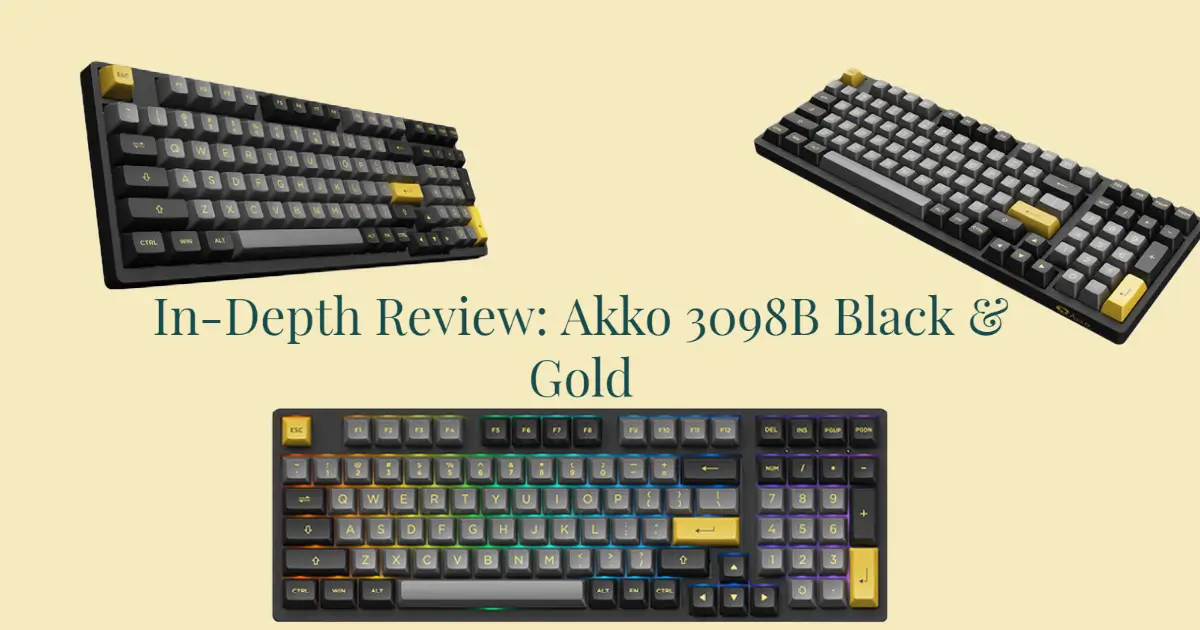
⚡ Quick answer: the Akko 3098B is one of the best-value 96% keyboards you can buy. You get a full number pad, hot-swap sockets, triple-mode wireless and thick double-shot PBT in a case barely wider than a tenkeyless board. The compromises are a cramped navigation cluster, a non-standard bottom row that limits keycap sets, and companion software that is genuinely annoying.
The 96% layout is the least understood keyboard size, and the 3098B is the board most people meet it through. It keeps every key a full-size board has, then deletes the empty space between the clusters so the whole thing shrinks by roughly the width of your palm.
That trade is the entire review. Everything good about this keyboard and everything irritating about it comes from that decision, so this covers what you actually gain, what it costs you day to day, and who should buy something else instead.
Akko 3098B specifications
| Layout | 96% (98 keys) with number pad |
| Switches | Akko CS / Jelly series, hot-swappable (3-pin and 5-pin) |
| Keycaps | Double-shot PBT, ASA profile |
| Connectivity | USB-C wired, 2.4 GHz dongle, Bluetooth 5.0 (multi-device) |
| Battery | 3,600 mAh, roughly a work week with lighting off and far less with RGB on |
| Lighting | South-facing RGB, legends are not shine-through |
| Compatibility | Windows and macOS |
| Rollover | N-key |
The 96% layout, and what it costs you
On a full-size board there are gaps between the main alphas, the navigation cluster and the number pad. Those gaps exist for orientation, not function: they let your hand find the arrow keys or the Home block without looking. A 96% layout removes them and pushes everything together.
The gain is real. You get back several centimetres of desk, which matters most if you play anything requiring low mouse sensitivity and wide sweeps, and you keep the number pad, which matters if you work in spreadsheets. Very few layouts offer both, and that is why 96% exists at all.
The cost lands in three places:
- The arrow keys sit directly against the number pad, so reaching for Right arrow and hitting 1 or 0 is the standard first-week mistake.
- The navigation cluster is compressed into a vertical column down the right edge instead of the familiar two-by-three block, so Home, End, Page Up and Page Down all need relearning.
- The bottom row is non-standard, which is the one that has consequences beyond muscle memory. More on that below.
None of this is a defect. It is the layout working as intended, and most people adapt inside a week. But if you use the navigation block constantly, a tenkeyless board plus a separate number pad will annoy you less.
Typing feel and sound
The 3098B is a plastic-cased, plate-mounted board at a budget price, and it sounds like one. Expect a moderately high-pitched, slightly hollow signature out of the box, with some case resonance on the longer keys because the stock stabilisers are not lubed.
The keycaps do more work than the case here. Akko’s double-shot PBT is genuinely thick for the price, and thick caps damp the ring that thin ABS would add. The result is better than most boards in this bracket without being close to a gasket-mounted custom.
If you want to improve it, the order that pays off is stabilisers first, then a layer of foam under the plate. Both are cheap, and the hot-swap sockets mean you never have to desolder anything to experiment. Our stabiliser lubing guide covers the first step in detail.
Switches and hot-swap
The sockets accept standard MX-style switches in both 3-pin and 5-pin form, which means essentially anything on the market fits. That is the single most valuable feature on the board, because it turns a fixed budget keyboard into something you can keep changing as your taste develops.
Stock configurations usually ship with Akko’s own CS or Jelly switches. Jelly White is the common linear option and is a reasonable all-rounder, light enough for gaming without feeling flimsy for typing. If you want something with a bump, the CS tactiles are the cheapest sensible upgrade, and our guide to Akko switch families explains how CS, V3 and Pro differ so you are not buying by colour alone.
One practical note: the RGB is south-facing, meaning the LED sits at the bottom of the switch housing rather than the top. That matters if you ever fit Cherry-profile keycaps, because north-facing boards can catch the front edge of a Cherry cap. South-facing avoids that problem entirely, so this board is the more flexible of the two orientations.
The keycap problem worth knowing before you buy
This is the one thing that catches people out, and it is worth being blunt about.
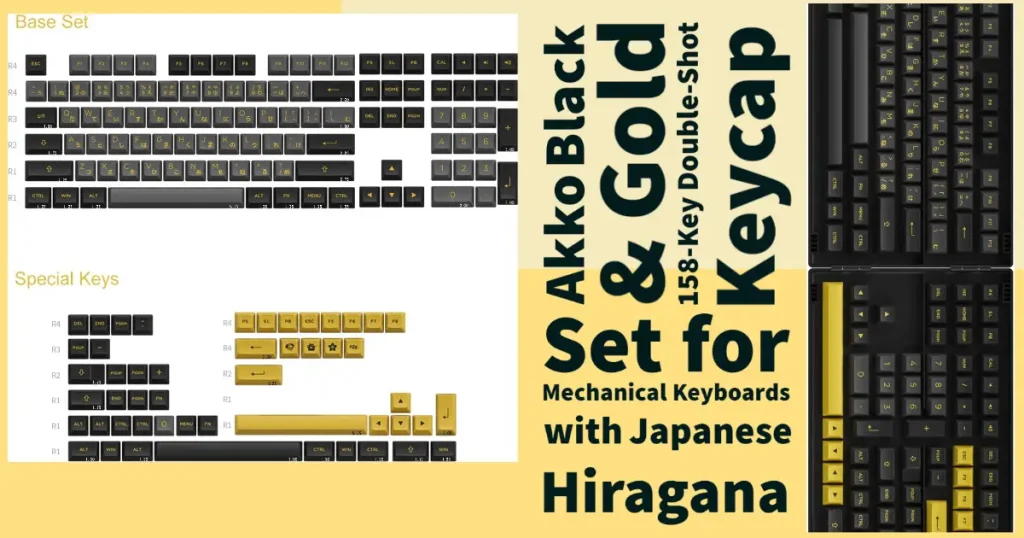
The 3098B uses a non-standard bottom row. Most aftermarket keycap sets are cut for the standard widths, so a set that looks compatible will often leave you with modifiers that do not fit. Combined with the 96% layout, which already needs an unusual mix of key sizes, replacing the caps is meaningfully harder than on a normal tenkeyless or full-size board. Before buying any set, check that it explicitly lists 96% or 1800-compatible kits.
Second, the stock legends are not shine-through. The RGB lights the board around the keys rather than the letters themselves, so in a dark room you get glow but not readable legends. If backlit lettering is the reason you want RGB, this is the wrong keyboard, and the replacement-set difficulty above means you cannot easily fix it later.
💡 Worth knowing: the stock ASA keycaps are actually good, thick PBT with clear legends that resist shine for years. The compatibility warning matters if you plan to change them for looks, not because there is anything wrong with what comes in the box.
Wireless, battery and daily use
Three connection modes cover the realistic cases. The 2.4 GHz dongle is the one to use for gaming, since it is fast enough that you will not notice it against a cable. Bluetooth 5.0 pairs with several devices at once and is the right choice for switching between a laptop and a tablet, but it adds enough latency to be felt in fast games. USB-C runs the board and charges it.
The 3,600 mAh battery is large for a keyboard, and with the lighting off it comfortably lasts a working week or more. Turn the RGB up and that collapses, which is true of every wireless board with per-key lighting and not a criticism specific to this one. Treat the lighting as an occasional thing and battery life stops being a consideration.
The software
The companion software is the weakest part of the package. It is unintuitive, the layout is dated, and remapping keys takes more clicking than it should. It also only works over USB, so you have to plug in a board you may have bought specifically to use wirelessly.
It does work. Lighting, macros and key reassignment are all there, and once you have configured the board the settings persist onboard so you can go back to wireless and forget the software exists. If you expect to remap constantly, or you want QMK or VIA support, this board will frustrate you and you should be looking at a different tier of keyboard.
Pros and cons
✅ Pros
- Full number pad in a near-tenkeyless footprint
- Hot-swap sockets take any 3-pin or 5-pin MX switch
- Triple-mode with multi-device Bluetooth
- Thick double-shot PBT caps that resist shine
- South-facing RGB, so Cherry-profile caps fit without interference
- Hard to beat at the price
❌ Cons
- Companion software is clunky and USB-only
- No QMK or VIA support
- Legends are not shine-through
- Non-standard bottom row limits replacement keycap sets
- Arrow keys sit against the number pad
- Stock stabilisers rattle until you lube them
Who should buy it
Buy it if you need the number pad for real work, want your mouse to have room, and like the idea of changing switches later without soldering. That combination at this price is the whole argument, and it is a strong one.
Buy something else if you live in the navigation cluster, you want backlit legends, or you care about remapping and would rather have VIA. A tenkeyless board with a separate number pad solves the first case, and it is worth stepping up a tier for the third.
If you like the brand but this specific layout is not right, we compare the rest of the range, including the ergonomic Alice boards and the full-size 5108B, in our best Akko keyboards guide.
How the 3098B compares
The 3098B’s real competition is not other 96% boards, it is the other ways to keep a numpad without a full-size footprint. Here is how it stacks up.
| Option | Numpad | Footprint | Main trade-off |
|---|---|---|---|
| Akko 3098B (96%) | Yes | Near-TKL | Cramped nav, non-standard bottom row |
| Full-size board | Yes | Largest | Pushes the mouse furthest right |
| TKL + separate numpad | Yes (detached) | Flexible | Two devices, but standard keycaps |
| 75% board | No | Smallest | No numpad at all |
If you want the numpad in the smallest single board and can live with the layout quirks, the 3098B wins outright. If you would rather have standard keycaps and roomier navigation, a tenkeyless board with a separate numpad is the more flexible route for about the same desk space.
Verdict
The 3098B is a genuinely good budget keyboard whose flaws are all predictable from the spec sheet. Nothing about it is surprising in a bad way: the software is poor, the layout takes a week, and the keycaps are awkward to replace. Against that you get hot-swap, thick PBT, three connection modes and a number pad in a small case, for less than most boards charge for half of it.
Buy it as a base to modify rather than a finished product. Lube the stabilisers, put your preferred switches in it, and it will outclass its price for years.
Frequently asked questions
Is the Akko 3098B hot-swappable?
Yes. It uses hot-swap sockets that accept standard 3-pin and 5-pin MX-style switches, so you can change switches without soldering.
Does the Akko 3098B work with a Mac?
Yes. It supports Windows and macOS, and multi-device Bluetooth lets you pair a Mac, a PC and a tablet at the same time and switch between them.
Is the Akko 3098B good for gaming?
Yes, over the 2.4 GHz dongle or the USB-C cable, both of which are effectively lag-free. Bluetooth adds enough latency that it is better kept for office work.
What is the difference between a 96% and a full-size keyboard?
A 96% board keeps every key, including the number pad, but removes the empty spacing between the key clusters. You lose almost no function while saving real desk width, at the cost of a compressed navigation column and a tighter arrow key area.
Can I put any keycap set on the Akko 3098B?
No. The board uses a non-standard bottom row and a 96% layout, so you need a set that explicitly includes 96% or 1800-compatible kits. Many popular sets do not, and a standard tenkeyless kit will leave you short of correctly sized modifiers.
Does the Akko 3098B support VIA or QMK?
No. Customisation is handled through Akko’s own software, which works over USB only. Settings are stored on the board afterwards, so you can configure it once and then use it wirelessly.