Quick answer: the Akko 3098B is still a sensible buy if you want a full number pad in a smaller case, hot-swap sockets, wireless and thick PBT keycaps for a budget price, and you can find one in stock. Skip it if you want VIA or QMK, backlit legends, or an easy keycap swap. Stock is patchy now: Akko has moved several 3098 colourways into its discontinued section, and the newer 3098B Plus is the version you’re most likely to find.
The 96% layout is one of the least understood keyboard sizes, and the 3098B is the board many people first meet it through. It keeps every key a full-size board has, including the number pad, and removes most of the empty space between the key clusters, so the whole board is noticeably narrower.
That trade explains most of this review: what you gain, what it costs you day to day, which version of the 3098 you’re actually looking at, and who should buy something else.
Which 3098 is this?
Akko has sold several boards under the 3098 name, and listings don’t always say which one they mean:
| Version | Connection | What’s different |
|---|---|---|
| 3098B (the original “multi-mode”) | 2.4 GHz, Bluetooth, USB-C | Shipped with Akko CS Jelly switches (White, Pink or Blue). This is the board this review was first written about |
| 3098N | Wireless (reviewed alongside the 3098B) | Tom’s Hardware lists it with TTC switches (Silent Red V3 or Princess) instead of Akko CS Jellies |
| 3098B Plus | 2.4 GHz, Bluetooth, USB-C | The newer version: Akko V3 Pro switches, 3-pin and 5-pin hot-swap, tray mount, 3000 mAh battery (per Akko’s German store) |
| 3098S | Wired | A wired version; Akko’s listing marks hot-swap as not available on it |
If a listing just says “Akko 3098”, check the switch name and the connection modes to work out which one it is. Everything below applies to the 3098B and 3098B Plus unless it says otherwise.
Specifications
| Spec | Akko 3098B / 3098B Plus |
|---|---|
| Layout | 96% (98 keys) with number pad |
| Switches | 3098B: Akko CS Jelly series. 3098B Plus: Akko V3 Pro series. Hot-swap, 3-pin and 5-pin |
| Keycaps | Double-shot PBT, ASA profile on most colourways |
| Connectivity | USB-C wired, 2.4 GHz dongle (1000 Hz polling listed), Bluetooth 5.0 |
| Bluetooth devices | Akko’s manual lists three Bluetooth 5.0 slots plus a Bluetooth 3.0 slot |
| Battery | 3000 mAh (retailer and Akko store listings) |
| Software | Akko Cloud driver (Akko says it covers all B and B Plus versions); not VIA or QMK on the standard models |
| Compatibility | Windows and macOS |
Specs checked on 13 October 2026 against Akko’s manual, Akko’s European and German stores, and retailer listings. They vary by colourway, so check the listing for the one you buy.
Is it still worth buying in 2026?
Yes, for the right person, but availability is the first thing to check. Akko’s European store now lists several 3098B Plus and 3098N colourways under “Discontinued keyboards”, some sold out and some still priced, and some retailers show the 3098B Plus as temporarily out of stock. Second-hand and old stock of the original 3098B is still around.
- If you find a 3098B Plus at a fair price, it’s the one to get: newer switches and the same layout.
- If you find an original 3098B, it’s still fine. The hot-swap sockets mean you can replace the CS Jelly switches later.
- If neither is in stock, look at the rest of the range in our best Akko keyboards guide. We haven’t tested a direct replacement, so we don’t name one here.
The 96% layout, and what it costs you
On a full-size board there are gaps between the main keys, the navigation cluster and the number pad. Those gaps help your hand find the arrow keys or the Home block without looking. A 96% layout removes them and pushes everything together.
The gain is real: you get back several centimetres of desk, which matters if you use low mouse sensitivity, and you keep the number pad, which matters if you work in spreadsheets. Few layouts offer both.
The cost lands in three places:
- The arrow keys sit right next to the number pad, so hitting 1 or 0 instead of the Right arrow is a common first-week mistake.
- The navigation keys move into a single column down the right edge instead of the usual two-by-three block, so Home, End, Page Up and Page Down need relearning.
- Replacement keycaps are harder to find, because a 96% board needs an unusual mix of key sizes. More on that below.
None of this is a defect; most people adapt within a week or two. But if you use the navigation block constantly, a tenkeyless board plus a separate number pad may annoy you less.
Typing feel and sound
Tom’s Hardware’s review of the 3098B and 3098N praised the typing feel and called the ASA keycaps a highlight, with their deeper curve a big part of how the board feels. The thick double-shot PBT keycaps also help the sound: thicker caps generally sound fuller than thin ABS ones.
It’s still a plastic-cased budget board. If you want to improve it, the stabilizers are the place to start, then foam. Our stabilizer guide covers the first step, and the hot-swap sockets mean you never need to solder anything to experiment.
We haven’t recorded our own sound test of this board. Feel and sound notes are from the review linked above and owner reports.
Switches and hot-swap
The sockets take standard MX-style switches in both 3-pin and 5-pin form, so almost any switch on the market fits. That’s the most useful feature on the board: you can keep changing switches as your taste develops.
The original 3098B shipped with Akko’s CS Jelly switches (White, Pink or Blue); the 3098B Plus uses Akko’s V3 Pro switches, such as V3 Cream Yellow Pro. Our guide to Akko switch families explains how CS, V3 and V3 Pro differ, so you’re not choosing by colour alone.
Keycaps: what to know before you buy
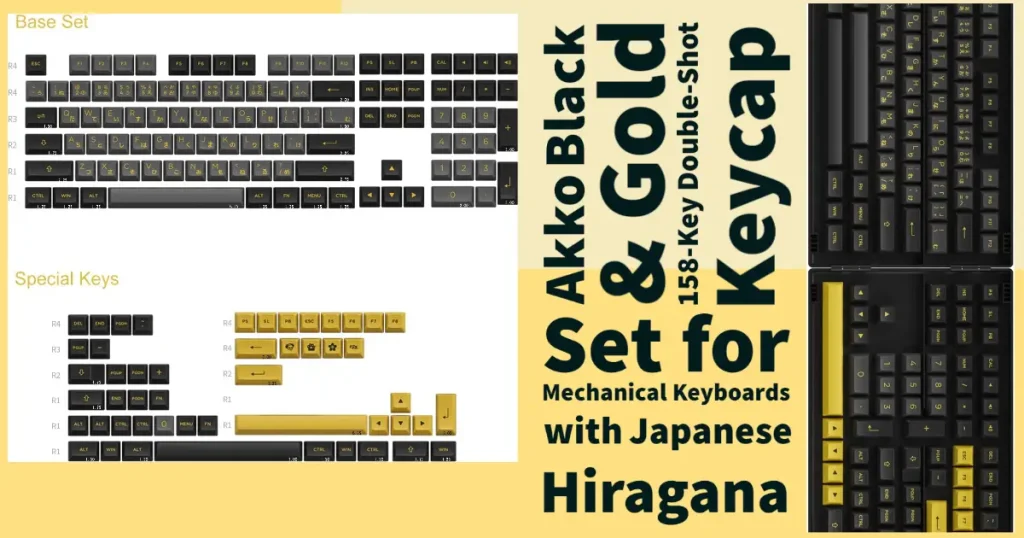
The stock ASA keycaps are good: thick double-shot PBT that resists shine. The catch comes if you want to replace them. A 96% board needs extra keys that a standard set may not include: the number pad, the compressed right-hand column and the bottom-row keys around the arrows. Before buying a set, check that it lists 96% or 1800 compatibility, and count the keys against the kit list. Our keycap compatibility checklist walks through it.
The stock legends on most colourways are not shine-through, so the RGB lights around the keys rather than through the letters. If readable backlit legends matter to you, this isn’t the right board.
Wireless, battery and software
Use the 2.4 GHz dongle or the cable for gaming: Akko lists 1000 Hz polling on the dongle. Bluetooth is best for switching between a laptop, tablet and phone. Akko’s manual lists three Bluetooth 5.0 slots plus a Bluetooth 3.0 slot for older devices. The battery is 3000 mAh, and as with any wireless board, RGB lighting shortens battery life a lot.
Customisation is done in the Akko Cloud driver, which Akko says covers all B and B Plus versions. Reviewers, including Tom’s Hardware, have criticised the software, and Akko notes that customising over Bluetooth isn’t supported on a Mac, so plan to plug in the cable when you set it up. The standard 3098B doesn’t support VIA or QMK. If you want those, check the exact listing or look at a different board.
Pros and cons
Pros
- Full number pad in a smaller case
- Hot-swap sockets take 3-pin and 5-pin MX switches
- 2.4 GHz, Bluetooth and USB-C
- Thick double-shot PBT ASA keycaps
- Budget price, when you can find it
Cons
- Stock is patchy; several colourways are discontinued
- Clunky software; no VIA or QMK on the standard model
- Legends aren’t shine-through on most colourways
- Replacement keycap sets need 96% support
- Arrow keys sit right next to the number pad
Who should still buy it
Buy it if you need the number pad for real work, want more room for your mouse, and like the idea of changing switches later without soldering. At its usual price, that combination is still the main reason to buy it.
Buy something else if you live in the navigation cluster, want backlit legends, or want to remap keys in VIA. A tenkeyless board with a separate number pad solves the first; the others mean looking at a different board. Our best Akko keyboards guide covers the rest of Akko’s range.
How the 3098B compares
| Option | Number pad | Desk space | Main trade-off |
|---|---|---|---|
| Akko 3098B (96%) | Yes | Smaller than full-size | Compressed navigation keys; harder keycap swaps |
| Full-size board | Yes | Largest | Pushes your mouse furthest to the right |
| TKL + separate number pad | Yes (separate) | Flexible | Two devices, but standard keycaps |
| 75% board | No | Smallest | No number pad at all |
Verdict
The 3098B is a good budget keyboard whose flaws are all predictable from the spec sheet: the software is weak, the layout takes a little getting used to, and replacement keycaps are harder to find. In return you get hot-swap, thick PBT keycaps, three connection modes and a number pad in a smaller case. The biggest change since this review was first written is availability, so check stock and the exact version before you buy.
Affiliate link: if you buy through it we may earn a small commission at no extra cost to you.
Frequently asked questions
Is the Akko 3098B still available?
Partly. Akko has moved several 3098B Plus and 3098N colourways into its discontinued section, and some retailers show them out of stock, but some colourways and old stock are still sold. Check the listing before you plan around it.
What is the difference between the Akko 3098B and 3098B Plus?
The 3098B Plus is the newer version. It uses Akko V3 Pro switches instead of the original CS Jelly switches, with 3-pin and 5-pin hot-swap, a tray mount and a 3000 mAh battery. The layout and connection modes are the same.
Is the Akko 3098B hot-swappable?
Yes. The 3098B and 3098B Plus take 3-pin and 5-pin MX-style switches without soldering. The wired 3098S is listed without hot-swap.
Does the Akko 3098B support VIA or QMK?
Not the standard model. Customisation is done in the Akko Cloud driver. Akko notes that customising over Bluetooth is not supported on a Mac, so use the cable for setup.
Is the Akko 3098B good for gaming?
Yes, over the 2.4 GHz dongle, which Akko lists at 1000 Hz polling, or the USB-C cable. Use Bluetooth for office work and switching between devices.
Can I put any keycap set on the Akko 3098B?
No. A 96% board needs extra keys for the number pad and the compressed right-hand column, so choose a set that lists 96% or 1800 compatibility and check the kit list.
Specs, versions and stock checked on 13 October 2026 against Akko’s manual and store pages and retailer listings. Typing notes reference Tom’s Hardware’s 3098B/3098N review.