linear switches

Written by Elizabeth · Published September 3, 2024
Reviewed & Updated by Olivia · Updated on July 25, 2026

Disclosure: This guide contains affiliate links. If you buy through them we may earn a small commission at no extra cost to you. We only recommend switches we would put in our own boards.

Linear switches press straight down with no bump and no click, which makes them smooth, consistent, and the default choice for gaming. But not all linears feel the same. Spring weight, factory lube, and housing material change the feel and sound a lot. Below are the best linear switches you can buy in 2026, sorted so you can match one to how you type or play.

⚡ Quick take

For most people, a factory-lubed Gateron linear like the Ink Black is the smoothest safe bet. Gamers who want a light, fast switch should look at the TTC Gold Pink. On a budget, the Akko or Kailh reds do the job. New to switches? Start with the tried and true Cherry MX Red.

This roundup ranks linear switches for typing and everyday use. If you are buying specifically for gaming, where actuation weight and how early the switch fires matter more than sound, start with our best linear switches for gaming guide instead.

How we picked

We judged each switch on smoothness, sound, spring weight, whether it comes factory-lubed, availability, and value. Every pick has a real use case and an honest downside, because no single switch is best for everyone. If you are still deciding between linear and tactile, start with our tactile vs linear switches guide, then come back here.

Best linear switches compared

SwitchActuation (approx)Feel and soundBest for
Cherry MX Red45 gLight, clacky, reliableBeginners and gaming
Gateron Baby Raccoon~62 gSmooth, deep, factory lubedThocky sound lovers
NovelKeys Cream~55 gCreamy POM, improves with break-inEnthusiasts who lube
Kailh Red~50 gBasic, budget-friendlyCheap builds
Razer Linear OpticalLightFast optical actuationRazer keyboard gamers
Akko Pink (CS)~45 gLight, smooth for the priceBudget Akko builds
Outemu Red~50 gVery cheap, decentRock-bottom budget
Durock Linear~62 gSmooth, good valueSmooth mid-weight typing
TTC Gold Pink~37 gVery light and fastSpeed-focused gaming
Tealios V2~67 gPremium, extremely smoothEnthusiasts chasing smoothness
Gateron Ink Black~60 gDeep, smooth, premiumSound and smoothness
Alpaca V2~62 gBoutique-smooth, great valueMid-weight all-rounder

The 12 best linear switches

1. Cherry MX Red, the reliable classic
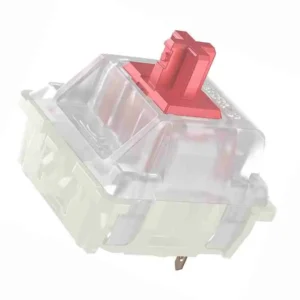
Cherry MX RED 1

Why it is here. The 45 g Cherry MX Red is the switch that made linears mainstream. It is light, dependable, and available in almost every board, which makes it the safe first linear. Best for: beginners and everyday gaming.

Watch out: it is not factory lubed and feels a little scratchier and clackier than modern Gateron linears. A quick lube fixes most of that.

2. Gateron Baby Raccoon, deep and thocky
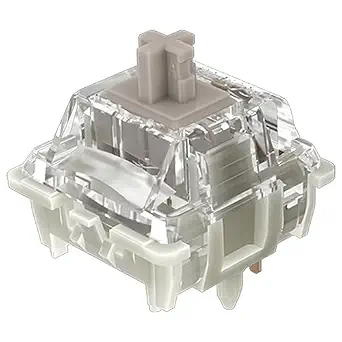
Gateron baby racoon

Why it is here. A factory-lubed linear around 62 g with a deep, full sound that people chase for a thocky build. Smooth out of the box with a satisfying, rounded bottom-out. Best for: people who care about sound.

Watch out: the heavier spring is not for everyone, and stock can come and go depending on the batch.

3. NovelKeys Cream, the creamy POM linear
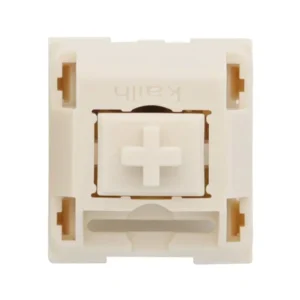
Novelkeys Cream MX SMD

Why it is here. Full POM housings give the Cream a unique, muted, creamy sound and feel that no other switch quite copies. It gets smoother the more you use it. Best for: enthusiasts who lube and enjoy a distinctive sound.

Watch out: it can feel scratchy out of the box and really wants a lube and a short break-in to shine. Not a plug-and-play pick.

4. Kailh Red, the budget standard

Kailh-Red-Switch-Set_720x

Why it is here. A dependable, cheap linear around 50 g that shows up in a lot of budget boards. It does the job without fuss. Best for: low-cost builds and spares.

Watch out: it is not as smooth as a modern Gateron and has no factory lube, so it feels basic next to premium options.

5. Razer Linear Optical, fast for Razer boards
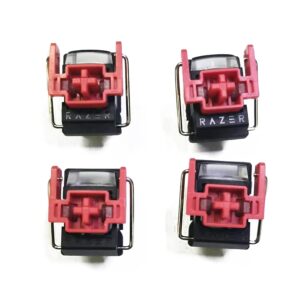
Razer red Linear Optical

Why it is here. Razer’s optical linear registers with light instead of metal contact, which shaves a little latency and appeals to competitive players on Razer boards. Best for: gamers already in the Razer ecosystem.

Watch out: it only works in Razer optical keyboards, so you cannot hot-swap it into a standard MX board. That limits it to Razer owners.

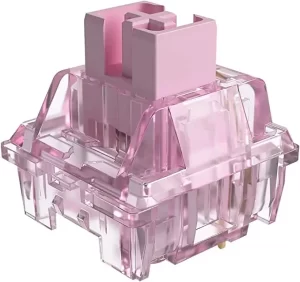
6. Akko CS Pink, budget smoothness
Jelly Pink Akko

Why it is here. A light linear around 45 g that is smoother than you expect for the money, and a natural pick if you already own an Akko board. Best for: budget builds that still want a pleasant feel. See more in our best Akko keyboards guide.

Watch out: the light spring and budget housing mean it does not match premium switches on consistency, and some units are slightly scratchy.

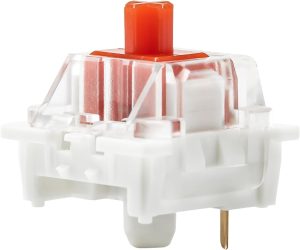
7. Outemu Red, the rock-bottom option
Yunzii Outemu Switches for Mechanical Keyboard DIY

Why it is here. If you need the cheapest possible linear for a first build or a repair, Outemu Red gets you typing. Best for: the tightest budgets.

Watch out: quality varies from unit to unit and it is scratchier than pricier switches. Treat it as a starting point, not an endgame.

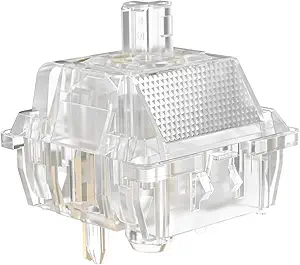
8. Durock Linear, smooth value
Durock Linear

Why it is here. Durock’s linears around 62 g are smooth, well built, and priced below boutique switches, which makes them a great value upgrade. Best for: smooth mid-weight typing without paying flagship prices.

Watch out: Durock sells several linear models under different names, so check the exact weight and stem before you buy.

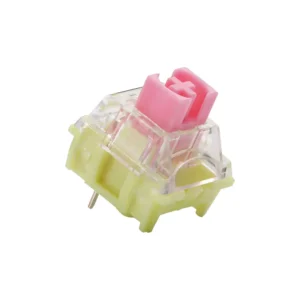
9. TTC Gold Pink, light and fast
TTC V2

Why it is here. A very light linear around 37 g that actuates fast and feels effortless, which speed-focused gamers love. Best for: fast gaming and light-touch typists.

Watch out: that light spring causes accidental key presses for some people, especially heavy typists. Try before committing a full board.

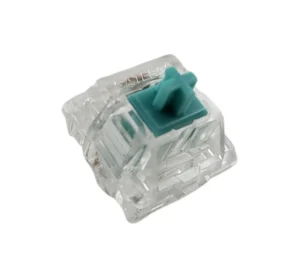
10. Tealios V2, premium smoothness
tealios v2 switches

Why it is here. Tealios V2, the linear member of the Zeal family, is one of the smoothest stock linears you can buy, with a clean, refined feel around 67 g. Best for: enthusiasts chasing top-tier smoothness.

Watch out: it is expensive and often out of stock. You pay a real premium over switches that get most of the way there for less.

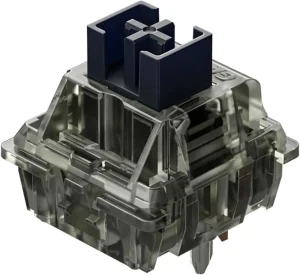
11. Gateron Ink Black, deep and refined
Gateron Ink Black Linear Switch

Why it is here. The Ink Black pairs a special ink housing with a smooth, slightly heavier linear feel around 60 g and a deep, premium sound. It is a community favorite for a reason. Best for: people who want smoothness and a deep sound in one switch.

Watch out: it costs more than standard Gateron linears, and the heavier spring is not ideal if you like a light touch.

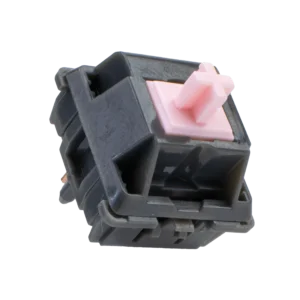
12. Alpaca V2, boutique feel for less
Alpaca V2

Why it is here. Alpacas built a reputation as a smooth, mid-weight linear around 62 g that punches well above its price. A great all-rounder for typing and gaming. Best for: a balanced daily-driver linear.

Watch out: availability comes and goes, and stem wobble is slightly higher than the most premium options.

What to look for in a linear switch

  • Spring weight: lighter switches (around 45 g) suit fast gaming and light typists; heavier ones (60 g and up) feel more deliberate and reduce accidental presses.
  • Factory lube: a factory-lubed switch feels smoother out of the box. Unlubed switches can be improved with our switch lubing guide.
  • Housing and stem material: POM and ink housings change the sound, usually toward a deeper, muted tone.
  • Sound: heavier, well-lubed linears in a foamed board give the deep thock many people want.
  • Compatibility: standard MX-style linears drop into any hot-swap board. Proprietary optical switches, like Razer’s, only work in their own keyboards.

Frequently asked questions

Are linear switches good for typing?

Yes, though they feel different from tactile switches. Linears are smooth with no bump, so you get no feedback until you bottom out. Many people type happily on them, especially heavier, well-lubed linears. If you want to feel each key register, a tactile switch may suit you better.

What is the best linear switch overall?

For most people, a smooth factory-lubed Gateron linear like the Ink Black is the best balance of smoothness, sound, and availability. Enthusiasts chasing the smoothest possible feel often pick the Tealios V2, and gamers who want a light, fast switch prefer the TTC Gold Pink.

What is the smoothest linear switch?

The Tealios V2 is widely considered one of the smoothest stock linears, with the Gateron Ink Black and Alpaca V2 close behind for less money. Any linear gets smoother with a proper lube job, so a mid-priced switch plus lube often rivals a premium one.

Are linear switches good for gaming?

Yes. Their smooth, consistent travel makes rapid presses reliable, which is why most gaming keyboards ship with linears. Lighter linears like the TTC Gold Pink feel especially fast. For the lowest latency, use a wired board or look at magnetic switches.

Do linear switches work in any keyboard?

Standard MX-style linear switches drop into any hot-swap or solderable board. The exception is proprietary optical switches, such as Razer’s linear optical, which only work in that brand’s optical keyboards and cannot be swapped into a normal MX board.

Verdict: which linear switch should you buy?

If you want one easy answer, get a smooth factory-lubed Gateron linear like the Ink Black. It sounds great, feels smooth out of the box, and suits both typing and gaming. Gamers who want a light, fast switch should pick the TTC Gold Pink, budget builders are well served by the Akko or Kailh reds, and enthusiasts chasing the smoothest possible feel should try the Tealios V2.

Whatever you choose, remember that a lube job and a well-built board change the feel and sound as much as the switch itself. Pick the weight that matches your hands, and you will be happy with any switch on this list.


We update this roundup as new switches launch and community favorites shift, so the picks stay current.
Written by Elizabeth · Published August 29, 2024
Reviewed & Updated by Olivia · Updated on July 26, 2026

Disclosure: This guide contains affiliate links. If you buy through them we may earn a small commission at no extra cost to you. We only recommend switches we would put in our own boards.

Akko has become one of the best value brands in switches, and its linear lineup is where it shines. Linear switches press straight down with no bump, which makes them smooth and a favorite for gaming and fast typing. But Akko sells a lot of them, split across the budget CS series and the pre-lubed V3 Pro series, and they do not all feel the same. Below are the best Akko linear switches in 2026, ranked and sorted so you can pick the right one for your build.

⚡ Quick take

For most people the V3 Cream Yellow Pro is the best all-round Akko linear: smooth, pre-lubed, and easy to love out of the box. Gamers who want speed should get the V3 Silver Pro, and anyone on a budget is well served by the CS Jelly Black. New to switch types? Read our tactile vs linear guide first.

How we picked

We judged each Akko linear on smoothness, sound, spring weight, whether it comes factory pre-lubed, and value. The V3 Pro switches ship pre-lubed and feel more refined, while the CS series is cheaper and still solid for the money. Every pick below has a clear best use and an honest downside, because no single switch suits everyone.

Akko linear switches compared

SwitchSeriesWeight (approx)Best for
V3 Cream Yellow ProV3 Pro~50 gBest overall
V3 Piano ProV3 Pro~63 gBest sound
CS Jelly BlackCS~50 gBest budget
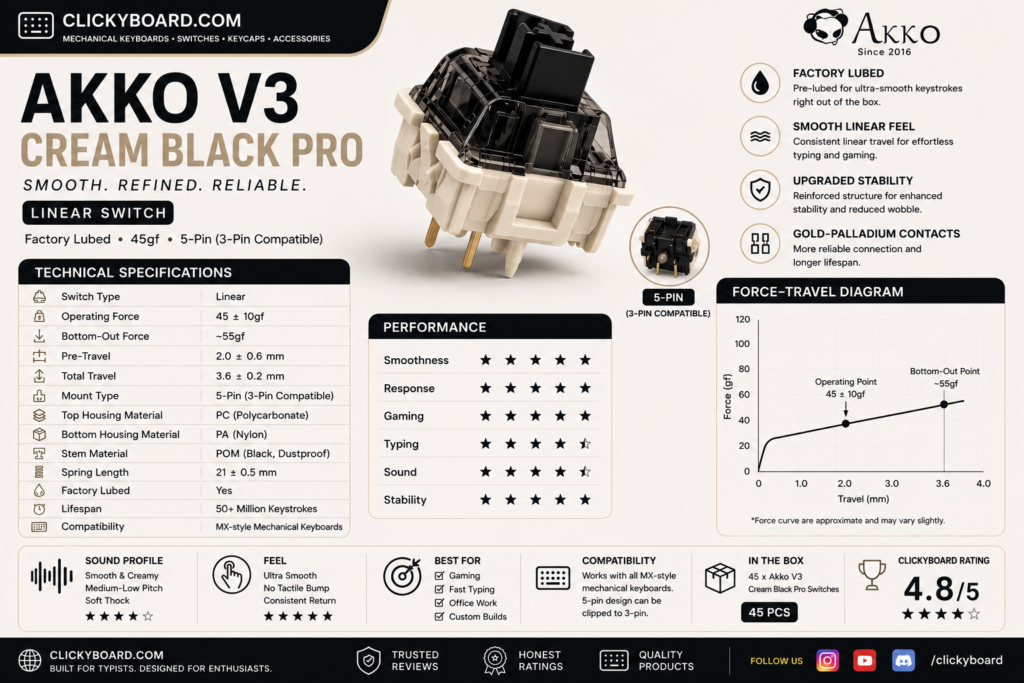
V3 Cream Black ProV3 Pro~60 gBest heavier linear
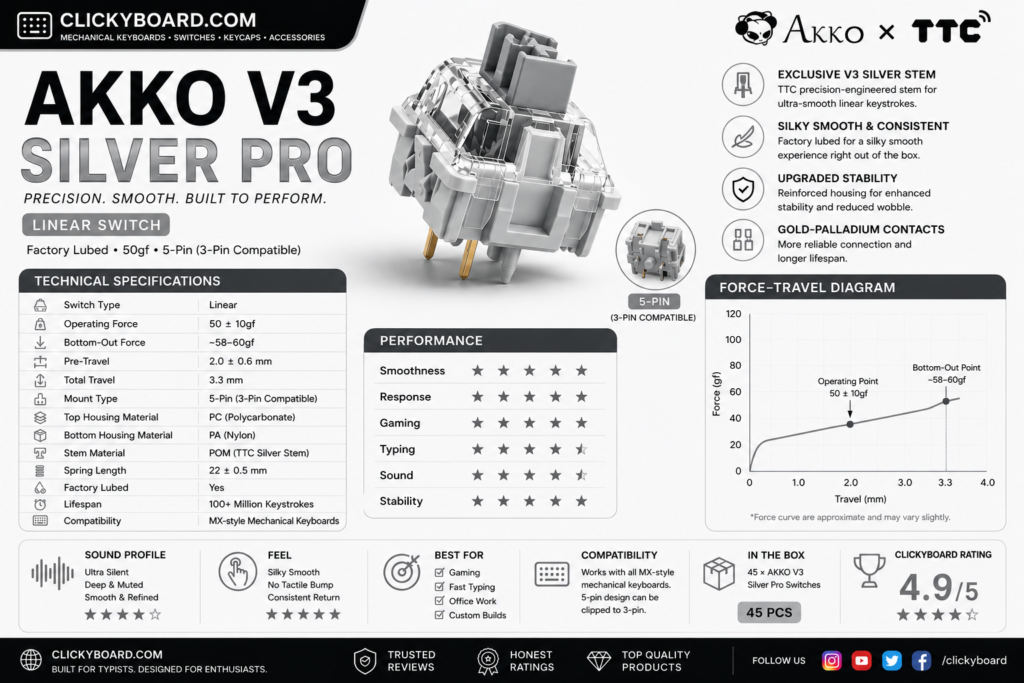
V3 Silver ProV3 Pro~43 gBest for gaming and speed
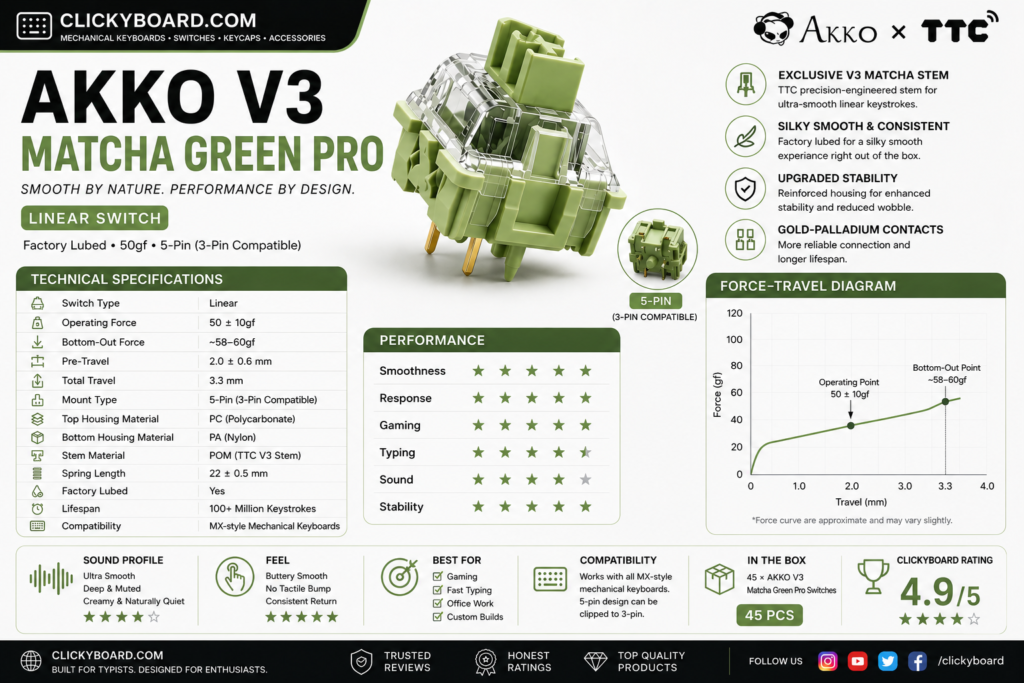
V3 Matcha Green ProV3 Pro~50 gBest balanced feel
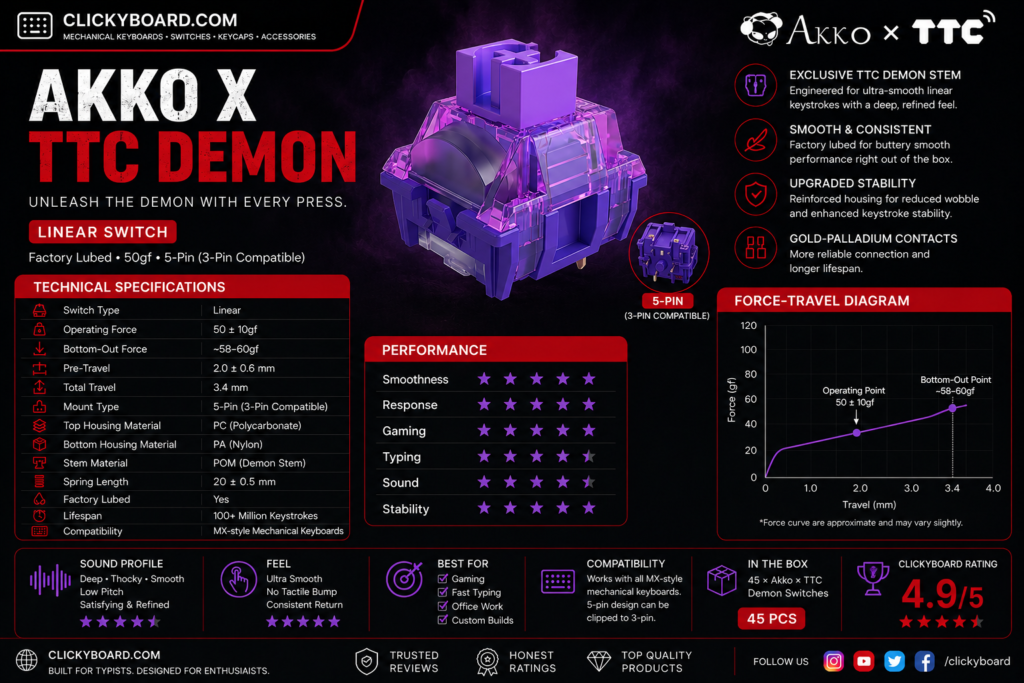
Akko x TTC DemonCollab~42 gBest light and smooth
V3 Penguin (Silent)V3 Pro~45 gBest silent linear
RosewoodThemed~43 gLight budget classic
POM PinkThemed~45 gCreamy, muted feel
CS CrystalCS~43 gBudget RGB shine-through
CS Wine RedCS~50 gBudget all-rounder

The best Akko linear switches

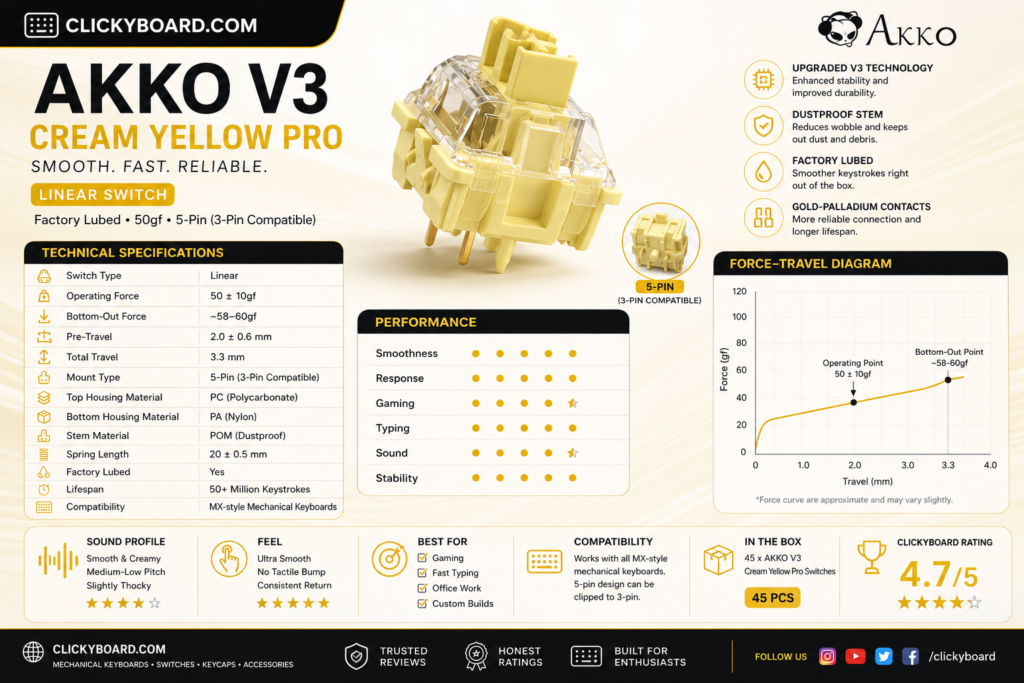
1. Akko V3 Cream Yellow Pro, the best all-rounder

Akko v3 cream yellow pro

Why it is here. A medium-weight linear around 50 g that comes factory pre-lubed and feels smooth and deep straight out of the box. It is the switch most people should buy first, with a rounded, satisfying sound. Best for: an easy, do-it-all linear for typing and gaming.

Watch out: the mid weight feels a touch heavy if you prefer a fast, feather-light switch for competitive play.

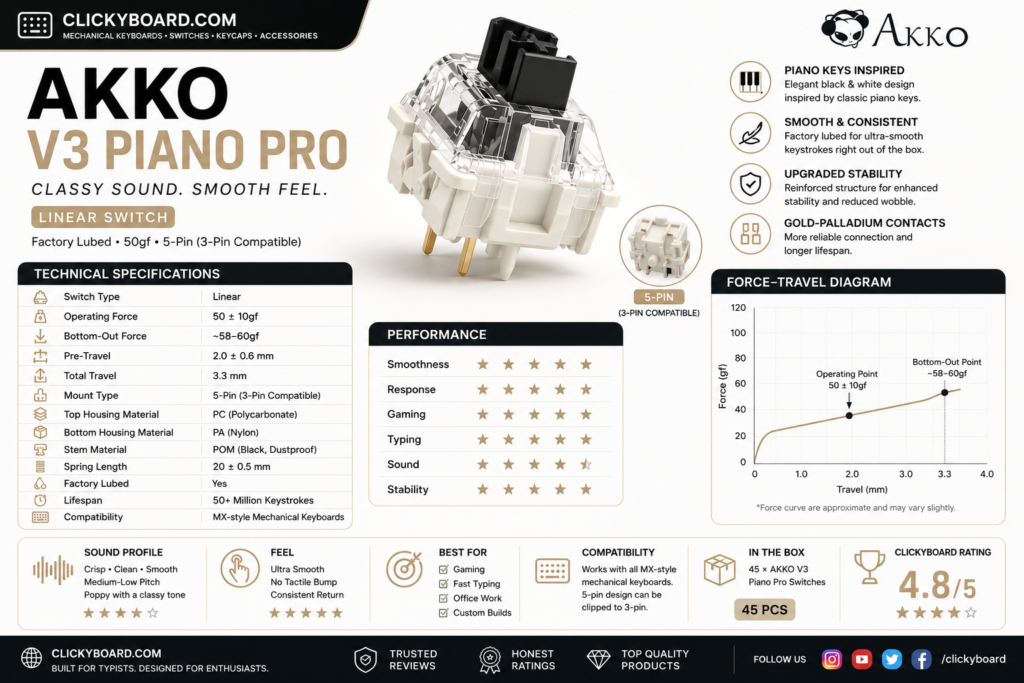
2. Akko V3 Piano Pro, the best sound

Akko v3 piano pro

Why it is here. Tuned for a deep, musical sound, the Piano Pro is pre-lubed and smooth with a fuller thock than most Akko linears. It is the pick if you care most about how a board sounds. Best for: sound-focused builds.

Watch out: it is heavier and pricier than the CS series, so it is overkill if you just want a cheap, light linear.

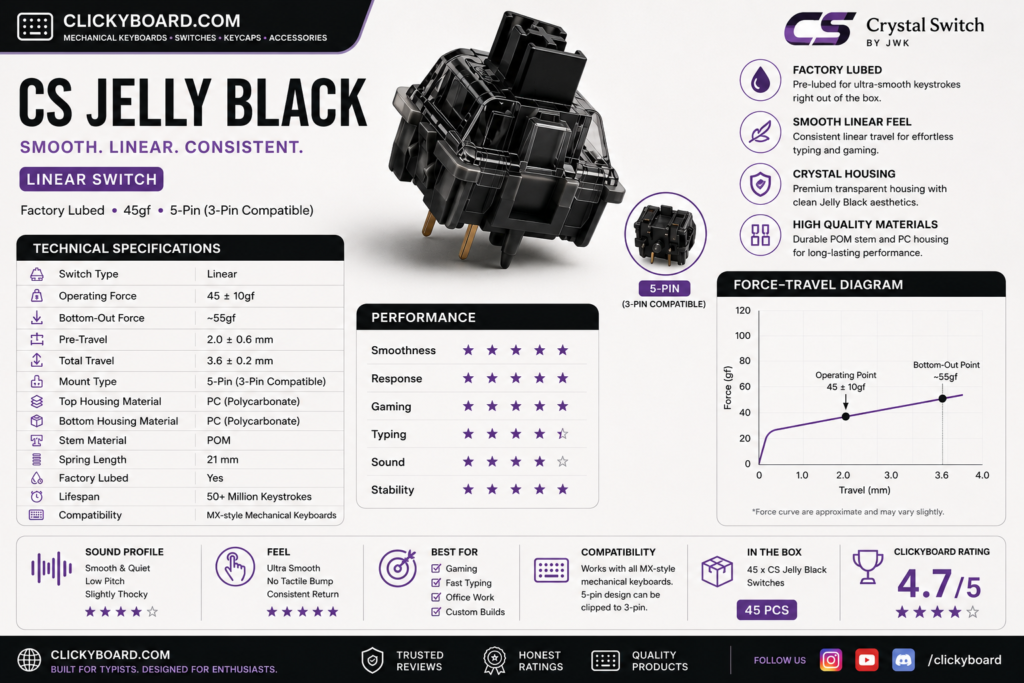
3. Akko CS Jelly Black, the best budget pick

CS jelly black

Why it is here. A budget linear around 50 g that is smoother than its price suggests and a favorite for first builds. Great value if you are filling a whole board. Best for: cheap builds that still want a pleasant feel.

Watch out: it is not pre-lubed, so it is a step less refined than the V3 Pro switches. A quick lube closes most of the gap.

4. Akko V3 Cream Black Pro, the best heavier linear

Akko v3 cream black pro

Why it is here. A pre-lubed linear around 60 g with a firmer, more deliberate press and a deep sound. Typists who bottom out hard tend to love it. Best for: heavy-handed typists who want control.

Watch out: the heavier spring tires out light typists and is not ideal for fast gaming.

5. Akko V3 Silver Pro, the best for gaming

Akko v3 silver pro

Why it is here. A light, short-travel speed linear around 43 g that actuates fast, which competitive gamers value. Pre-lubed and smooth for a speed switch. Best for: fast gaming and quick reactions.

Watch out: the short travel and light spring cause accidental presses for some, especially while typing.

6. Akko V3 Matcha Green Pro, the balanced choice

Akko v3 matcha green pro

Why it is here. A smooth mid-weight linear around 50 g with a balanced feel and a pleasant, slightly muted sound. A great alternative if you want the Cream Yellow feel with a different tone. Best for: a balanced daily-driver linear.

Watch out: it is close enough to the Cream Yellow Pro that you rarely need both.

7. Akko x TTC Demon, the light and smooth pick

Akko ttc pro

Why it is here. A collaboration with TTC that produces a very smooth, light linear around 42 g. If you like a fast, effortless keystroke, this is one of the smoothest light Akko options. Best for: light-touch typists and gamers.

Watch out: the light weight is not for heavy typists, and stock can be harder to find.

8. Akko V3 Penguin, the best silent linear

Akko v3 penguin silent

Why it is here. A silent linear that muffles the bottom-out for quiet offices, shared rooms, or late-night typing, while keeping a smooth press. Best for: quiet spaces where a normal switch would be too loud.

Watch out: the silencing pads make the bottom-out feel slightly mushy, so it is less crisp than a standard linear.

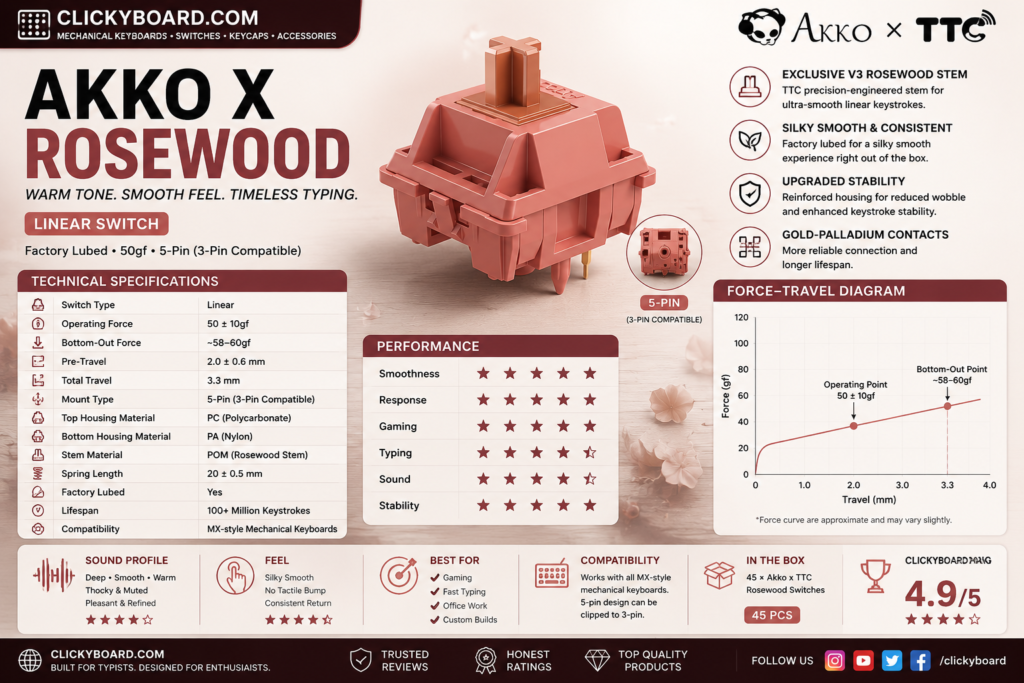
9. Akko Rosewood, a light budget classic

Akko Rosewood

Why it is here. A light linear around 43 g from Akko’s themed lineup, smooth and easy to type on at a low price. A solid, no-drama budget option. Best for: a cheap, light everyday linear.

Watch out: it is an older line, so availability can be hit or miss.

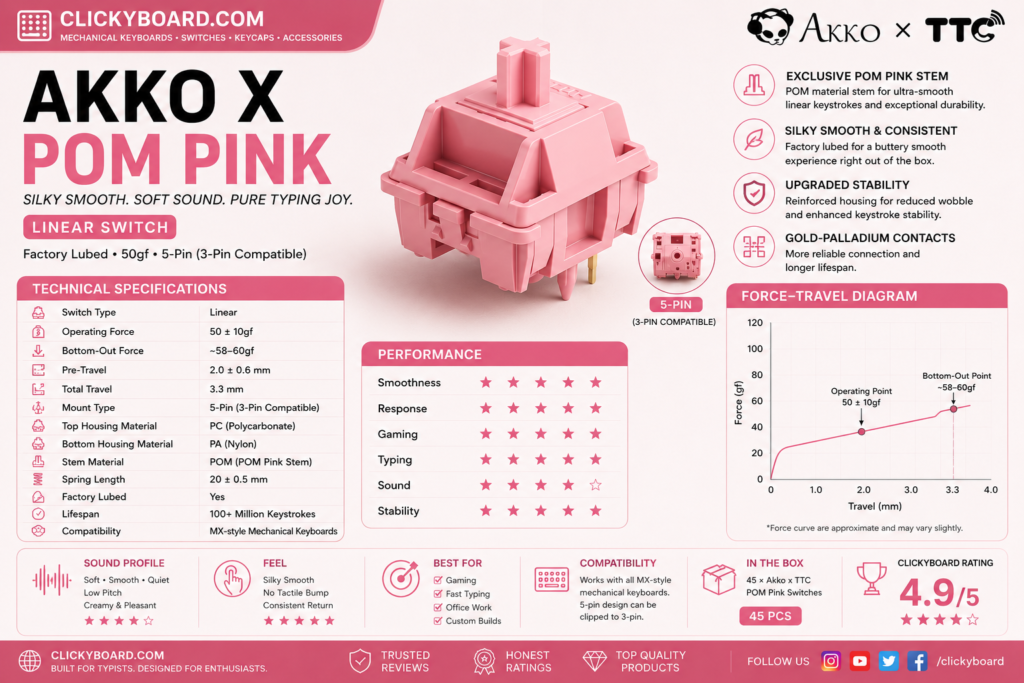
10. Akko POM Pink, creamy and muted

Akko POM Pink

Why it is here. POM parts give this linear a soft, creamy feel and a muted, rounded sound that some people prefer over a sharper switch. Best for: a softer, quieter linear character.

Watch out: the muted sound and soft feel are subjective, so try to hear it before buying a full set.

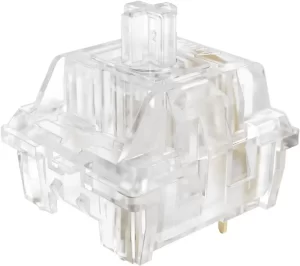
11. Akko CS Crystal, budget RGB shine-through

Crystal Transparent Linear Akko

Why it is here. A clear-housing budget linear that lets RGB shine through brightly, so it is a natural pick for a colorful, backlit build. Light and easy to press. Best for: RGB-focused budget builds.

Watch out: the feel is basic next to the V3 Pro switches, and it is not pre-lubed.

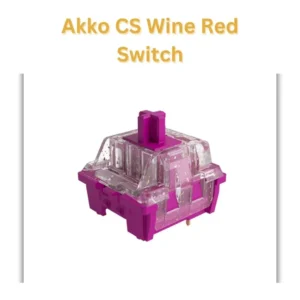
12. Akko CS Wine Red, the budget all-rounder

Akko CS Red Wine factory pre lubed linear switches

Why it is here. A dependable budget linear around 50 g that handles both typing and gaming without fuss. A safe, cheap choice if you just want a solid linear. Best for: a low-cost, general-purpose linear.

Watch out: it is unremarkable next to the premium picks and has no factory lube.

CS series vs V3 Pro: which should you buy?

Akko splits its linears into two families. The CS series is the budget line: good switches with no factory lube, best for cheap builds or if you plan to lube them yourself. The V3 Pro series costs more but ships pre-lubed and feels noticeably smoother and deeper out of the box. If you want the best experience with no extra work, buy V3 Pro. If you are filling a big board on a budget, the CS series is the smart value, and our switch lubing guide will get them most of the way to V3 Pro smoothness.

Frequently asked questions

What is the best Akko linear switch?

For most people the V3 Cream Yellow Pro is the best Akko linear overall. It is pre-lubed, smooth, and has a deep, pleasant sound out of the box. Gamers who want a lighter, faster switch should look at the V3 Silver Pro, and budget builders are well served by the CS Jelly Black.

Are Akko linear switches good?

Yes. Akko linears offer some of the best value in switches, especially the pre-lubed V3 Pro line, which feels smooth and refined for the price. The cheaper CS series is also solid, though it benefits from a lube job. They are a common recommendation for people getting into the hobby.

What is the difference between Akko CS and V3 Pro switches?

The CS series is budget-priced and not factory lubed, while the V3 Pro series costs more, ships pre-lubed, and feels smoother and deeper straight away. Buy V3 Pro for the best out-of-box feel, or CS if you want to save money and do not mind lubing them yourself.

Which Akko linear switch is best for gaming?

The V3 Silver Pro is the best Akko linear for gaming. It is a light, short-travel speed switch that actuates quickly, which helps in fast games. If you find it too light and prone to accidental presses, the V3 Cream Yellow Pro is a slightly heavier all-rounder that still games well.

Do Akko switches fit any keyboard?

Yes. Akko switches use the standard MX stem and pins, so they drop into any hot-swap or solderable board that takes MX-style switches. Check whether your board is 3-pin or 5-pin, though most modern hot-swap boards accept both.

Verdict: which Akko linear should you buy?

If you want one easy answer, buy the V3 Cream Yellow Pro. It is smooth, pre-lubed, and suits almost any build. Gamers should get the V3 Silver Pro for speed, budget builders should grab the CS Jelly Black, and anyone chasing a deep sound should try the V3 Piano Pro.

Whatever you pick, Akko linears are among the best value switches you can buy, and a lube job plus a well-built board will make any of them sing. If you are still weighing linear against tactile, our tactile vs linear guide and our best linear switches roundup will help, and you can pair these switches with a board from our best Akko keyboards guide.


We update this roundup as Akko releases new switches and community favorites shift, so the picks stay current.
In the vast and intricate landscape of mechanical keyboards, “Gateron Yellow Vs Cherry MX Red” is a battle that has keyboard enthusiasts on the edge of their seats. Both of these switches have their unique strengths, making it a clash of the titans.

These low-profile linear switches sit lower than most Cherry MX switch alternatives, which means they take up less space and are thus preferable in compact keyboards (like the tenkeyless models that are so popular these days). In this article we’ll look at what makes Gateron Yellow switches different, how they compare to other options, and how to decide whether they’re right for your needs. So, let’s dive deep into this riveting showdown.

What’s the difference between Gateron Yellow Switches and Cherry MX switches

Unraveling the Mystery: Gateron Yellow

Answering this question fully would require us to discuss the technical details of both types of switches. In this article, we’ll simply discuss the most relevant differences that should inform your purchasing decision. Gateron Yellow switches use different materials and have a different design from Cherry MX switches (with a couple of exceptions).

Let’s meet our first contender: the Gateron Yellow. Known for its smooth keystrokes, the Gateron Yellow is a linear switch, meaning there’s no tactile bump or audible click when a key is pressed. It’s a smooth ride from the top to the bottom of the keystroke.

These differences are what lead to the different properties Gateron yellow switches have different variation while Cherry MX does not have. For starters, Gateron switches use an entirely different spring design. They provide about 40% less actuation force than Cherry MX switches, and they don’t have a tactile or auditory click.

Other Features that are important to notice for Gateron Yellow Switch are the mount type is available in both Plate and PCB. Spring is made up of stainless steel and has normal sound.

Playing a high-intensity game or typing out a long report? The Gateron Yellow, with its lower actuation force, ensures less finger fatigue. It’s like a marathon runner, built for long distances and stamina.

Gateron_Yellow_Vs_Cherry_Red

Gateron yellow switch and Cherry MX

The Challenger: Cherry MX Red

In the other corner, we have the Cherry MX Red. A force to reckon with in the world of mechanical switches, Cherry MX Reds are favored for their reliability and balanced specs. They’re also linear switches, offering a smooth, uninterrupted keypress.

However, the Cherry MX Reds pack more punch when it comes to actuation force. They’re like the sprinters of the keyboard world, providing a more substantial resistance that some typists and gamers prefer.

Cherry MX Red, Linear switches - Smooth and responsive switches ideal for gaming and typing. Experience effortless keystrokes and quick response times with Cherry MX Red linear switches.

Gateron Yellow Vs Cherry MX Red: The Gaming Perspective

The keyword here is ‘linear.’ For gamers, both the Gateron Yellow and Cherry MX Red switches are quite appealing. The lack of tactile bump means faster, smoother key presses – perfect for those rapid-fire gaming scenarios.

Imagine you’re in the middle of a heated CS:GO match, where every millisecond counts. With both these switches, your commands are executed as quickly as your fingers can move.

However, in the Gateron Yellow Vs Cherry MX Red face-off, Gateron Yellow might take the cake for some due to its lower actuation force. This could translate into quicker responses and less finger fatigue during those extended gaming sessions.

Gateron Yellow Vs Cherry MX Red: The Typing Experience

From a typing standpoint, the Gateron Yellow Vs Cherry MX Red battle offers a different perspective. For the touch typist, the heavier actuation force of Cherry MX Reds can be advantageous. It offers a form of feedback, ensuring you’ve pressed the key adequately, and can help prevent accidental keystrokes.

On the other hand, if you’re in for long typing sessions, the Gateron Yellow’s lower actuation force means less strain on your fingers, making it a worthy opponent in this contest.

Differences between Gateron Yellow switches and Cherry MX based on user experience can be observed below

 Gateron YellowCherry MX
CostBudget FriendlyExpensive
SoundQuiteLouder
FeelSmoothScratchier
VariationsVariety switchesLess variety in switches
AvailabilityEasily AvailableEasily Available
Actuation Force50 ± 15 gf45 ± 15 cN
Pre-Travel2.0 ± 0.6 mm2.0 ± 0.6 mm
Travel Distance4.0 ± 0.6 mm4.0 ± 0.4 mm
BehaviorLinearCrossLinear
Suitable forOffice/gamingOffice/gaming
Comparison between Gateron yellow switch and Cherry MX

Variations

Gateron Yellow Switch

One of the most important things that a buyer must notice is that these switches are not factory-lubed. If you ever feel an issue in lubing your switches follow the guide that I have published previously.

Except Gateron KS-3 all the variations of the Gateron Yellow switch benefits from films. The table below shows different variations of the Gateron Yellow switches which are having different appearance yet their performance and specifications remain same except few features.

VariationsActuationBottom-OutPre-TravelTotal TravelPOM Colored (Opaque)Housing Bottom
Gateron KS-3X4755g63.5g2.00mm4.00mmYesNylon/PC (Mily Colored)Nylon (Colored Opaque)
Gateron KS-355g63.5g2.00mm4.00mmYesNylon (Colored Opqaue)Nylon (Colored Opaque)
Gateron KS-855g63.5g2.00mm4.00mmYesPC TransparentNylon (Colored Opaque)
Gateron KS-3X155g63.5g2.00mm4.00mmYesNylon/PC (Mily Colored)Nylon/PC (Mily Colored)
Gateron KS-955g63.5g2.00mm4.00mmYesPC TransparentNylon (Colored Opaque)

Technical Specification of Gateron Yellow Vs Cherry Mx Red

The feel: Gateron Yellow Vs Cherry Mx Switches

In terms of feel, both the Gateron Yellow and Cherry MX Red switches offer a smooth, linear keystroke with no tactile bump or audible click. However, there are subtle differences.

Gateron Yellow switches are known for their buttery smooth keystroke due to their slightly lower actuation force. If you’re after a whisper-soft touch, Gateron Yellow switches may be more to your liking.

Cherry MX Red switches, on the other hand, offer a slightly more pronounced keystroke due to their marginally higher actuation force. If you prefer a touch more feedback when typing, Cherry MX Red might be your perfect match.

Durability Rating: Gateron Yellow Vs Cherry MX Red

When it comes to durability, Cherry MX Red switches typically come out ahead. These switches are rated for an impressive 100 million keystrokes, reflective of Cherry’s commitment to quality and durability.

Gateron Yellow switches, while not quite hitting the same numbers, are still quite robust, rated for 50 million keystrokes. While this is lower than the Cherry MX Red, it’s still a substantial number and should serve most users well over many years of usage.

Ultimately, in the faceoff of Gateron Yellow Vs Cherry MX Red, the decision rests on your personal preferences and requirements. Both switches have their strengths, offering a unique typing and gaming experience. Whether you value a lighter touch or a more robust keystroke, one of these switches is sure to elevate your keyboard game.

Delving into Actuation Force: Gateron Yellow Vs Cherry MX Red

Actuation force is the amount of pressure needed to register a keypress, and it’s one of the critical factors that determine how a switch feels.

Gateron Yellow switches have an actuation force of about 50g. It’s a lighter touch, leading to less finger fatigue over extended periods. It’s like a featherweight champion, delivering fast, light punches.

In contrast, Cherry MX Red switches have an actuation force of 45g. However, due to their design, they might feel slightly heavier to some users. They’re the middleweights, providing a touch more resistance that some typists and gamers find satisfying.

The pre-travel distance and total travel distance allows the users to press the switch as fast they can and allows a free movement of fingers on switches while gaming or typing.

Wobble Factor: Gateron Yellow Vs Cherry MX Red

Wobble, in the world of mechanical keyboards, refers to the degree to which a keycap can move side-to-side on a switch. A keyboard with minimal wobble provides a more stable and satisfying typing experience.

In the wobble comparison of Gateron Yellow Vs Cherry MX Red, Cherry MX Red switches generally have less wobble. Cherry’s longstanding reputation for high-quality switches shines here, offering a more stable keystroke. Gateron Yellow switches, while also relatively stable, may exhibit slightly more wobble.

Gateron Yellow Vs Cherry MX Noise Level

In the noise comparison of Gateron Yellow Vs Cherry MX Red, it’s a tie. Since both switches are linear and don’t produce a click upon actuation, they’re comparatively quieter than their clicky counterparts. They’re a good choice if you share your workspace or gaming station and don’t want to disturb others.

Which keycap sizes are available for Gateron Yellow Vs Cherry MX Switches?

When it comes to the Cherry MX Red and Gateron Yellow switches, they both support the standard keycap sizes. This compatibility means you can choose from a wide variety of keycap sets to customize your keyboard.

It’s important to note that while the switch types (Cherry MX Red or Gateron Yellow) do not restrict the keycap sizes, the layout of your specific keyboard might. If you’re considering buying new keycaps, it’s crucial to ensure they will fit your keyboard’s layout. Some keyboards, especially smaller ones like 60% or 75% keyboards, may use non-standard layouts, and thus require specific keycap sizes.

Where to buy Gateron Yellow Switches

If you’re looking to buy a keyboard that comes with Gateron Yellow switches, you’ll want to do some searching to find the best options. The most popular sites to buy keyboards are Amazon and AliExpress, but neither of these sites will show you the switches the keyboard is equipped with. Fortunately, you can use Google to search for sites that sell Gateron switches, and you’ll find plenty.

Some of these includes Gateron.co, Divinikey,  KBDfans, Cannonkeys etc. The price rates offered on these sites $4.14 (18 set), $2.00 (10 pcs), and $16.10 (70 pcs) respectively. However, Gateron itself is selling it for $6.00 (12 switches).  Alternatively, you can search for Gateron keyboards and see which sites sell that specific model. If you’re buying switches individually, then you have far more options. You can buy them directly from Gateron or from one of the many resellers that stock their switches.

Reviews of Verified Buyers

Jonathan W.:Great switches however. I bought a 10 pack to fiddle around with and take apart with my kids while ordering supplies to lube and film my Glorious Panda’s. What we discovered was a nice, well built switch, clean and linear feeling even dry. Not too scratchy. I’ll likely be ordering 10 packs to have a full set on hand, and probably some other inexpensive switches to try. I’m thoroughly impressed with the packaging as well. Clean and organized. Great job.

Aj:The Gateron Milky top Yellow is a great switch. The feel and sound are so good just stock can’t wait for the switches to be restocked really want to lube these switches. 🙂

Conclusion

When it comes down to Gateron Yellow Vs Cherry MX Red, the choice ultimately hinges on your preferences and needs. If you’re after a lighter, smoother keystroke, and tend to have long gaming or typing sessions, Gateron Yellow might be your best bet.

However, if you’re looking for a switch with a more substantial feel and an excellent reputation for durability, Cherry MX Red is a strong contender.

In the end, the best way to decide between Gateron Yellow Vs Cherry MX Red is to try them out for yourself. After all, when it comes to mechanical switches, personal feel is king. Whichever you choose, happy typing and gaming!