


We regularly review and update our guides to ensure keyboard recommendations, specs, and software information stay current with the latest releases and updates.
Affiliate disclosure: this article contains Amazon affiliate links. Purchases made through these links support Clickyboard at no extra cost to you.
The first time someone told me my keyboard could “run QMK,” I genuinely thought they were describing some separate piece of hardware I needed to buy. It took embarrassingly long to realise it was already sitting there, built into the board I owned, waiting for me to open a piece of free software and start clicking. Once I did, remapping my barely-reachable right Ctrl key into something useful took about thirty seconds, a change that would have required learning actual firmware programming just a few years earlier.
This guide explains exactly what QMK and VIA are, how they relate to each other, what you can actually do with them, and how to check whether your next keyboard supports either before you buy.
⚡ Quick Answer
QMK is open-source firmware that runs directly on a keyboard’s microcontroller, storing its keymap and settings. VIA is a graphical desktop app that lets you configure QMK-compatible keyboards by clicking instead of writing code. Together they let you remap any key, build custom layers, and record macros, all without programming knowledge. Check a board’s product page or the official VIA supported list before buying if this matters to you.
1. QMK vs VIA: They’re Not Competitors
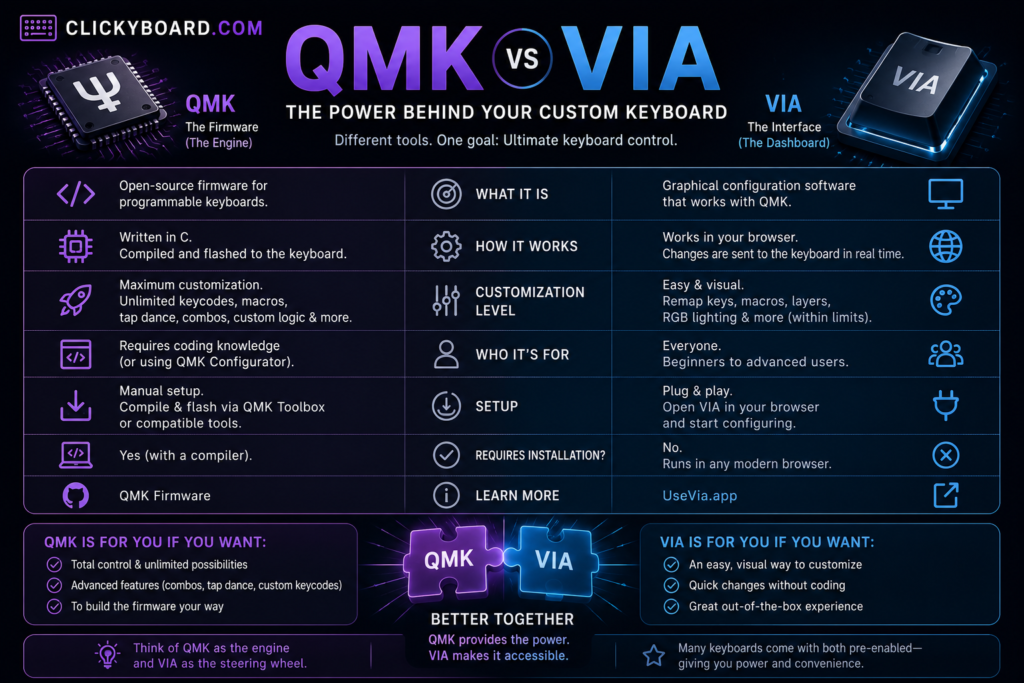
QMK (Quantum Mechanical Keyboard) is open-source firmware that runs directly on the keyboard’s microcontroller, storing the keymap, macros, layers, and lighting settings. VIA is a graphical desktop application that communicates with QMK-compatible keyboards, letting you configure all of that by clicking instead of writing and compiling code.
⚙️ QMK = The Engine
Lives on the keyboard itself. Handles every keystroke, stores your configuration, and keeps working even when no computer software is open.
🖱️ VIA = The Steering Wheel
A free app you install on your computer. Talks to QMK firmware to change settings, you don’t need it open after you’ve finished configuring.
2. What You Can Actually Do
🔄 Remap Any Key
Reassign any physical key to any function, swap Caps Lock for Escape, move a modifier, whatever suits you.
🧱 Custom Layers
Stack multiple full keymaps switched by holding or tapping a key, the backbone of compact layouts.
⏺️ Macros
Record a sequence of keystrokes and play it back with a single press.
🌈 RGB Lighting
Control per-key RGB lighting on boards with compatible hardware.
3. Do You Need to Know How to Code?
No. If your keyboard supports VIA, you can remap keys, build layers, and record macros entirely through a graphical interface with no coding required. Coding only becomes necessary for advanced custom QMK features beyond what VIA’s interface exposes, such as highly specific custom logic, which most users never actually need.
✅ If VIA covers your needs, you’ll likely never touch a line of code. The vast majority of practical customization (remapping, layers, basic macros, lighting) lives entirely inside VIA’s point-and-click interface.
4. Checking Compatibility Before You Buy
Check the manufacturer’s product page for explicit mention of QMK or VIA. Search the official VIA supported keyboards list for your specific model. Check community forums for unofficial QMK configurations hobbyists have built for boards without official support.
⚠️ “Programmable” doesn’t always mean QMK/VIA. Some manufacturers use proprietary software with similar but more limited remapping and market it as “programmable” without QMK or VIA support specifically. If open, standardised firmware matters to you, verify the specific terms rather than trusting generic marketing.
5. Common Real-World Use Cases
- Fixing an awkward stock layout: swap Caps Lock for Escape, move a misplaced modifier, or relocate a function you use constantly.
- Making compact layouts livable: the FN-layer system on every 60% and 65% keyboard exists because of exactly this layer-switching capability.
- Gaming binds: macros and remapped keys let players set up complex inputs without relying on in-game settings alone.
- Multi-language typing: remap keys to type special characters or switch layouts for different languages on the same board.
6. Frequently Asked Questions
What is QMK?
QMK (Quantum Mechanical Keyboard) is open-source firmware that runs directly on a keyboard’s microcontroller, storing the keymap, macros, layers, and lighting settings. It is the underlying engine that makes advanced keyboard customization possible.
What is VIA and how is it different from QMK?
VIA is a graphical desktop application that lets you configure a QMK-compatible keyboard by clicking instead of writing and compiling code. VIA is not a replacement for QMK, it is a friendly interface that communicates with QMK firmware already running on the keyboard.
Do I need to know how to code to use QMK or VIA?
No. If your keyboard supports VIA, you can remap keys, build layers, and record macros entirely through a graphical interface with no coding required. Coding is only necessary for advanced custom QMK features beyond what VIA’s interface exposes, which most users never need.
How do I know if my keyboard supports QMK or VIA?
Check the manufacturer’s product page for explicit mention of QMK or VIA support, search the official VIA supported keyboards list for your specific model, or check community forums for unofficial QMK configurations hobbyists have built for boards without official support.
What can I do with QMK/VIA that I can’t do otherwise?
QMK/VIA lets you remap any physical key to any function, build multiple custom keymap layers accessed by holding or tapping a key, record macros that play back a sequence of keystrokes with one press, and control per-key RGB lighting on boards with compatible hardware.
Can QMK/VIA break my keyboard if I make a mistake?
It is very difficult to permanently damage a keyboard through normal QMK/VIA configuration, since changes are stored in firmware that can be reset or reflashed. Most mistakes, like an awkward layout, are simply inconvenient until corrected rather than destructive.
Last Updated: July 28, 2026
By: Elizabeth & Olivia
We regularly review and update our guides to ensure keyboard recommendations, specs, and software information stay current with the latest releases and updates.
Affiliate disclosure: this article contains Amazon affiliate links. Purchases made through these links support Clickyboard at no extra cost to you.