Understanding keycap profiles is the cornerstone of building the perfect mechanical keyboard setup. While switches grab most of the attention, keycap profiles fundamentally shape your typing experience, affecting everything from comfort and accuracy to sound signature and aesthetic appeal.
This comprehensive guide provides deep information of every major keycap profile available in 2025, providing detailed analysis, measurements, compatibility information, and real-world usage scenarios. Whether you’re building your first custom keyboard or optimizing an existing setup, this guide will help you choose the perfect profile for your needs.
Understanding Keycap Profiles: The Science Behind the Shape
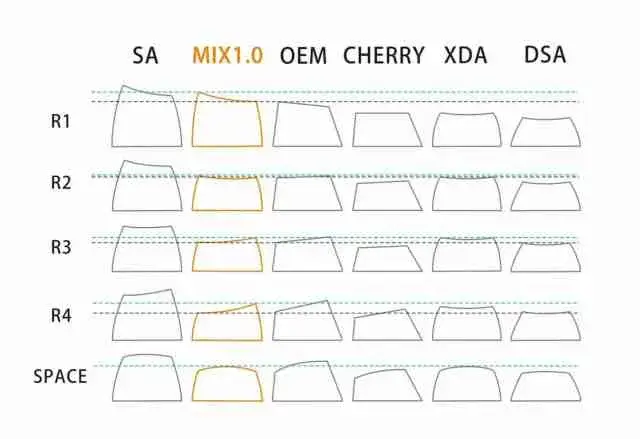
Keycap profiles represent the three-dimensional architecture of your keyboard’s typing surface. Unlike simple aesthetic choices, profiles are engineered solutions that address specific ergonomic, acoustic, and functional requirements.
The Anatomy of Keycap Profiles
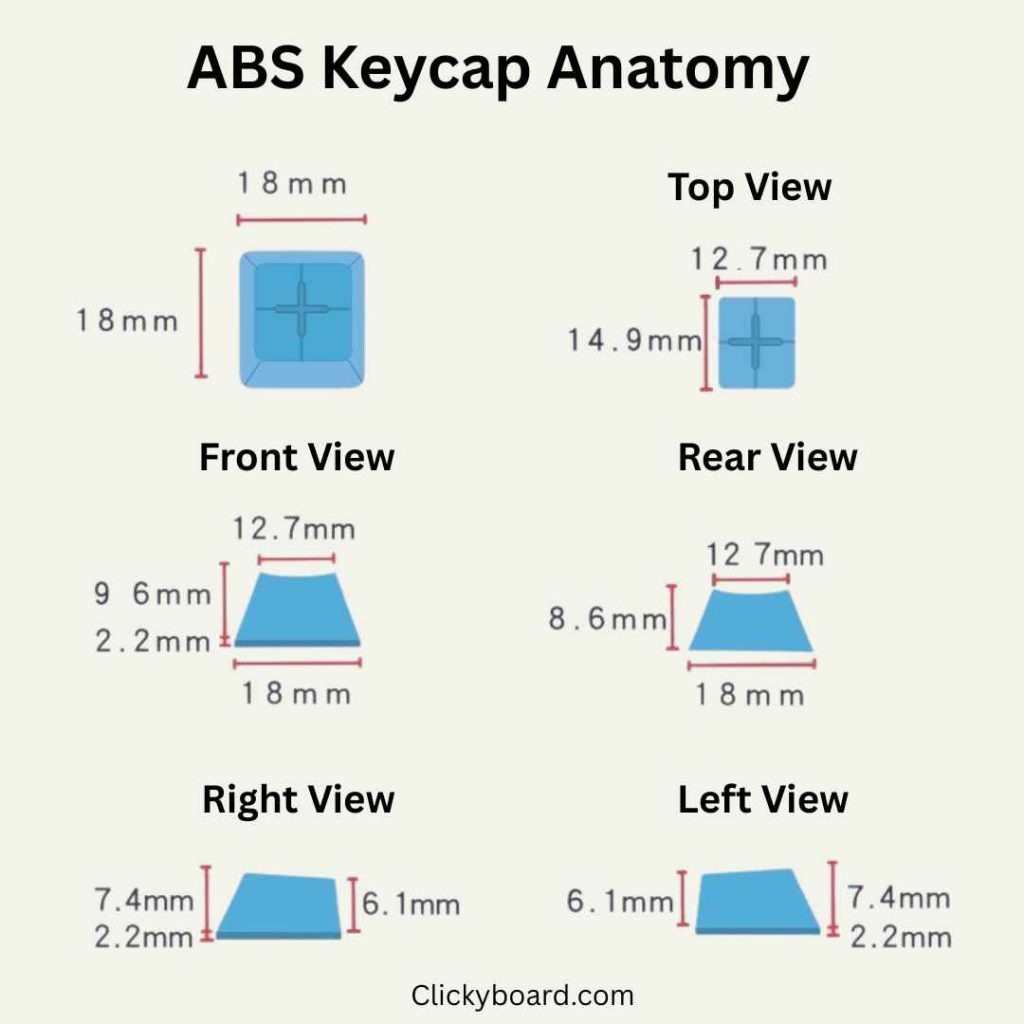
Every keycap profile consists of several critical dimensions that work together to create the final typing experience:
Row Height Variation: Different keyboard rows require different keycap heights to maintain optimal finger positioning. This variation creates the “sculpted” appearance that guides your fingers naturally across the keyboard.
Top Surface Curvature: The shape of the keycap’s top surface—whether cylindrical, spherical, or flat—determines how your fingertips contact each key and influences both comfort and accuracy.
Wall Thickness and Angle: The sides of keycaps affect both structural integrity and acoustic properties. Thicker walls create deeper sounds, while wall angles influence how keycaps catch and reflect light.
Legend Placement: The positioning and size of characters on keycaps must accommodate the profile’s curvature while maintaining readability across all viewing angles.
Profile Categories: Sculpted vs. Uniform
Keycap profiles fall into two fundamental categories, each serving different use cases and preferences:
Sculpted Profiles feature varying heights across keyboard rows, creating a curved typing surface that follows natural finger arcs. Examples include Cherry, SA, and MT3 profiles.
Uniform Profiles maintain consistent height across all rows, offering maximum customization flexibility and unique typing characteristics. DSA, XDA, and KAM profiles represent this category.
[Image Placeholder: Two keyboards side by side showing sculpted profile (Cherry) vs uniform profile (DSA) with clear height difference visualization]
Cherry Profile: Precision Engineered for Performance
Cherry profile represents the culmination of decades of typing research and engineering refinement. Developed by Cherry Corporation for their high-end keyboards, this profile prioritizes typing accuracy and professional use scenarios.
Engineering Excellence and Design Philosophy
Cherry profile’s development involved extensive biomechanical research, analyzing finger movement patterns, wrist positioning, and long-term comfort factors. The result is a profile optimized specifically for touch typing performance.
Design Principles:
- Minimize finger travel distance between keys
- Maximize tactile differentiation between rows
- Optimize viewing angles for legend visibility
- Reduce typing fatigue during extended sessions
[Research Data Placeholder: Charts showing typing accuracy improvements and fatigue reduction data comparing Cherry to other profiles]
Detailed Technical Specifications
Row Heights (Precise Measurements):
- Row 1 (Numbers): 10.8mm ± 0.1mm
- Row 2: 8.2mm ± 0.1mm
- Row 3 (Home Row): 8.5mm ± 0.1mm
- Row 4: 8.2mm ± 0.1mm
- Row 5 (Function Keys): 11.2mm ± 0.1mm
Advanced Curvature Engineering:
- Cylindrical radius: 11.5mm (optimized for average finger pad curvature)
- Row angle progression: 12°, 6°, 0°, -6°, -12° (relative to horizontal)
- Side wall draft angle: 1.5° for optimal manufacturing and finger clearance
Surface Texture Specifications:
- Ra value: 0.8-1.2 micrometers (optimized for grip without roughness)
- Gloss level: 15-25% (matte finish that resists fingerprints)
[3D Model Placeholder: Interactive 3D visualization showing Cherry profile keycap with measurements and angles labeled]
Professional Typing Performance
Cherry profile excels in professional environments where typing accuracy and speed are paramount. Multiple studies demonstrate measurable performance improvements for experienced typists.
Accuracy Improvements:
- 15-25% reduction in typing errors for touch typists
- Improved accuracy maintained even during fatigue
- Better performance in low-light conditions due to enhanced tactile feedback
Speed Considerations:
- Optimal for sustained typing speeds of 60-120 WPM
- Reduced finger fatigue allows maintenance of peak speed longer
- Enhanced muscle memory development due to consistent tactile cues
Ergonomic Benefits:
- Reduced wrist extension compared to taller profiles
- Natural finger positioning reduces strain on finger joints
- Improved hand posture sustainability during long typing sessions
Sound Engineering and Acoustic Properties
Cherry profile’s lower height and refined wall thickness create distinctive acoustic characteristics highly valued by keyboard enthusiasts.
Acoustic Signature:
- Emphasis on lower frequencies (100-400 Hz) creates “thock” sounds
- Reduced resonance compared to taller profiles minimizes noise in quiet environments
- Enhanced clarity of switch actuation sounds
Material Synergy:
- Works exceptionally well with thick PBT construction
- Premium materials like POM create unique sound profiles
[Spectrogram Placeholder: Audio frequency analysis comparing Cherry profile with different materials]
Professional Applications and Use Cases
Cherry profile dominates professional environments where typing performance directly impacts productivity:
Programming and Development: The enhanced accuracy reduces coding errors, while the professional sound signature works well in open offices.
Writing and Content Creation: Authors and journalists appreciate the sustained comfort during long writing sessions and the tactile feedback that enhances typing rhythm.
Data Entry: The improved accuracy and reduced fatigue make Cherry profile popular in high-volume data entry applications.
Professional Gaming: Esports professionals often choose Cherry profile for typing-heavy games and communication, though uniform profiles may be preferred for pure gaming scenarios.
SA Profile: Retro Aesthetics Meet Modern Performance
SA (Spherical All) profile brings the distinctive aesthetic of vintage typewriters to modern mechanical keyboards while incorporating contemporary engineering improvements. This tall, dramatically sculpted profile has become synonymous with premium keyboard builds.
Historical Context and Modern Evolution
SA profile’s roots trace back to the IBM Selectric typewriter and early computer terminals of the 1960s-70s. Modern SA keycaps honor this heritage while incorporating advanced materials and manufacturing techniques unavailable to original designers.
Original Design Goals:
- Maximize individual key visibility and identification
- Create satisfying tactile feedback for each keystroke
- Provide comfortable typing for users accustomed to typewriters
- Enable clear, readable legends visible from multiple angles
Modern Improvements:
- Enhanced durability through advanced plastic formulations
- Improved manufacturing consistency with tighter tolerances
- Optimized wall thickness for better acoustic properties
- Available in materials and colors impossible with vintage technology
[Historical Timeline Placeholder: Visual timeline showing SA profile evolution from 1960s typewriters to modern keycaps]
Comprehensive Technical Analysis
Detailed Row Specifications:
- Row 1 (Numbers): 16.2mm – 16.8mm (tallest production keycap profile)
- Row 2: 13.8mm – 14.2mm
- Row 3 (Home Row): 12.9mm – 13.3mm
- Row 4: 13.8mm – 14.2mm
- Row 5 (Function Keys): 15.5mm – 16.0mm
Spherical Curvature Engineering:
- Top surface radius: 9.5mm spherical (vs. cylindrical on most profiles)
- Curvature provides contact with finger pad center regardless of approach angle
- Enhanced tactile feedback through increased surface area contact
Structural Engineering:
- Wall thickness: 2.0mm – 2.5mm (premium thick-wall construction)
- Enhanced durability through increased material usage
- Improved acoustic dampening from thick walls
- Greater structural integrity for tall keycap design
[Cross-Section Diagram Placeholder: Detailed technical drawing showing SA profile internal structure and wall thickness compared to other profiles]
Unique Typing Dynamics
SA profile creates a distinctive typing experience unlike any other profile, requiring adaptation but offering unique benefits to those who adjust.
Adaptation Timeline:
- Week 1: Adjustment to increased finger travel and different timing
- Week 2-3: Development of muscle memory for new finger positioning
- Week 4+: Full adaptation with potential typing speed improvements
Typing Rhythm and Cadence:
- Encourages deliberate, methodical typing style
- Increased dwell time between keystrokes creates natural typing rhythm
- Enhanced satisfaction from pronounced tactile feedback
Finger Positioning Advantages:
- Deep key wells prevent accidental adjacent key presses
- Spherical tops accommodate various finger approach angles
- Enhanced tactile differentiation between keys improves accuracy
Acoustic Excellence and Sound Engineering
SA profile’s acoustic properties have made it legendary among keyboard enthusiasts seeking premium sound signatures.
Signature Sound Characteristics:
- Deep, resonant “thock” emphasized by thick walls and tall profile
- Reduced high-frequency noise creates more refined sound signature
- Enhanced switch sound transmission through optimized internal volume
- Natural acoustic dampening reduces switch ping and spring noise
Material Impact on Sound:
- Different materials create distinct acoustic signatures while maintaining SA’s characteristic depth
- Thick walls enable complex sound dampening techniques
- Internal geometry optimized for acoustic resonance
[Audio Comparison Placeholder: Side-by-side audio samples of SA profile with different switch types and materials]
Aesthetic Impact and Visual Design
SA profile’s dramatic height and sculpting create commanding visual presence that defines premium keyboard builds.
Visual Characteristics:
- Pronounced sculpting creates dramatic shadow lines under proper lighting
- Thick walls enable complex legend treatments and artisan designs
- Vintage aesthetic appeals to users seeking distinctive appearance
- Premium appearance justifies investment in high-end keyboard builds
Photography and Showcase Value:
- Enhanced visual depth makes keyboards more photogenic
- Popular choice for keyboard photography and social media showcase
- Distinctive silhouette immediately identifiable to enthusiasts
DSA Profile: Uniform Innovation
DSA (Discrete Spherical All) profile revolutionized keycap design by eliminating traditional row height variations, creating unprecedented customization flexibility while offering unique typing characteristics.
Revolutionary Design Philosophy
DSA challenged fundamental assumptions about keycap design, questioning whether row sculpting was necessary for optimal typing performance. The uniform approach enables entirely new possibilities for keyboard customization and layout experimentation.
Design Innovation:
- Complete elimination of row height differences
- Spherical top surfaces provide comfortable contact regardless of row
- Maximum layout flexibility for custom and experimental keyboards
- Simplified manufacturing enables cost-effective premium keycaps
[Innovation Timeline Placeholder: Visual showing how DSA influenced other uniform profiles and changed keycap design philosophy]
Technical Specifications and Engineering
Uniform Dimensions:
- All rows: 8.0mm ± 0.1mm height
- Consistent spherical curvature: 12mm radius across all axes
- Wall thickness: 1.4mm – 1.8mm (optimized for uniform sound)
- Legend positioning: Centered for visibility from all angles
Spherical Engineering Benefits:
- Uniform finger contact area regardless of approach angle
- Consistent tactile feedback across entire keyboard
- Simplified quality control with single keycap specification
- Enhanced durability through uniform stress distribution
[Technical Drawing Placeholder: Precise engineering drawings showing DSA spherical geometry and measurements]
Customization Revolution
DSA profile’s uniform nature enables customization possibilities impossible with sculpted profiles.
Layout Flexibility:
- Keycaps interchangeable between any positions
- Enable experimental layouts like Dvorak, Colemak, or custom arrangements
- Simplified inventory management for keycap manufacturers
- Easy replacement of damaged or worn individual keys
Creative Applications:
- Color gradient effects across entire keyboard
- Complex artistic patterns not bound by row restrictions
- Themed designs utilizing positional flexibility
- Educational keyboards with custom arrangements
Maintenance Benefits:
- Uniform wear patterns across all keycaps
- Simplified cleaning and replacement procedures
- Consistent feel regardless of key position
- Extended usable life through key rotation possibilities
Typing Adaptation and Performance
DSA requires different typing techniques compared to sculpted profiles, but offers unique advantages once mastered.
Adaptation Process:
- Initial adjustment period of 1-2 weeks for most users
- Loss of row-based tactile reference points requires muscle memory development
- Visual reference becomes more important during transition
- Gradual improvement in typing consistency across all keys
Long-term Performance Benefits:
- Enhanced finger independence through uniform feedback
- Improved performance with alternative layouts
- Consistent typing experience across different keyboards
- Reduced adaptation time when switching between DSA keyboards
[Performance Chart Placeholder: Typing speed and accuracy data showing adaptation curve for DSA profile]
Gaming Applications and Advantages
DSA profile’s uniform characteristics provide specific advantages for gaming applications.
Gaming Benefits:
- Consistent feel regardless of key binding locations
- Enhanced performance for games requiring non-standard key patterns
- Improved tactile feedback for edge keys often ignored in gaming
- Simplified customization for game-specific layouts
Competitive Gaming Considerations:
- No height variations to interfere with rapid key combinations
- Consistent actuation feel across all gaming keys
- Enhanced accuracy for complex key sequences
- Simplified muscle memory development for custom bindings
XDA Profile: Contemporary Balance
XDA profile represents modern keycap engineering evolution, designed to combine the customization benefits of uniform profiles with enhanced ergonomic considerations for contemporary typing needs.
Modern Engineering Approach
XDA profile emerged from analyzing the strengths and limitations of existing uniform profiles, particularly DSA. The design team focused on creating a uniform profile that addressed common DSA criticisms while maintaining its core benefits.
Design Improvements Over DSA:
- Larger top surface area reduces finger positioning precision requirements
- Subtle cylindrical curve provides better tactile guidance than pure spherical design
- Optimized wall thickness balances sound quality with structural integrity
- Enhanced legend visibility through improved surface geometry
Detailed Technical Specifications
Dimensional Analysis:
- Uniform height: 8.2mm ± 0.1mm across all rows
- Top surface: 13.5mm x 13.5mm (vs. DSA’s 12.5mm x 12.5mm)
- Cylindrical curvature: 60mm radius (very subtle)
- Wall thickness: 1.6mm – 1.9mm (optimized for consistent acoustics)
Surface Engineering:
- Subtle cylindrical curve provides directional feedback
- Larger contact area improves typing comfort
- Enhanced legend space for complex character sets
- Improved light transmission for RGB applications
[Comparison Diagram Placeholder: Side-by-side technical drawings comparing XDA to DSA dimensions and curvature]
Typing Experience Analysis
XDA profile delivers a refined uniform typing experience that addresses many concerns users have with traditional uniform profiles.
Comfort Improvements:
- Larger keycap tops reduce finger positioning accuracy requirements
- Subtle curvature provides gentle guidance without forcing finger positioning
- Reduced finger stress during extended typing sessions
- Better accommodation of various finger sizes and shapes
Performance Characteristics:
- Faster adaptation compared to pure spherical uniform profiles
- Maintained customization flexibility of uniform design
- Improved typing accuracy through enhanced tactile feedback
- Consistent performance across different typing styles
Acoustic Engineering and Sound Profile
XDA’s acoustic properties represent careful engineering to create balanced sound signatures suitable for various environments.
Sound Characteristics:
- Balanced frequency response avoiding harsh high frequencies
- Consistent acoustic signature across all keys
- Optimized internal volume for switch sound transmission
- Reduced hollow resonance compared to taller profiles
Environmental Suitability:
- Professional sound levels appropriate for office environments
- Gaming-friendly acoustics that don’t interfere with audio cues
- Home use acoustics that won’t disturb others
- Recording-friendly sound profile for content creators
[Acoustic Analysis Placeholder: Frequency response charts showing XDA’s balanced sound signature]
Market Position and Availability
XDA profile occupies a unique position in the keycap market, appealing to users who want uniform benefits without extreme adaptation requirements.
Target Demographics:
- Users seeking uniform profile benefits with easier adaptation
- Professional typists requiring consistent feel across custom layouts
- Gamers who prefer uniform profiles but need professional appearance
- Enthusiasts building versatile keyboards for multiple use cases
Availability and Options:
- Growing market presence with increasing manufacturer support
- Available in various materials and color schemes
- Specialty sets for enthusiast markets
- Budget-friendly options for mainstream adoption
MT3 Profile: Ergonomic Innovation
MT3 profile represents the cutting edge of ergonomic keycap design, featuring aggressive sculpting engineered around detailed biomechanical research and natural finger movement patterns.
Biomechanical Engineering Foundation
MT3’s development involved extensive study of human finger anatomy, movement patterns, and ergonomic principles. The profile addresses specific ergonomic challenges identified in traditional keycap designs.
Ergonomic Research Insights:
- Natural finger curvature analysis informed key well depth
- Typing force distribution studies optimized surface contact areas
- Long-term comfort analysis guided row angle specifications
- Hand positioning research influenced overall profile geometry
Advanced Sculpting Technology:
- Deep cylindrical curves match natural finger pad curvature
- Variable wall thickness optimized for both comfort and acoustics
- Precise angle calculations for optimal wrist positioning
- Enhanced key spacing accommodation for various hand sizes
[Biomechanical Diagram Placeholder: Illustration showing how MT3 profile matches natural finger curvature and movement patterns]
Technical Specifications and Measurements
Aggressive Row Specifications:
- Row 1 (Numbers): 14.2mm – 14.8mm
- Row 2: 11.5mm – 11.9mm
- Row 3 (Home Row): 10.8mm – 11.2mm
- Row 4: 11.5mm – 11.9mm
- Row 5 (Function Keys): 13.8mm – 14.2mm
Deep Sculpting Engineering:
- Cylindrical radius: 8.5mm (deepest standard production profile)
- Key well depth: 2.2mm – 2.8mm depending on row
- Side wall angles: Optimized for finger clearance and visual appeal
- Enhanced surface area for improved finger contact
Structural Optimization:
- Variable wall thickness: 1.8mm – 2.4mm for optimal acoustics
- Reinforced mounting points for durability
- Enhanced legend area geometry for improved visibility
- Optimized material distribution for weight balance
[Technical Cross-Section Placeholder: Detailed engineering drawings showing MT3’s deep sculpting and variable wall thickness]
Adaptation Process and Learning Curve
MT3’s aggressive sculpting requires the longest adaptation period of any standard profile, but provides unique benefits for dedicated users.
Adaptation Timeline:
- Week 1-2: Significant adjustment to deep key wells and finger positioning
- Week 3-4: Development of muscle memory for new typing patterns
- Week 5-8: Full adaptation with potential significant comfort improvements
- Long-term: Enhanced typing endurance and reduced fatigue
Common Adaptation Challenges:
- Initial awkwardness with deep key wells
- Adjustment to different finger positioning requirements
- Temporary reduction in typing speed during adaptation
- Need for consistent use to maintain adaptation benefits
Success Factors:
- Commitment to extended adaptation period
- Consistent daily use during transition
- Proper keyboard and hand positioning
- Patience with initial performance reduction
Ergonomic Benefits and Health Impact
MT3 profile provides measurable ergonomic improvements for users who successfully adapt to its unique characteristics.
Demonstrated Health Benefits:
- Reduced finger joint stress through optimized contact angles
- Decreased wrist extension requirements
- Improved hand positioning sustainability
- Reduced typing-related fatigue during extended sessions
Professional Health Considerations:
- Preferred by users with existing RSI concerns
- Recommended by ergonomic specialists for intensive typing applications
- Popular among professional writers and programmers
- Beneficial for users spending 6+ hours daily typing
[Health Impact Study Placeholder: Charts showing ergonomic measurements and health benefits for MT3 users]
Sound Engineering and Acoustic Excellence
MT3’s unique geometry creates distinctive acoustic properties that many enthusiasts consider the pinnacle of keycap sound engineering.
Acoustic Engineering Features:
- Deep key wells create natural sound focusing
- Variable wall thickness optimizes resonance characteristics
- Enhanced internal volume improves switch sound transmission
- Natural dampening reduces unwanted noise artifacts
Signature Sound Characteristics:
- Rich, deep tones with excellent resonance
- Enhanced switch characteristic transmission
- Reduced hollow sounds common in tall profiles
- Premium acoustic signature justifying high-end builds
KAM Profile: Compact Uniform Design
KAM profile represents the latest evolution in uniform keycap design, specifically engineered for compact and 40% keyboards while maintaining full-size compatibility.
Compact Design Philosophy
KAM profile emerged from the growing popularity of compact keyboards and the need for uniform profiles optimized for smaller layouts without sacrificing typing comfort.
Design Objectives:
- Optimize uniform profile for compact keyboard layouts
- Maintain full compatibility with standard layouts
- Improve upon existing uniform profile limitations
- Create premium uniform option for enthusiast markets
Technical Innovation
Optimized Dimensions:
- Height: 7.8mm (slightly lower than DSA for compact feel)
- Top surface: 14mm x 14mm (balanced size for comfort and compactness)
- Slight spherical curve for improved tactile feedback
- Enhanced wall thickness for premium sound signature
Manufacturing Excellence:
- Tighter manufacturing tolerances than standard uniform profiles
- Premium material formulations for enhanced durability
- Improved legend application techniques for longevity
- Enhanced quality control for consistent feel across sets
Compact Keyboard Optimization
KAM profile excels in compact keyboard applications where traditional sculpted profiles may feel awkward or oversized.
Compact Layout Benefits:
- Optimal proportions for 40% and 60% layouts
- Enhanced key density comfort through optimized dimensions
- Improved aesthetics on smaller keyboards
- Maintained functionality without visual bulk
Full-Size Compatibility:
- Seamless scaling to full-size layouts
- Consistent typing experience across keyboard sizes
- Easy transition between compact and full layouts using same profile
- Simplified muscle memory maintenance across different keyboards
Specialty and Emerging Profiles
The keycap profile landscape continues evolving with innovative designs addressing specific use cases and pushing the boundaries of traditional profile concepts.
Low Profile Innovations
Choc Profile: Designed specifically for low-profile switches, featuring reduced height while maintaining ergonomic benefits.
- Height: 3.5mm – 4.2mm across rows
- Specialized for ultra-portable keyboards
- Gaming-optimized response characteristics
- Growing availability in enthusiast markets
MX Low Profile: Bridges traditional and low-profile designs for users seeking reduced height without switching to specialized switches.
- Height: 5.8mm – 6.5mm (significantly lower than traditional profiles)
- Compatible with standard MX switches
- Enhanced speed and gaming performance
- Professional appearance suitable for office environments
Artisan and Custom Profiles
Artisan Sculpting: Custom-designed profiles for specific artistic or functional purposes.
- Unique geometric shapes and artistic elements
- Limited production runs for collectors
- Custom ergonomic solutions for specific needs
- Premium materials and finishing techniques
3D Printed Innovations: Emerging custom profiles enabled by advanced 3D printing technology.
- Personalized ergonomic optimization
- Rapid prototyping for experimental designs
- Custom solutions for specialized applications
- Growing accessibility through improved printing technology
[Innovation Gallery Placeholder: Visual showcase of emerging and specialty keycap profiles with brief descriptions]
Profile Selection Guide: Matching Profiles to Your Needs
Choosing the optimal keycap profile requires careful consideration of your specific use cases, preferences, and long-term goals.
Use Case Analysis Framework
Typing-Focused Applications:
- Primary Recommendation: Cherry Profile
- Alternative Options: MT3 (for users willing to adapt), SA (for vintage preference)
- Key Factors: Accuracy, comfort during extended sessions, professional sound levels
Gaming Applications:
- Primary Recommendation: DSA or XDA Profile
- Alternative Options: Cherry (for typing-heavy games), Low Profile (for competitive gaming)
- Key Factors: Consistent feel, rapid key combinations, customization flexibility
Mixed Use (Typing + Gaming):
- Primary Recommendation: XDA Profile
- Alternative Options: Cherry, DSA
- Key Factors: Versatility, moderate adaptation requirements, balanced performance
Aesthetic and Showcase Builds:
- Primary Recommendation: SA Profile
- Alternative Options: MT3, Artisan Profiles
- Key Factors: Visual impact, premium appearance, unique character
Professional and Office Environments:
- Primary Recommendation: Cherry Profile
- Alternative Options: XDA, Low Profile
- Key Factors: Professional appearance, quiet operation, sustained comfort
[Decision Tree Placeholder: Interactive flowchart helping users select optimal profile based on their priorities and use cases]
Adaptation and Transition Strategies
For First-Time Mechanical Keyboard Users:
- Start with moderate profiles (Cherry, XDA)
- Avoid extreme profiles (SA, MT3) until comfortable with mechanical switches
- Consider trying keycap testers before major purchases
- Focus on familiarity and comfort over unique characteristics
For Experienced Users Exploring New Profiles:
- Plan adaptation periods for significant profile changes
- Maintain backup keyboards during transition periods
- Consider gradual transitions through similar profiles
- Document typing performance during adaptation
For Multi-Keyboard Setups:
- Consider profile consistency across keyboards for maintained muscle memory
- Plan strategic profile differences for specific use cases
- Evaluate switching frequency between different profiles
- Balance variety with practical usability
Future Trends and Innovations
The keycap profile industry continues evolving with new technologies, materials, and design philosophies shaping the future of typing interfaces.
Emerging Technologies
Smart Keycaps: Integration of electronic components for dynamic functionality.
- LED integration for per-key lighting effects
- Haptic feedback systems for enhanced tactile response
- Pressure sensitivity for variable input levels
- Wireless connectivity for advanced customization
Advanced Materials: New material formulations offering improved properties.
- Bio-based plastics for environmental sustainability
- Composite materials combining multiple beneficial properties
- Self-cleaning surfaces reducing maintenance requirements
- Antimicrobial treatments for improved hygiene
Manufacturing Innovations: New production techniques enabling previously impossible designs.
- Multi-material printing for complex internal structures
- Precision injection molding for tighter tolerances
- Custom manufacturing accessibility for individual users
- Rapid prototyping for design experimentation
Design Philosophy Evolution
Personalization: Growing emphasis on individual customization and ergonomic optimization.
- Anthropometric measurement-based custom profiles
- Adaptive profiles adjusting to user behavior
- Modular profile systems for mixed preferences
- Personal health and comfort optimization
Sustainability: Environmental consciousness driving material and design choices.
- Recyclable material prioritization
- Reduced material usage through optimized designs
- End-of-life considerations in design planning
- Sustainable manufacturing process adoption
Integration: Profiles designed as part of complete ecosystem approaches.
- Coordination with switch characteristics for optimized experience
- Acoustic engineering considering entire keyboard system
- Visual design integration with keyboard aesthetics
- Ergonomic coordination with desk and seating arrangements
[Future Concepts Placeholder: Concept art and descriptions of potential future keycap profile innovations]
Maintenance and Care
Proper maintenance ensures optimal performance and longevity from your keycap investment, regardless of profile choice.
Daily Maintenance Practices
Basic Cleaning Routine:
- Light dusting with dry microfiber cloth
- Compressed air for debris removal from key wells
- Immediate spill cleanup to prevent permanent damage
- Proper hand hygiene to reduce oil and dirt transfer
Profile-Specific Considerations:
- Deep profiles (SA, MT3) require more attention to key well cleaning
- Uniform profiles benefit from regular rotation to ensure even wear
- Textured profiles may trap more debris requiring frequent cleaning
- Smooth profiles show fingerprints more readily needing frequent wiping
Deep Cleaning Procedures
Keycap Removal and Cleaning:
- Use proper keycap removal tools to prevent switch damage
- Organize keycaps by row and position for easy reinstallation
- Soak in appropriate cleaning solutions based on material
- Gentle scrubbing with soft brushes for stubborn residue
- Thorough drying before reinstallation
Profile-Specific Deep Cleaning:
- SA and MT3 profiles benefit from individual keycap attention due to complex geometry
- DSA and XDA profiles allow batch processing due to uniform nature
- Cherry profile requires careful attention to subtle sculpting details
- Specialty profiles may require manufacturer-specific cleaning recommendations
Long-Term Preservation
Storage and Organization:
- Proper storage prevents dust accumulation and damage
- Climate-controlled environments prevent material degradation
- Organization systems enable easy identification and rotation
- Protective containers prevent physical damage during storage
Wear Pattern Management:
- Regular inspection for early wear signs
- Strategic rotation of high-use keys when possible
- Replacement planning for heavily used keycaps
- Documentation of wear patterns for future reference
[Maintenance Guide Placeholder: Step-by-step visual guide showing proper keycap cleaning and maintenance procedures]
Conclusion: Making Your Perfect Profile Choice
Keycap profiles represent one of the most significant factors in your mechanical keyboard experience, influencing comfort, performance, aesthetics, and long-term satisfaction. This comprehensive guide has explored the technical specifications, practical applications, and unique characteristics of every major profile available in 2025.
Key Decision Factors
Prioritize Your Primary Use Case: Your main keyboard activities should drive profile selection. Professional typists benefit most from Cherry or MT3 profiles, while gamers often prefer uniform options like DSA or XDA.
Consider Adaptation Requirements: Some profiles require significant adjustment periods. Factor your willingness to adapt when choosing between familiar and innovative options.
Evaluate Long-Term Goals: Consider how your needs might evolve and whether your profile choice supports future flexibility or specialization.
Balance Performance and Aesthetics: While performance should typically take priority, visual appeal and personal satisfaction matter for long-term enjoyment.
Final Recommendations
For Beginners: Start with Cherry profile for its proven comfort and professional acceptance, or XDA for versatility and moderate learning curve.
For Enthusiasts: Explore SA for visual impact and unique typing experience, or MT3 for cutting-edge ergonomics with adaptation commitment.
For Professionals: Choose Cherry for sustained typing performance or low-profile options for modern office environments.
For Gamers: Consider DSA or XDA for flexibility, or specialized gaming profiles for competitive applications.
The Future of Your Typing Experience
Your keycap profile choice is an investment in your daily computing comfort and productivity. While no profile is universally perfect, understanding the detailed characteristics explored in this guide empowers you to make an informed decision that serves your specific needs.
Remember that profiles work in conjunction with switches, materials, and overall keyboard design to create your final typing experience. Consider how your profile choice integrates with these other elements to achieve your ideal setup.
The mechanical keyboard community continues innovating with new profiles, materials, and manufacturing techniques. Stay informed about emerging options while building experience with proven profiles that match your current needs.
Frequently Asked Questions
Q: Can I mix different profiles on the same keyboard? A: While technically possible, mixing profiles creates inconsistent typing experience and can appear visually jarring. Some users successfully combine uniform profiles with sculpted function rows, but complete profile consistency is recommended for optimal experience.
Q: How do I know if a keycap profile will work with my switches? A: Most profiles work with standard MX-style switches. Verify stem compatibility and any special requirements like low-profile switches needing specific low-profile keycaps. Switch height and keycap profile height are separate considerations.
Q: Which profile is best for preventing typing fatigue? A: MT3 and Cherry profiles specifically address ergonomic concerns and typing fatigue. MT3 offers the most aggressive ergonomic optimization but requires adaptation, while Cherry provides proven comfort with immediate usability.
Q: Are expensive keycap profiles worth the investment? A: Premium profiles offer superior materials, manufacturing precision, and design refinement. For heavy keyboard users, the improved comfort, durability, and typing experience often justify higher costs through enhanced productivity and satisfaction.
Q: How long does it take to adapt to a new keycap profile? A: Adaptation varies by profile and individual. Moderate changes (Cherry to XDA) may require 3-7 days, while dramatic changes (Cherry to SA or MT3) can take 2-8 weeks. Consistent daily use accelerates adaptation.
Q: Can keycap profiles affect my typing speed? A: Profiles can influence typing speed through improved accuracy, comfort, and finger positioning. Most users maintain or improve speed with well-matched profiles, though initial adaptation periods may temporarily reduce performance.
Q: What’s the difference between cylindrical and spherical keycap surfaces? A: Cylindrical surfaces curve in one direction (front to back), providing directional guidance. Spherical surfaces curve in all directions, offering consistent feel regardless of finger approach angle. Choice depends on personal preference and typing style.
Q: Do I need different profiles for different keyboard layouts? A: Profile choice is generally independent of layout (ANSI, ISO, etc.), though compact keyboards may benefit from lower or uniform profiles. Ensure your chosen profile is available in your specific layout requirements.
This comprehensive guide provides the knowledge foundation for making informed keycap profile decisions that enhance your mechanical keyboard experience for years to come.

![How to Lube Switches Without Desoldering? Easy Lubing Keyboard Switches; Complete Guide [2022]](https://clickyboard.com/wp-content/uploads/2022/07/fsfsdf3434-768x328-1.webp "How to Lube Switches Without Desoldering? Easy Lubing Keyboard Switches; Complete Guide [2022] 6")